browser toolbar
-
-
-
Yes, if I understand your question.
Go to Design/ Menu / Menu structur
There you change the name of your dislayed sites / project.The browser toolbar title is still the name of your project.
Hope that helps.
x
x@kim thank you for your reply.
It does not solve my problem, it still changes the name in both locations (menu and browser toolbar).To give an example:
What do I have to do when I want to call a page "info" in the menu, but "about" in the browser toolbar if the page is loaded? -
Hi @lemo
this is not an option in Laytheme yet.Are you talking about the URL or really the top of the browser where you can see the page title?
Both is not an option in Laytheme though.
Best!
Marius
PS: You might find a Wordpress plugin which will do this for you. But I don't know which one would work…
-
Hi @lemo
this is not an option in Laytheme yet.Are you talking about the URL or really the top of the browser where you can see the page title?
Both is not an option in Laytheme though.
Best!
Marius
PS: You might find a Wordpress plugin which will do this for you. But I don't know which one would work…
I'm talking about what you see in the browser tab:
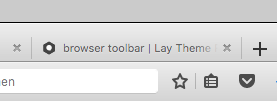
Ok, I will search a plugin... or find an other way
Thank you

Hello! It looks like you're interested in this conversation, but you don't have an account yet.
Getting fed up of having to scroll through the same posts each visit? When you register for an account, you'll always come back to exactly where you were before, and choose to be notified of new replies (either via email, or push notification). You'll also be able to save bookmarks and upvote posts to show your appreciation to other community members.
With your input, this post could be even better 💗
Register Login