*Pretty* Permalinks
-
Hi
Since some WP or LAY updates the pageurl redirects to the sitename.org/blog/2018/... date url after refreshing the page or if opend in a new tab. In the Main overviewpages the linkadress attached to the project thumbnails is correct (sitename.org/projectname). I can't figure out what might be the problem here. It worked out fine before though. Really hope to get some Help.
As LAY theme needs 'pretty permalinks' I can't use the Post-name option in the permalink WP Setting tab. I am using Yoast SEO and tested with using two sites in one WP Installation but I don't see how this effects the permalink structure.
Fabian
-
Hi @cx
can you post a link to your website?Then I can have a closer look.
Many thanks and all the best!
Marius
-
There you go http://bit.ly/2EWBDQo
Thanks for looking into it.Fabian
-
Dear @cx
everything seems to work fine. What do I miss?All the best!
Marius
PS: There is a new update!
-
I updated the Theme. In the Links in the Overviewpage are short permalinks -
but the Project/Page url changes when refreshing the page or when opened as a new Browsertab. ( right click > 'open in new tab').Example:
'site.org/projektname'
will change to
'site.org/blog/2017/05/24/projectname'
during the loading processGreetz, Fabian
-
-
-
Hi @cx alias Fabian,
ok! I see the problem now!
Best is if you write an email to marius@thepeople.world and include your username, password and a link to this conversation.
Then I will have a look!
Best!
Marius
-
Dear Fabian,
I see you have many plugins installed. I recommend to use as little plugins as possible.
They could influence each other in bad ways.Also have a look here:
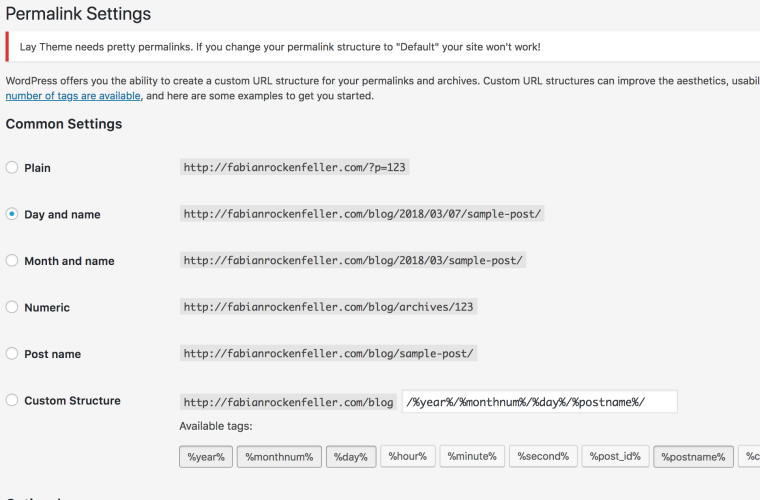
You can activate POST NAME.
It might work then.
Let me know if that did the job!
All the best!
Marius
-
Thanks for looking into it.
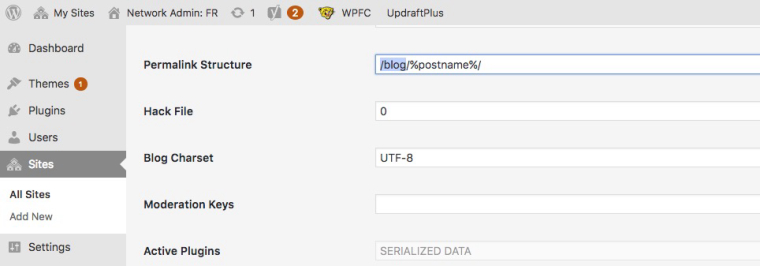
I deleted a couple of plugins and updated a lot but what seemed to have been the problem are the linkstructure that was modified my creating a Wordpress Multisite.The "Post-Name" Permalink setting worked again after changing the permalink structure in the Sites Setting again. Getting rid of the '/blog/' was all it needed.
-
Dear @cx
great! Happy to hear!We don't have much experience with Multi-Sites.
But it seems to work.
Best!
Marius

Hello! It looks like you're interested in this conversation, but you don't have an account yet.
Getting fed up of having to scroll through the same posts each visit? When you register for an account, you'll always come back to exactly where you were before, and choose to be notified of new replies (either via email, or push notification). You'll also be able to save bookmarks and upvote posts to show your appreciation to other community members.
With your input, this post could be even better 💗
Register Login