order of project items is getting mixed up
-
Hy Layteam,
I have set the order of my project thumbnails to "sort by date". If I go on the homepage, initially the order is right. But after visiting other sites of my homepage and returning back to the project thumbnail overview (which is located on the startpage) the order is mixed up. Strangely in the same order the project list is showing in the backend. How can I set it right, so that the thumbnails are constantly sorted by date? Thanks a lot for helping! (Deactivating the two plugins I use didn´t help, neither cleaning the cache).
Browser: Safari, 17.5
System: Mac OSBest regards
Götz -
My Domain is: www.goetzlange.de
-
i see i had the same issue with projectindex and coded a workaround back then
working on it now
-
-
-
hey u can update lay theme now and then see if it is fixed!
-
-
very nice :))
-
Hi,
when using "Sort by Date" in the Project Thumbnail Grid block, the sort order is hardcoded to DESC, meaning the post with the farthest future date appears first. For event-based sites, the expected behavior is the opposite: the nearest upcoming date should appear first, in ascending order.
The fix is a one-line change in frontend/assets/php/elements/thumbnailgrid_functions.php at the two places where $order is set:
Current:
if( $orderby == 'menu_order' || $orderby == 'post_title' ) {
$order = 'ASC';
}Suggested fix:
if( $orderby == 'menu_order' || $orderby == 'post_title' || $orderby == 'post_date' ) {
$order = 'ASC';
}Ideally this could also be a configurable option in the block editor, for example "Sort by Date ascending" vs. "Sort by Date descending", similar to the existing "Reverse Order" button.
Thank you!
-
hey! Oh yeah, this is a very good call and an amazing idea. I will implement this, and it will be included with the next update. Thanks for the heads up.
-
well, probably I can't just change the default order, but i will insert a new setting for this
-
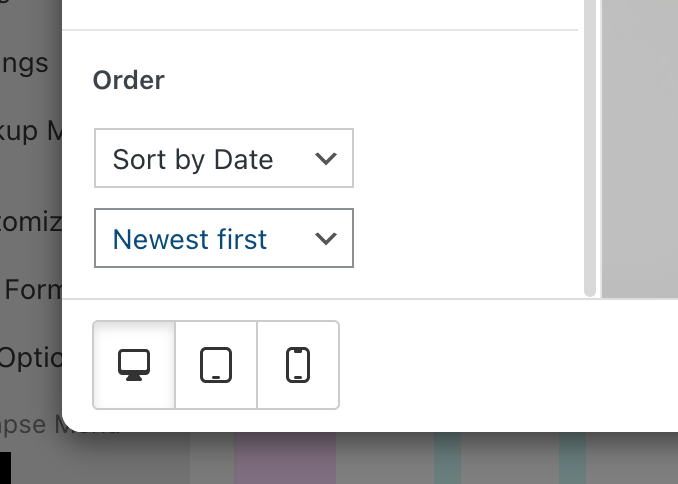
this is what it will look like
-

Hello! It looks like you're interested in this conversation, but you don't have an account yet.
Getting fed up of having to scroll through the same posts each visit? When you register for an account, you'll always come back to exactly where you were before, and choose to be notified of new replies (either via email, or push notification). You'll also be able to save bookmarks and upvote posts to show your appreciation to other community members.
With your input, this post could be even better 💗
Register Login