changing menu bar color on a specific page
-
Hello !
I am trying to change the color background of my menu bar on a specific page but I cannot achieve it...
here's a link to the page : https://leagarait.com/projets-copy/ (i want it in black with white text)Also, I managed to change the menu text color but not the site title.. any advice ?
Here is the code I found :
/*color for site title*/
body[data-id="724"][data-type="page"] .sitetitle.txt{
    color: #ffffff;
}
/*for menu*/
body[data-id="724"][data-type="page"] nav.primary a{
     color: #ffffff;
}
It works for the menu items but not the site title..
Thank you !
-
try a !important after your color, like:
color: #ffffff!important;or manipulate this, in the inspection you can see that this is where the actual color is declared:
.sitetitle-txt-inner {
color: #000000;
} -
body[data-id="724"][data-type="page"] .sitetitle.txt span{
    color: #ffffff;
}
try this!
you can also add !important; yea!body[data-id="724"][data-type="page"] .sitetitle.txt span{ color: #ffffff!important; } -
Thank you it worked !!
But I still can't find a way to change the menu bar color from white to black...
I tried this :body[data-id="724"][data-type="page"].navbar { background-color: #000000!important; }and this :
body[data-id="724"][data-type="page"] .site-header span{
  background-color: #000000!important;
}
But none of theme are working :/
-
you need a space between ] .navbar
-
body[data-id="724"][data-type="page"] .site-header span{
  background-color: #000000!important;
}
this css selector is wrong
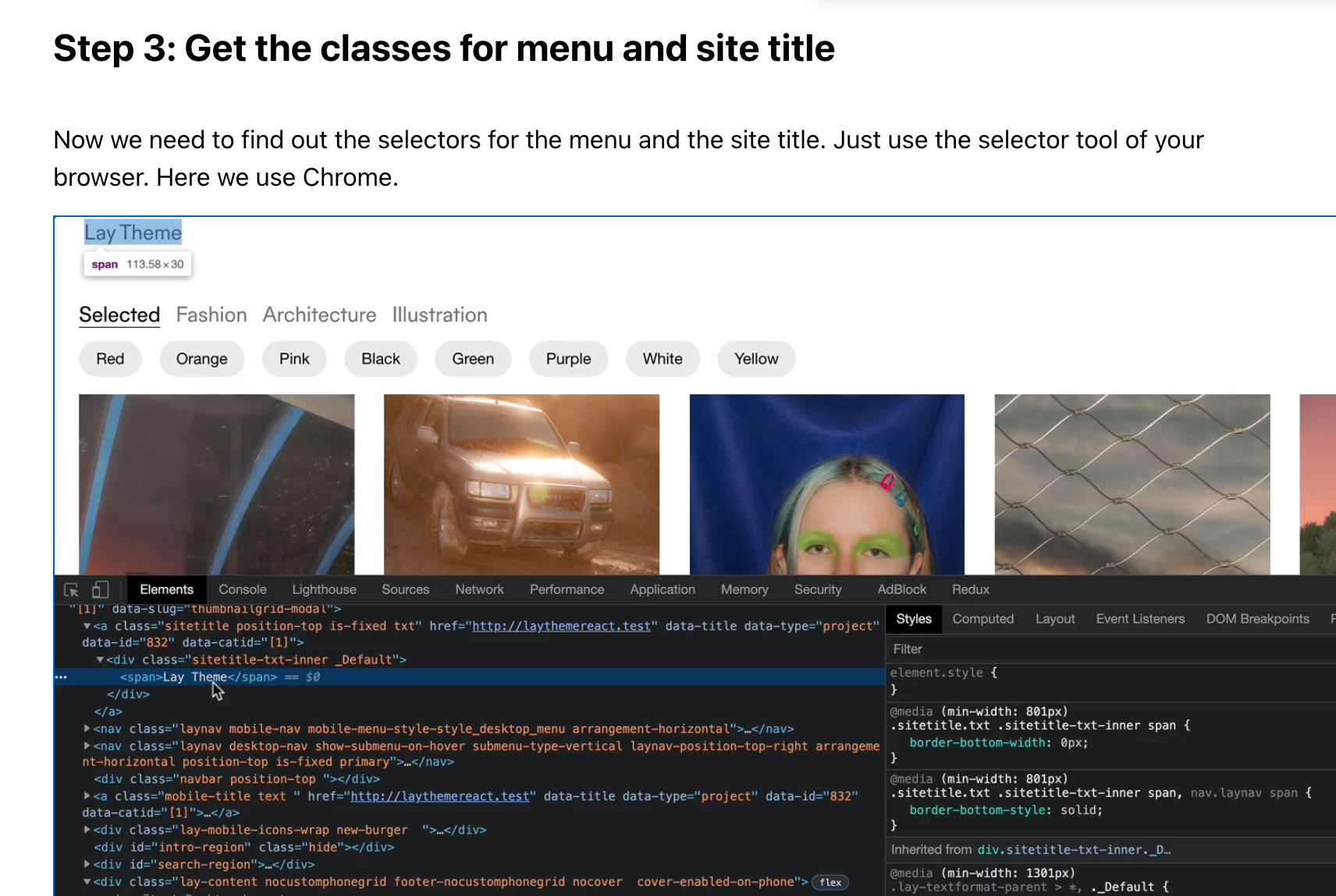
https://laytheme.com/documentation/custom-css-styling.html
please read this and here u can learn how to find the correct selectors
i also wrote the selector for the site title in my last post
body[data-id="724"][data-type="page"] .sitetitle.txt span{
color: #ffffff;
} -
Hi @arminunruh
I followed all the instructions above and successfully managed to change colour of menubar for a specific site.My landing page, info and index page all have a white menubar and I'd like the menubar to be inverted (black) for all project pages.
Is there a code I can use that assigns the black menu bar to all new project pages, so I don't have to write a custom code for each new project?
Here the link to my website:
https://elsamueller.co/Here the link to the project page, where I changed the colour of menu bar:
https://elsamueller.co/a-magazine-curated-by-glenn-martens/Here the code that I used:
/*site title mouseover /
body.slug-a-magazine-curated-by-glenn-martens .sitetitle.txt:hover .sitetitle-txt-inner span{
color: grey;
}
/ site title mouseover underline color /
body.slug-a-magazine-curated-by-glenn-martens .sitetitle.txt:hover .sitetitle-txt-inner span{
border-bottom-color: grey;
}
/ navigation /
body.slug-a-magazine-curated-by-glenn-martens nav.primary a span{
color: yellow;
}
body.slug-a-magazine-curated-by-glenn-martens .sitetitle.txt .sitetitle-txt-inner span, nav.laynav a span{
color: white;
}
/ navigation mouseover /
body.slug-a-magazine-curated-by-glenn-martens nav.primary a:hover span{
color: grey;
}
/ navigation mouseover underline color /
body.slug-a-magazine-curated-by-glenn-martens nav.primary a:hover span{
border-bottom-color: grey;
}
body.slug-a-magazine-curated-by-glenn-martens .navbar {
background-color: black!important;
}
/ site title navigation /
body.slug-index nav.primary a span{
color: black;
}
/ site title mouseover index /
body.slug-index .sitetitle.txt:hover .sitetitle-txt-inner span{
color: grey;
}
/ site title mouseover underline color index /
slug-index .sitetitle.txt:hover .sitetitle-txt-inner span{
border-bottom-color: black;
}
slug-index .sitetitle.txt .sitetitle-txt-inner span, nav.laynav a span{
color: black;
}
/ navigation work */
body.slug-work nav.primary a span{
color: black;
}
body.slug-a-magazine-curated-by-glenn-martens .sitetitle.txt .sitetitle-txt-inner span,
body.slug-a-magazine-curated-by-glenn-martens nav.laynav a span {
color: white;
}Thanks!!!
-
try this
this makes all menubars of project pages black:
body[data-type="project"] .navbar {
background-color: black!important;
}
similarly you can do:
body[data-type="page"] .navbar {
background-color: green!important;
}
which makes all "pages" menubars green

Hello! It looks like you're interested in this conversation, but you don't have an account yet.
Getting fed up of having to scroll through the same posts each visit? When you register for an account, you'll always come back to exactly where you were before, and choose to be notified of new replies (either via email, or push notification). You'll also be able to save bookmarks and upvote posts to show your appreciation to other community members.
With your input, this post could be even better 💗
Register Login