Navigation bar
-
Hey,
I've created the following website with laytheme: https://elkedenda.com/
When I lower the size of the browser window the navigation moves over the logo top left. I already tried to change the breakpoint for tablets but still it doesn't work. Any idea how to fix this?
At the moment the navigation bar is top right aligned. If I change this to top left aligned the issue is solved but then the "info" point gets lost when changing the window size in the browser.Thanks in advance
Annika -
nav.primary ul {
gap: 750px;
}you have this big gap between your menu points, that is set in pixel and doesn't change according to the window size.
maybe you want to set it in % so it gets smaller with smaller window size.
-
Hey Felix,
many thanks for your help and reply. Unfortunatley the gap between the menu points only allows pixel no other setting options.
-
in custom css (not custom css for desktop or mobile):
@media (max-width: 800px) {
      nav.desktop-nav.primary ul {
        gap: 50px;
    }
}

@media (min-width: 801px) {
      nav.desktop-nav.primary ul {
        gap: 750px;
    }
}
and remove this css:
nav.primary ul {
gap: 750px;
} -
Hey Armin,
many thanks, much appreaciated.
I've tried to enter the above custom css but its still not working 100%.
First of all I don't know where to delete the css that you mentioned below as it doesn't show up anywhere in the css descriptions?Also i got a yellow attention mark that says 'unknown property 'gap''
For 'nav.desktop-nav.primary..' it keeps telling me "Dont use adjoining classes"
Any further ideas about how to solve this? -
elke what is your goal?
do you want one menupoint in the top center, one in the top right?
then delete this css and use multiple menus:
https://laytheme.com/documentation/menus.html#multiple-menuscreate 2 menus, put one menupoint in one menu each
then in the customizer, put one menu in the top center and one in the top right
otherwise, the css that i gave you works, but maybe the values need to be changed like:
@media (max-width: 1020px) {
      nav.desktop-nav.primary ul {
        gap: 50px;
    }
}

@media (min-width: 1021px) {
      nav.desktop-nav.primary ul {
        gap: 450px;
    }
}
Also i got a yellow attention mark that says 'unknown property 'gap''
For 'nav.desktop-nav.primary..' it keeps telling me "Dont use adjoining classes"
Any further ideas about how to solve this?this you can ignore
First of all I don't know where to delete the css that you mentioned below as it doesn't show up anywhere in the css descriptions?
felix told you to use some css, i told you to use mine so to remove the one he gave you first.
i dont know where you put his css -
When I lower the size of the browser window the navigation moves over the logo top left.
ok
so using this css that felix gave you:
nav.primary ul {
gap: 750px;
}this just creates a big gap between the two menupoints:

i dont think that was even the question. i think in the end what it was about was:
you dont want your menupoint "projects and exhibitions" to overlap "elke denda", your site title.
when i resize the screen to 600px wide, right before it jumps over to the mobile menu, your menupoint doesnt even overlap the site title: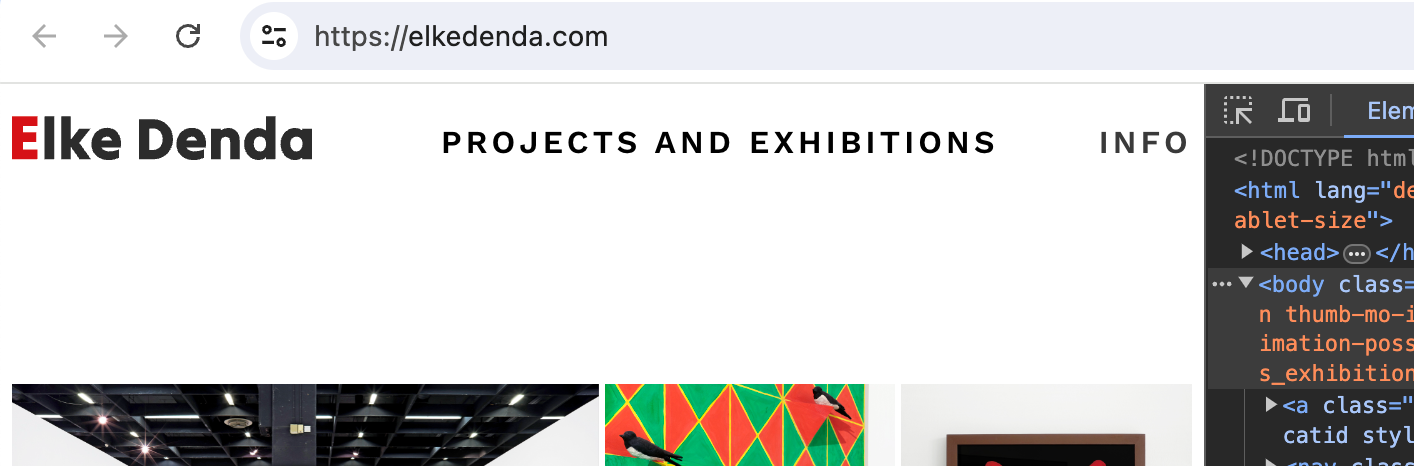
so i think you can just remove all of this custom css altogether and you should be good to go,
or maybe i dont understand the problem -
Thank you so much for your detailed reply! I managed to get the solution I aimed for via 2 menus. Thanks again :)
Best wishes,
Annika

Hello! It looks like you're interested in this conversation, but you don't have an account yet.
Getting fed up of having to scroll through the same posts each visit? When you register for an account, you'll always come back to exactly where you were before, and choose to be notified of new replies (either via email, or push notification). You'll also be able to save bookmarks and upvote posts to show your appreciation to other community members.
With your input, this post could be even better 💗
Register Login