Skip to content
  • Recent
  • Tags
  • Popular
  • Users
  • Search
Skins
  • Light
  • Brite
  • Cerulean
  • Cosmo
  • Flatly
  • Journal
  • Litera
  • Lumen
  • Lux
  • Materia
  • Minty
  • Morph
  • Pulse
  • Sandstone
  • Simplex
  • Sketchy
  • Spacelab
  • United
  • Yeti
  • Zephyr
  • Dark
  • Cyborg
  • Darkly
  • Quartz
  • Slate
  • Solar
  • Superhero
  • Vapor

  • Default (No Skin)
  • No Skin
Collapse

Lay Theme Forum

  1. Home
  2. General Discussion
  3. Change nav and logo text to white/black when scrolling

Change nav and logo text to white/black when scrolling

Scheduled Pinned Locked Moved General Discussion
21 Posts 10 Posters 5.6k Views 5 Watching
  • Oldest to Newest
  • Newest to Oldest
  • Most Votes
Reply
  • Reply as topic
Log in to reply
This topic has been deleted. Only users with topic management privileges can see it.
  • A
    A
    adam
    wrote on last edited by
    #4

    Hey @arminunruh

    Does this method still work?

    I have tried so many times to get this to work yet still have no success. Both with and without fullscreen slider activated. I followed all the steps exactly as you mentioned also. Is it possible this is being overwritten by the "text-format" and "font-family" selection in the customise section for the site title and nav text?

    Regards
    A

    1 Reply Last reply
    0
    • mariusjopenM
      mariusjopenM
      mariusjopen
      Global Moderator
      wrote on last edited by
      #5

      Hi @adam
      we will check for you!

      Best!

      Marius

      www.mariusjopen.world

      1 Reply Last reply
      0
      • arminunruhA
        arminunruhA
        arminunruh
        Global Moderator
        wrote on last edited by
        #6

        Hey! This should work now:

        JS (insertable in "custom <head> content" in "lay options" -> "custom css & html")

        <script>
            var offset = 50;
            var $blackRows;
            var $nav;
            
            window.laytheme.on("newpageshown", function(layoutObj, type, obj){
                $blackRows = jQuery(".darkrow");
                $nav = jQuery("nav a, .sitetitle span");
                $nav.removeClass("white");
            });
            
            jQuery(document).on("scroll", function(){
                $blackRows.each(function(){
                    var rect = this.getBoundingClientRect();
                    if(rect.top - offset < 0 && rect.bottom - offset > 0){
                        $nav.addClass("white");
                        return false;
                    }else{
                        $nav.removeClass("white");
                    }
                });
            });
        </script>
        

        CSS (insertable in "custom css for desktop" in "lay options" -> "custom css & html")

        .white{
        color: white!important;
        }
        

        The main difference is just

                $nav = jQuery("nav a, .sitetitle span");
        

        nav a instead of nav and sitetitle span instead of span. :)

        1 Reply Last reply
        0
        • A
          A
          adam
          wrote on last edited by
          #7

          Hey Armin thanks for the update.

          Is there anyway this is possible with direction set to horizontal and activating fade in effect rather then sliding effect?

          Many thanks

          1 Reply Last reply
          0
          • mariusjopenM
            mariusjopenM
            mariusjopen
            Global Moderator
            wrote on last edited by
            #8

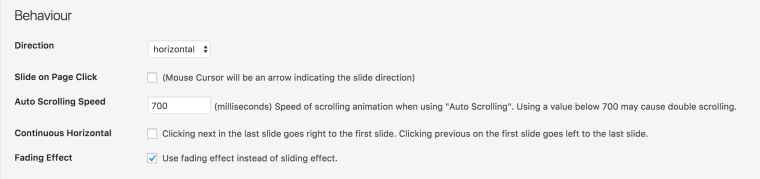
            Hi @adam

            these are the only options so far:

            0_1515017609346_Bildschirmfoto 2018-01-03 um 20.12.54.png

            All the best!

            Marius

            www.mariusjopen.world

            1 Reply Last reply
            0
            • A
              A
              adam
              wrote on last edited by
              #9

              Hi Marius, thanks for replying

              I am aware of the options available within the fullscreen slider, I am asking if its possible to still apply the solution Armin has suggested to changing the site title and navigation color when "horizontal" direction and "fading effect" is selected.

              I got this to work when scrolling vertically however it doesn't work when scrolling horizontally or with the fade effect activated.

              Does that make sense?

              1 Reply Last reply
              0
              • mariusjopenM
                mariusjopenM
                mariusjopen
                Global Moderator
                wrote on last edited by
                #10

                Hi @adam
                ok. I get what you mean :-)

                So what needs to be done it to change this function:

                 jQuery(document).on("scroll", function(){
                        $blackRows.each(function(){
                            var rect = this.getBoundingClientRect();
                            if(rect.top - offset < 0 && rect.bottom - offset > 0){
                                $nav.addClass("white");
                                return false;
                            }else{
                                $nav.removeClass("white");
                            }
                        });
                

                Right now it gets activated on scroll. You need to activate it when you click and change the slide.

                You know the basics of jQuery?

                All the best!

                Marius

                www.mariusjopen.world

                1 Reply Last reply
                0
                • A
                  A
                  adam
                  wrote on last edited by
                  #11

                  Hi @mariusjopen

                  Thanks for the tip, im not to familiar with JQuery. Is it a difficult change?

                  1 Reply Last reply
                  0
                  • B
                    B
                    Brant
                    wrote on last edited by
                    #12

                    This does only seem to work in combination with the Fullscreen Slider activated. Is there a way to make it work without / or best with the cover feature activated? help is much appreciated, thanks a lot guys!

                    1 Reply Last reply
                    0
                    • mariusjopenM
                      mariusjopenM
                      mariusjopen
                      Global Moderator
                      wrote on last edited by
                      #13

                      Dear @adam
                      I recommend to make a simple tutorial on Codeacademy.

                      You of course need to make a CSS line called

                      .white {
                      baclground: green;
                      }
                      

                      Then you can see the effect.

                      Dear @Brant
                      no. this is always when a row which you gave a custom class hits the top of a page.

                      Best!

                      Marius

                      www.mariusjopen.world

                      1 Reply Last reply
                      0
                      • S
                        S
                        StudioTomas
                        wrote on last edited by
                        #14

                        Hi there,

                        I'm not sure if this is the right forum post to comment on but hopefully you can help me!

                        My work in progress website is: studiotomas.com

                        I've used Armin's jQuery fix to turn my navigation white for certain rows in fullscreen slider using the .darkrow CSS, but I've encountered a couple of problems:

                        1. I've used an SVG for my logo in place of the site title, so I'm looking for this to link to a white version of the logo, or another fix which will turn the SVG white for a dark row.

                        2. The nav is turning white like it's supposed to on a dark row, but not matter what I try with custom css, I can't get the underline styling I have in place to change to white as well.

                        Help would be amazing, thanks!

                        Tomás

                        fabiandraxlF 1 Reply Last reply
                        0
                        • mariusjopenM
                          mariusjopenM
                          mariusjopen
                          Global Moderator
                          wrote on last edited by
                          #15

                          Dear @adam
                          put the white into the body, then you can control all elements on the page.
                          For example also a white logo which is visible or not.

                          Depending on the body class. Have a look as well into the structure of the navigation. It has a span element inside.

                          This element has the border-colour.

                          Hope that gave you a direction :-)

                          Best!

                          Marius

                          www.mariusjopen.world

                          1 Reply Last reply
                          0
                          • M
                            M
                            mp
                            wrote on last edited by
                            #16

                            this works nicely!

                            ... but if I use it on the first row, the site title will only change after i started scrolling a little bit. Is there a way to have it changed already on reload?

                            thanks

                            1 Reply Last reply
                            0
                            • mariusjopenM
                              mariusjopenM
                              mariusjopen
                              Global Moderator
                              wrote on last edited by
                              #17

                              Dear @mp
                              you could set the initial colour with CSS.
                              No need for jQuery in this case.

                              Best!
                              Marius

                              www.mariusjopen.world

                              1 Reply Last reply
                              0
                              • K
                                K
                                koenarbouw
                                wrote on last edited by
                                #18

                                Hey hey,

                                Just posting in here as this solved some of what I am trying to achieve. Here is a rough WIP https://mickeyross.photo/ I am working on, I would love to change the menu colour on every full screen scroll so it matches the text below. I have it working on the orange text one, what would be the best way to replicate this all the way down the page? Stuck on the purple one.

                                Appreciate the help.

                                Thanks
                                Koen

                                1 Reply Last reply
                                0
                                • RichardR
                                  RichardR
                                  Richard
                                  Global Moderator
                                  wrote on last edited by
                                  #19

                                  Dear @koenarbouw

                                  Could you please post the code you are currently using? & lets take a look :)
                                  I just ask to clarify as it may differ from previously in this thread,( some posts are two years old )

                                  Website looks great btw!

                                  Best Wishes
                                  Richard

                                  1 Reply Last reply
                                  0
                                  • S StudioTomas

                                    Hi there,

                                    I'm not sure if this is the right forum post to comment on but hopefully you can help me!

                                    My work in progress website is: studiotomas.com

                                    I've used Armin's jQuery fix to turn my navigation white for certain rows in fullscreen slider using the .darkrow CSS, but I've encountered a couple of problems:

                                    1. I've used an SVG for my logo in place of the site title, so I'm looking for this to link to a white version of the logo, or another fix which will turn the SVG white for a dark row.

                                    2. The nav is turning white like it's supposed to on a dark row, but not matter what I try with custom css, I can't get the underline styling I have in place to change to white as well.

                                    Help would be amazing, thanks!

                                    Tomás

                                    fabiandraxlF
                                    fabiandraxlF
                                    fabiandraxl
                                    wrote on last edited by fabiandraxl
                                    #20

                                    @StudioTomas Hej, just visited you site and I am wondering how you achieved the changing color effect on the logo of your site? Could you please reach out to me?

                                    1 Reply Last reply
                                    0
                                    • RichardR
                                      RichardR
                                      Richard
                                      Global Moderator
                                      wrote on last edited by
                                      #21

                                      Dear @fabiandraxl

                                      There are two different logo's. Every two 'scrolls' or 'slides' the class "white" is added to the site title changing the "background" url.

                                      (standard = black logo)

                                      a.sitetitle {
                                          display: block;
                                          width: 50px;
                                          height: 34px;
                                          background: url(/wp-content/uploads/2019/01/ST_Logo_test-03-03.svg) no-repeat center center / contain;
                                      }
                                      

                                      (white 'class added' = white logo)

                                      .sitetitle.white {
                                          background: url(/wp-content/uploads/2019/02/ST_Logo_test-03-03_WHITE.svg) no-repeat center center / contain;
                                      }
                                      

                                      Also this link will help with use of the Developer tools where you can inspect a page:

                                      https://laytheme.com/documentation.html#custom-css-styling


                                      Hope this helps & best wishes 🌝
                                      Richard

                                      1 Reply Last reply
                                      0

                                      Hello! It looks like you're interested in this conversation, but you don't have an account yet.

                                      Getting fed up of having to scroll through the same posts each visit? When you register for an account, you'll always come back to exactly where you were before, and choose to be notified of new replies (either via email, or push notification). You'll also be able to save bookmarks and upvote posts to show your appreciation to other community members.

                                      With your input, this post could be even better 💗

                                      Register Login
                                      Reply
                                      • Reply as topic
                                      Log in to reply
                                      • Oldest to Newest
                                      • Newest to Oldest
                                      • Most Votes


                                      Online Users
                                      Forgot your key, lost your files, need a previous Lay Theme or Addon version? Go to www.laykeymanager.com
                                      laytheme.com
                                      • Login

                                      • Don't have an account? Register

                                      • Login or register to search.
                                      • First post
                                        Last post
                                      0
                                      • Recent
                                      • Tags
                                      • Popular
                                      • Users
                                      • Search