Skip to content
  • Recent
  • Tags
  • Popular
  • Users
  • Search
Skins
  • Light
  • Brite
  • Cerulean
  • Cosmo
  • Flatly
  • Journal
  • Litera
  • Lumen
  • Lux
  • Materia
  • Minty
  • Morph
  • Pulse
  • Sandstone
  • Simplex
  • Sketchy
  • Spacelab
  • United
  • Yeti
  • Zephyr
  • Dark
  • Cyborg
  • Darkly
  • Quartz
  • Slate
  • Solar
  • Superhero
  • Vapor

  • Default (No Skin)
  • No Skin
Collapse

Lay Theme Forum

  1. Home
  2. General Discussion
  3. project overlay changes main site scale

project overlay changes main site scale

Scheduled Pinned Locked Moved General Discussion
7 Posts 2 Posters 1.1k Views 2 Watching
  • Oldest to Newest
  • Newest to Oldest
  • Most Votes
Reply
  • Reply as topic
Log in to reply
This topic has been deleted. Only users with topic management privileges can see it.
  • S
    S
    Sebaster
    wrote on last edited by Sebaster
    #1

    Hello,
    when i use the project overlay feature - which is really a great option - there is a strange scale effect of the main page when opening and closing the overlay. In your example video it all looks pretty smooth, here it wobbles back and forth a bit unattractively... Is there a way to fix this?

    1 Reply Last reply
    0
    • arminunruhA
      arminunruhA
      arminunruh
      Global Moderator
      wrote on last edited by
      #2

      is there a scrollbar to the right that appears and disappears and that makes it move around?

      are u on mac or windows, which browser do u use?

      1 Reply Last reply
      0
      • S
        S
        Sebaster
        wrote on last edited by
        #3

        Yes, there is a scrollbar, wich disapears when I open the project overlay, you can see it here: https://rm.metagebirge.de. I'm on a mac (MacOS 13.7) and it happens in Firefox and Safari.

        1 Reply Last reply
        0
        • S
          S
          Sebaster
          wrote on last edited by
          #4

          It looks like opening the project overlay changes the overflow-y setting for the html element from "scroll" to "hidden". This is causing the main site to scale to full width when opening the overlay. Is it possible to change that somehow?

          1 Reply Last reply
          0
          • arminunruhA
            arminunruhA
            arminunruh
            Global Moderator
            wrote on last edited by arminunruh
            #5

            in lay options → custom css & html

            in custom css, can you add:

            html, body{
              scrollbar-width: thin;
            }
            

            that makes scrollbars thinner so this jumping could be less noticable

            instead of this css you can also use

            html::-webkit-scrollbar {
              display: none;
            }
            

            to hide scrollbars altogether

            or instead of this css use

            html::-webkit-scrollbar {
              width: 5px;
              background-color: white;
            }
            html::-webkit-scrollbar-thumb {
              background: #ccc;
            }
            

            this is another way of making the scrollbar smaller, 5px in this case, which would lead to a less noticeable jump.

            maybe you can change width: 5px; to even width: 2px; to make it even smaller

            please also notice that if you have this mac setting enabled
            https://support.wix.com/en/article/mac-users-unable-to-see-scroll-bar-in-the-editor

            that says "always show" only then will you have this jump i think

            i have it set to "when scrolling":
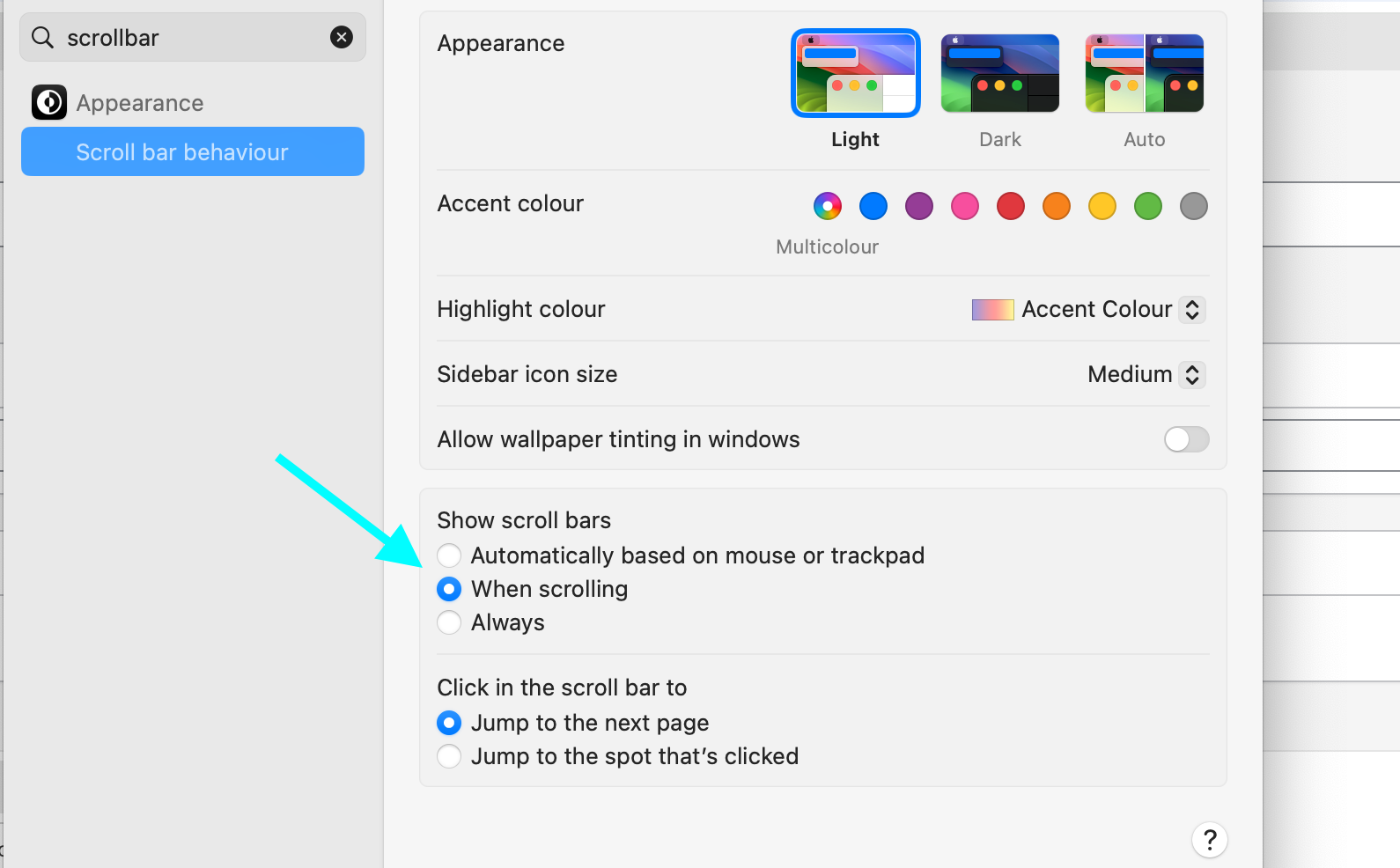
            Screenshot 2024-10-30 at 13.21.35.png

            with "when scrolling" active, i dont have this jump

            i need to set the body/html to overflow hidden, otherwise the background would still be scrollable

            1 Reply Last reply
            0
            • S
              S
              Sebaster
              wrote on last edited by
              #6

              Hello Armin, thank you for your quick support.
              I hadn't yet tested the last update 7.46 in this regard, but according to the description there was an adjustment from you.
              However, I have now adapted my page and menu structure so that it works well even without project overlays.

              1 Reply Last reply
              0
              • arminunruhA
                arminunruhA
                arminunruh
                Global Moderator
                wrote on last edited by
                #7

                ok nice. yea i changed the code a little so it would jiggle around less

                1 Reply Last reply
                0

                Hello! It looks like you're interested in this conversation, but you don't have an account yet.

                Getting fed up of having to scroll through the same posts each visit? When you register for an account, you'll always come back to exactly where you were before, and choose to be notified of new replies (either via email, or push notification). You'll also be able to save bookmarks and upvote posts to show your appreciation to other community members.

                With your input, this post could be even better 💗

                Register Login
                Reply
                • Reply as topic
                Log in to reply
                • Oldest to Newest
                • Newest to Oldest
                • Most Votes


                Online Users
                Forgot your key, lost your files, need a previous Lay Theme or Addon version? Go to www.laykeymanager.com
                laytheme.com
                • Login

                • Don't have an account? Register

                • Login or register to search.
                • First post
                  Last post
                0
                • Recent
                • Tags
                • Popular
                • Users
                • Search