Skip to content
  • Recent
  • Tags
  • Popular
  • Users
  • Search
Skins
  • Light
  • Brite
  • Cerulean
  • Cosmo
  • Flatly
  • Journal
  • Litera
  • Lumen
  • Lux
  • Materia
  • Minty
  • Morph
  • Pulse
  • Sandstone
  • Simplex
  • Sketchy
  • Spacelab
  • United
  • Yeti
  • Zephyr
  • Dark
  • Cyborg
  • Darkly
  • Quartz
  • Slate
  • Solar
  • Superhero
  • Vapor

  • Default (No Skin)
  • No Skin
Collapse

Lay Theme Forum

  1. Home
  2. General Discussion
  3. How to make horizontal and vertical images in Carousel have the same size

How to make horizontal and vertical images in Carousel have the same size

Scheduled Pinned Locked Moved General Discussion
12 Posts 3 Posters 1.1k Views 2 Watching
  • Oldest to Newest
  • Newest to Oldest
  • Most Votes
Reply
  • Reply as topic
Log in to reply
This topic has been deleted. Only users with topic management privileges can see it.
  • arminunruhA Online
    arminunruhA Online
    arminunruh
    Global Moderator
    wrote on last edited by
    #2

    Screenshot 2025-01-06 at 17.45.17.png

    happy new year!

    i think if you choose this configuration it will be the same height

    additionally you can check this setting too:

    Screenshot 2025-01-06 at 17.45.53.png

    you can also play around with checking "fill slides"
    but this will cut off parts of an image i think

    1 Reply Last reply
    0
    • J Offline
      J Offline
      Jhmmitchell
      wrote on last edited by
      #3

      thank you very much for your help!
      I didn't work unfortunately... The horizontal photos are still small and positionned at the bottom of the carousel
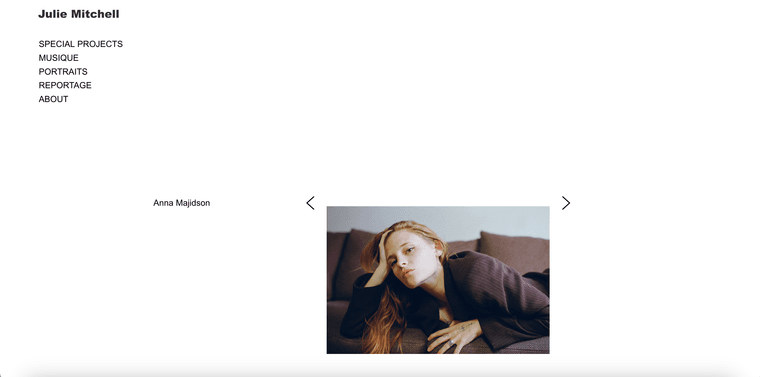
      Capture d’écran 2025-01-06 à 18.42.39.png

      1 Reply Last reply
      0
      • J Offline
        J Offline
        Jhmmitchell
        wrote on last edited by
        #4

        It works perfectly on this Website created with Lay Theme : https://www.charlotteabramow.com/angele/

        1 Reply Last reply
        0
        • arminunruhA Online
          arminunruhA Online
          arminunruh
          Global Moderator
          wrote on last edited by
          #5

          i think this is the configuration they used:
          Screenshot 2025-01-07 at 02.16.25.png

          you might need to change the 16:9 aspect ratio

          1 Reply Last reply
          0
          • J Offline
            J Offline
            Jhmmitchell
            wrote on last edited by
            #6

            Thank you!
            I followed your screenshot instructions, and they all have the same format now. But the new problem is that, with these settings, all the horizontal photos are croped...
            https://main.juliehmmitchell.com/anna-majidson/?preview=true

            arminunruhA 1 Reply Last reply
            0
            • dmncnD Offline
              dmncnD Offline
              dmncn
              wrote on last edited by
              #7

              I think a workaround was used on the page https://www.charlotteabramow.com/angele/

              All the images are the same size (1500x1000 pixels), including the vertical ones, which have blank spaces on the sides.

              Screenshot 2025-01-08 alle 16.30.29.png

              1 Reply Last reply
              0
              • J Offline
                J Offline
                Jhmmitchell
                wrote on last edited by
                #8

                Thank you very much for your help! I'll do that!

                Have a good day!

                1 Reply Last reply
                0
                • J Jhmmitchell

                  Thank you!
                  I followed your screenshot instructions, and they all have the same format now. But the new problem is that, with these settings, all the horizontal photos are croped...
                  https://main.juliehmmitchell.com/anna-majidson/?preview=true

                  arminunruhA Online
                  arminunruhA Online
                  arminunruh
                  Global Moderator
                  wrote on last edited by
                  #9

                  @Jhmmitchell this means your custom aspect ratio should be different. try 20:9 this way the box will be wider relative to its height

                  1 Reply Last reply
                  0
                  • arminunruhA Online
                    arminunruhA Online
                    arminunruh
                    Global Moderator
                    wrote on last edited by
                    #10

                    Screenshot 2025-01-08 at 17.01.14.png

                    this part. try 20:10 there or sth like that

                    1 Reply Last reply
                    0
                    • arminunruhA Online
                      arminunruhA Online
                      arminunruh
                      Global Moderator
                      wrote on last edited by
                      #11

                      Screenshot 2025-01-08 at 17.02.01.png
                      Screenshot 2025-01-08 at 17.02.10.png

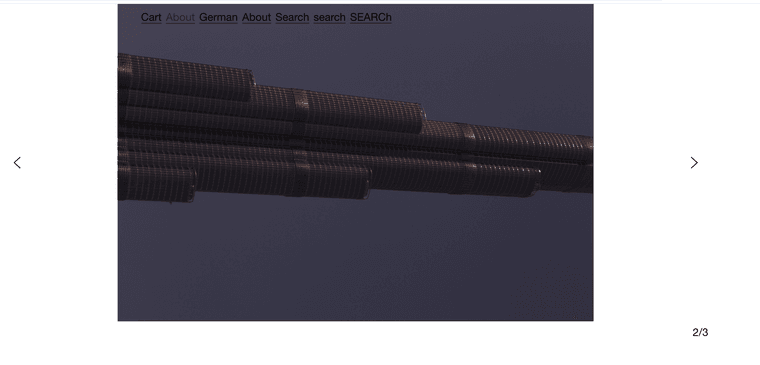
                      thats what a carousel looks like for me with the above configuration

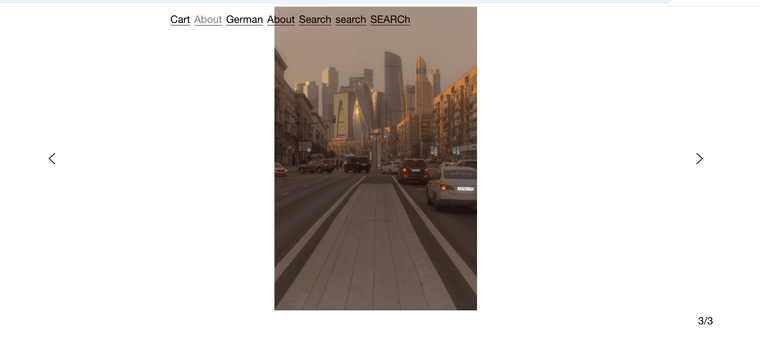
                      as you can see the landscape and portrait images both are 100% height of the carousel and the carousel aspect ratio creates a wide enough box for the landscape images to not get cut off

                      1 Reply Last reply
                      0
                      • J Offline
                        J Offline
                        Jhmmitchell
                        wrote on last edited by
                        #12

                        thank you very much! It now works perfectly!
                        Have a good day

                        1 Reply Last reply
                        0
                        Reply
                        • Reply as topic
                        Log in to reply
                        • Oldest to Newest
                        • Newest to Oldest
                        • Most Votes


                        Online Users
                        arminunruhA
                        arminunruh
                        Forgot your key, lost your files, need a previous Lay Theme or Addon version? Go to www.laykeymanager.com
                        laytheme.com
                        • Login

                        • Don't have an account? Register

                        • Login or register to search.
                        • First post
                          Last post
                        0
                        • Recent
                        • Tags
                        • Popular
                        • Users
                        • Search