Hide single menu item
-
Hi everyone,
I have four items in menu 1 (portfolio, about, contact, blog). Is it possible to hide one item of this menu (portfolio) when the homepage (which is same as 'portfolio') is shown? I tried some custom php (see below), which hid the menu item 'portfolio' when on homepage. But it did not reappear automatically when navigating to a page or project, it only reappeared when I reloaded the page or project. How can this be fixed?
add_filter('wp_nav_menu_objects', 'conditionally_hide_menu_item', 10, 2);
function conditionally_hide_menu_item($items, $args) {
if (is_front_page()) {
foreach ($items as $key => $item) {
if ($item->ID == 442) {
unset($items[$key]);
}
}
}
return $items;
} -
Hi everyone,
I have four items in menu 1 (portfolio, about, contact, blog). Is it possible to hide one item of this menu (portfolio) when the homepage (which is same as 'portfolio') is shown? I tried some custom php (see below), which hid the menu item 'portfolio' when on homepage. But it did not reappear automatically when navigating to a page or project, it only reappeared when I reloaded the page or project. How can this be fixed?
add_filter('wp_nav_menu_objects', 'conditionally_hide_menu_item', 10, 2);
function conditionally_hide_menu_item($items, $args) {
if (is_front_page()) {
foreach ($items as $key => $item) {
if ($item->ID == 442) {
unset($items[$key]);
}
}
}
return $items;
} -
hey! its easier to use custom css
the body tag has a slug and id. these are different based on the page you're on.
also, the menu items have ids you can use to target them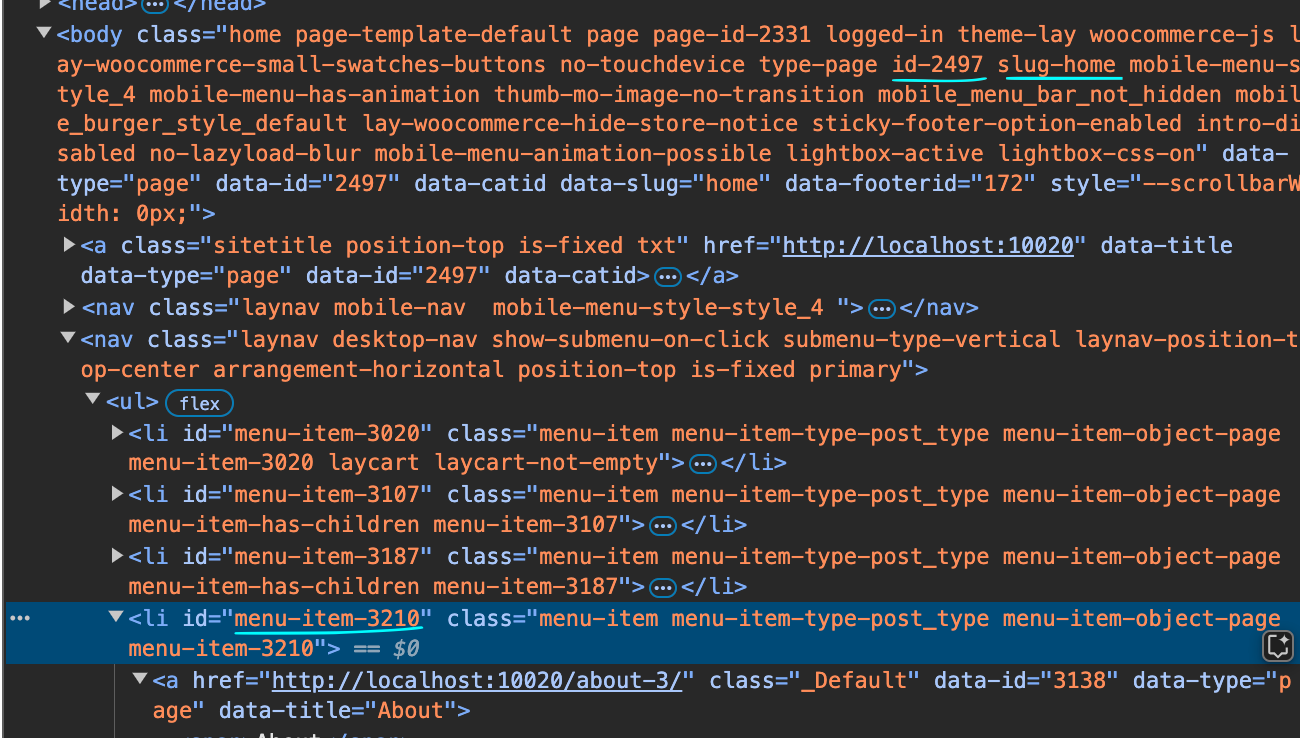
so for example
body.slug-home #menu-item-3210{
display: none;
}
Enter this css in "lay options" -> "custom css & html" -> "custom css for desktop"
https://laytheme.com/documentation/custom-css-styling.html#css-based-on-current-page
if you change the php code of the theme, it will be overwritten when lay theme updates
-
Thanks, @arminunruh! I added the CSS, but unfortunately it did not work. I tried body.type-category.id-1 #menu-item-442{
display: none;
}
and I also tried:
body.slug-portfolio #menu-item-442{
display: none;
}
but both did not work.
Can you have a look if you find the time? It is about this site: https://dagmarschwelle.com I want to hide the menu item PORTFOLIO when on page (category) portfolio. -
body.slug-portfolio .menu-item-442{
display: none!important;
}
seems like the menu had the class menu-item-442, not the id menu-item-442
not sure why!
does this css work?
-
yes, it does! Many thanks, @arminunruh !!

Hello! It looks like you're interested in this conversation, but you don't have an account yet.
Getting fed up of having to scroll through the same posts each visit? When you register for an account, you'll always come back to exactly where you were before, and choose to be notified of new replies (either via email, or push notification). You'll also be able to save bookmarks and upvote posts to show your appreciation to other community members.
With your input, this post could be even better 💗
Register Login