thumbnail tags: only one active, fixed position, implementation on project page
-
hi!
-
is there a way to make sure that only one tag is active? so, when clicking on a tag it becomes active, and when clicking on another tag the previous one becomes inactive, etc. (similar behaviour like the categories).
-
is it possible for these tags to have a fixed position? so, they don't move to the beginning but stay where they are?
-
is it possible to have tags displayed on project pages? let's say i'm on the project page, have a display of tags and when clicking on one of them, it brings me to the "archive" page with all the projects having this specific tag.
--> have a look at the website johannagratzer.site/archive for reference
thanks!
-
-
1.:
i think no2.:
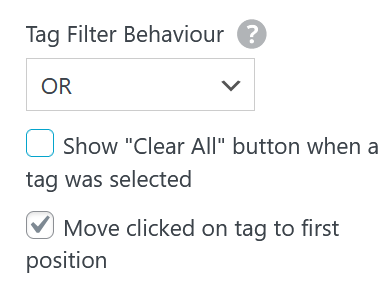
uncheck "move clicked on tag to first position"3.:
$tags$write this text into a text element: +text
this wont be a button but just text.

Hello! It looks like you're interested in this conversation, but you don't have an account yet.
Getting fed up of having to scroll through the same posts each visit? When you register for an account, you'll always come back to exactly where you were before, and choose to be notified of new replies (either via email, or push notification). You'll also be able to save bookmarks and upvote posts to show your appreciation to other community members.
With your input, this post could be even better 💗
Register Login