Skip to content
  • Recent
  • Tags
  • Popular
  • Users
  • Search
Skins
  • Light
  • Brite
  • Cerulean
  • Cosmo
  • Flatly
  • Journal
  • Litera
  • Lumen
  • Lux
  • Materia
  • Minty
  • Morph
  • Pulse
  • Sandstone
  • Simplex
  • Sketchy
  • Spacelab
  • United
  • Yeti
  • Zephyr
  • Dark
  • Cyborg
  • Darkly
  • Quartz
  • Slate
  • Solar
  • Superhero
  • Vapor

  • Default (No Skin)
  • No Skin
Collapse

Lay Theme Forum

  1. Home
  2. General Discussion
  3. text when hover over image

text when hover over image

Scheduled Pinned Locked Moved General Discussion
14 Posts 3 Posters 531 Views 2 Watching
  • Oldest to Newest
  • Newest to Oldest
  • Most Votes
Reply
  • Reply as topic
Log in to reply
This topic has been deleted. Only users with topic management privileges can see it.
  • J Offline
    J Offline
    Johannes Meger
    wrote on last edited by
    #1

    Hi,
    I´ve read through all the topics but couldnt find a concrete answer.
    Is there a way to show a text when hover over an image like here? https://www.juliasteinigeweg.de/work/
    I need this for "normal" images beside my projects.
    thanks for your help.

    1 Reply Last reply
    0
    • arminunruhA Offline
      arminunruhA Offline
      arminunruh
      Global Moderator
      wrote on last edited by
      #2

      how about this?

      Make image caption show up on mouseover:
      http://laythemeforum.com:4567/topic/11141/text-link-on-image-hover/6

      1 Reply Last reply
      0
      • J Offline
        J Offline
        Johannes Meger
        wrote on last edited by
        #3

        hey. I saw this already, tried it out but dont get it :-)
        The "moving text with mouse" worked, but I only want to hover over the image and want a text show up (plus link). When I enter the code you posted at the bottom there I cant see any effect.
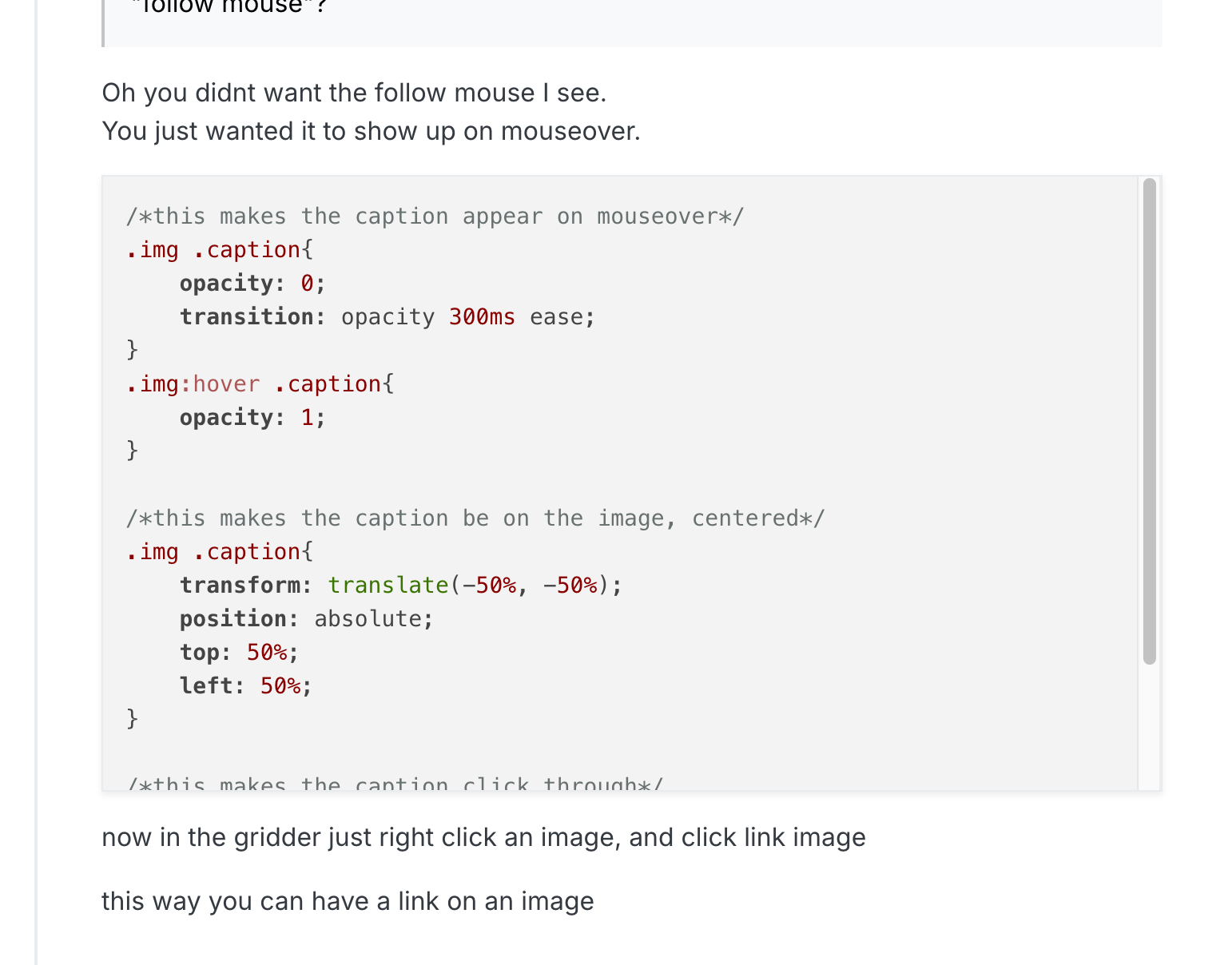
        Bildschirmfoto 2026-01-27 um 15.12.23.png
        and it looks like this:
        Bildschirmfoto 2026-01-27 um 15.47.59.png

        But maybe I´m to stupid, so can you tell me, what I have to do for having a text on mouse hover? (and how to set where its aligned)
        thanks

        1 Reply Last reply
        0
        • J Offline
          J Offline
          Johannes Meger
          wrote on last edited by
          #4

          @arminunruh would be nice if you can help me with this. thanks.

          1 Reply Last reply
          0
          • arminunruhA Offline
            arminunruhA Offline
            arminunruh
            Global Moderator
            wrote on last edited by arminunruh
            #5

            hey!

            ah so you want a text below the image to show up when you hover over the image?

            how about this code:
            https://laythemeforum.com/topic/11141/text-link-on-image-hover/6

            and sorry about the late reply, seems like i missed your reply here

            1 Reply Last reply
            0
            • J Offline
              J Offline
              Johannes Meger
              wrote on last edited by
              #6

              hey no worries. I want a text over the image when hover with mouse over it. like on this site: https://www.juliasteinigeweg.de/work/
              And if possible to align the text and change fontstyle.

              1 Reply Last reply
              0
              • arminunruhA Offline
                arminunruhA Offline
                arminunruh
                Global Moderator
                wrote on last edited by
                #7

                oh sorry, i just realized the code didn't work anymore.

                this is the right css:

                /*this makes the caption appear on mouseover*/
                .type-img .caption{
                    opacity: 0;
                    transition: opacity 300ms ease;
                }
                .type-img:hover .caption{
                    opacity: 1;
                }
                
                /*this makes the caption be on the image, centered*/
                .type-img .caption{
                    transform: translate(-50%, -50%);
                    position: absolute;
                    top: 50%;
                    left: 50%;
                }
                
                /*this makes the caption click through*/
                .type-img .caption{
                pointer-events: none;
                }
                
                1 Reply Last reply
                0
                • arminunruhA Offline
                  arminunruhA Offline
                  arminunruh
                  Global Moderator
                  wrote on last edited by
                  #8

                  if you want to set the position of the text differently for different images, use this CSS instead:

                  /*this makes the caption appear on mouseover*/
                  .type-img.mouseover-caption .caption{
                      opacity: 0;
                      transition: opacity 300ms ease;
                  }
                  .type-img.mouseover-caption:hover .caption{
                      opacity: 1;
                  }
                  
                  /*positions*/
                  .type-img.mouseover-caption.center-center .caption{
                      transform: translate(-50%, -50%);
                      position: absolute;
                      top: 50%;
                      left: 50%;
                  }
                  .type-img.mouseover-caption.top-left .caption{
                      position: absolute;
                      top: 20px;
                      left: 20px;
                  }
                  .type-img.mouseover-caption.bottom-left .caption{
                      position: absolute;
                      bottom: 20px;
                      left: 20px;
                  }
                  .type-img.mouseover-caption.top-right .caption{
                      position: absolute;
                      top: 20px;
                      right: 20px;
                      *{
                          text-align: right!important;
                      }
                  }
                  .type-img.mouseover-caption.bottom-right .caption{
                      position: absolute;
                      bottom: 20px;
                      right: 20px;
                      *{
                          text-align: right!important;
                      }
                  }
                  
                  /*this makes the caption click through*/
                  .type-img.mouseover-caption .caption{
                  pointer-events: none;
                  }


                  then right click an image and click "set html class and id":
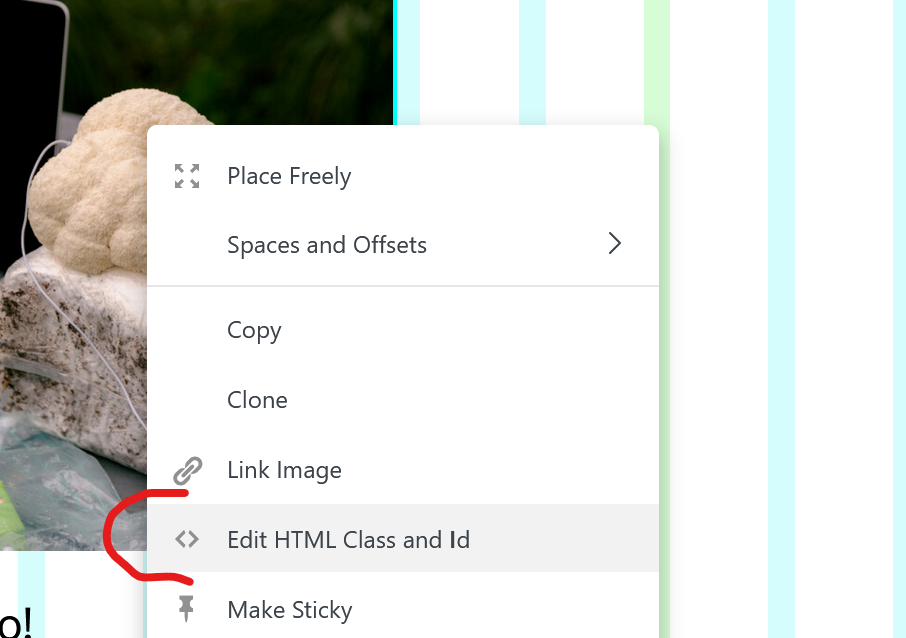
                  29eb9231-fcb0-4786-b1e7-85a0f5805e2b-image.png

                  now enter:

                  mouseover-caption top-right
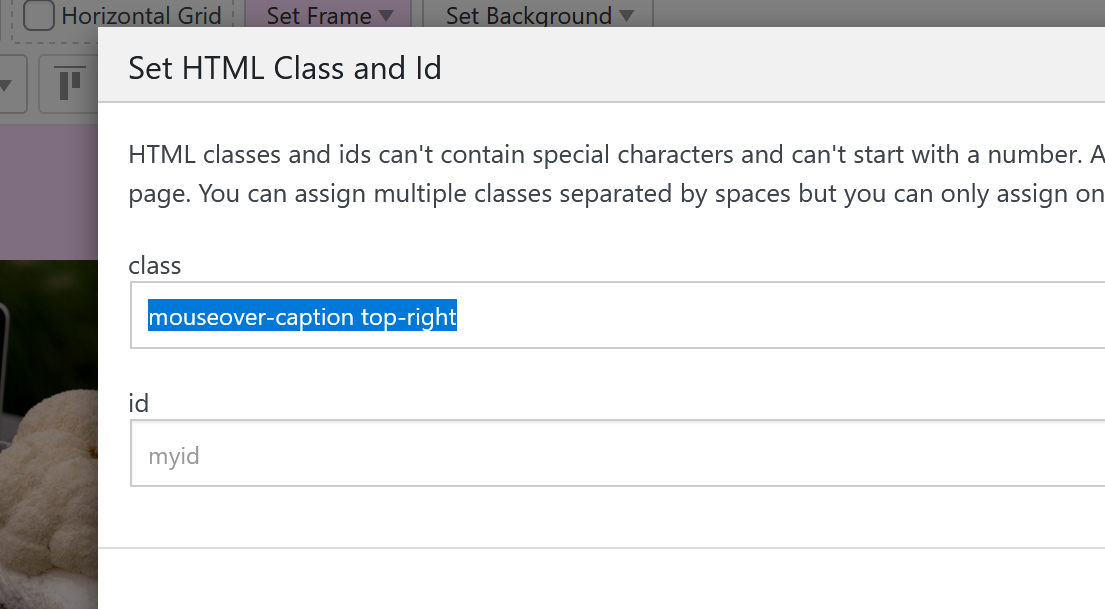
                  5932bdcd-2d2f-4d2a-9db1-ddbf35f5b5de-image.png

                  or
                  mouseover-caption top-left
                  mouseover-caption center-center
                  mouseover-caption bottom-left
                  mouseover-caption bottom-right

                  and the font size and font color you can edit when you edit the caption of the image. the caption will be the text thats on top of the image:
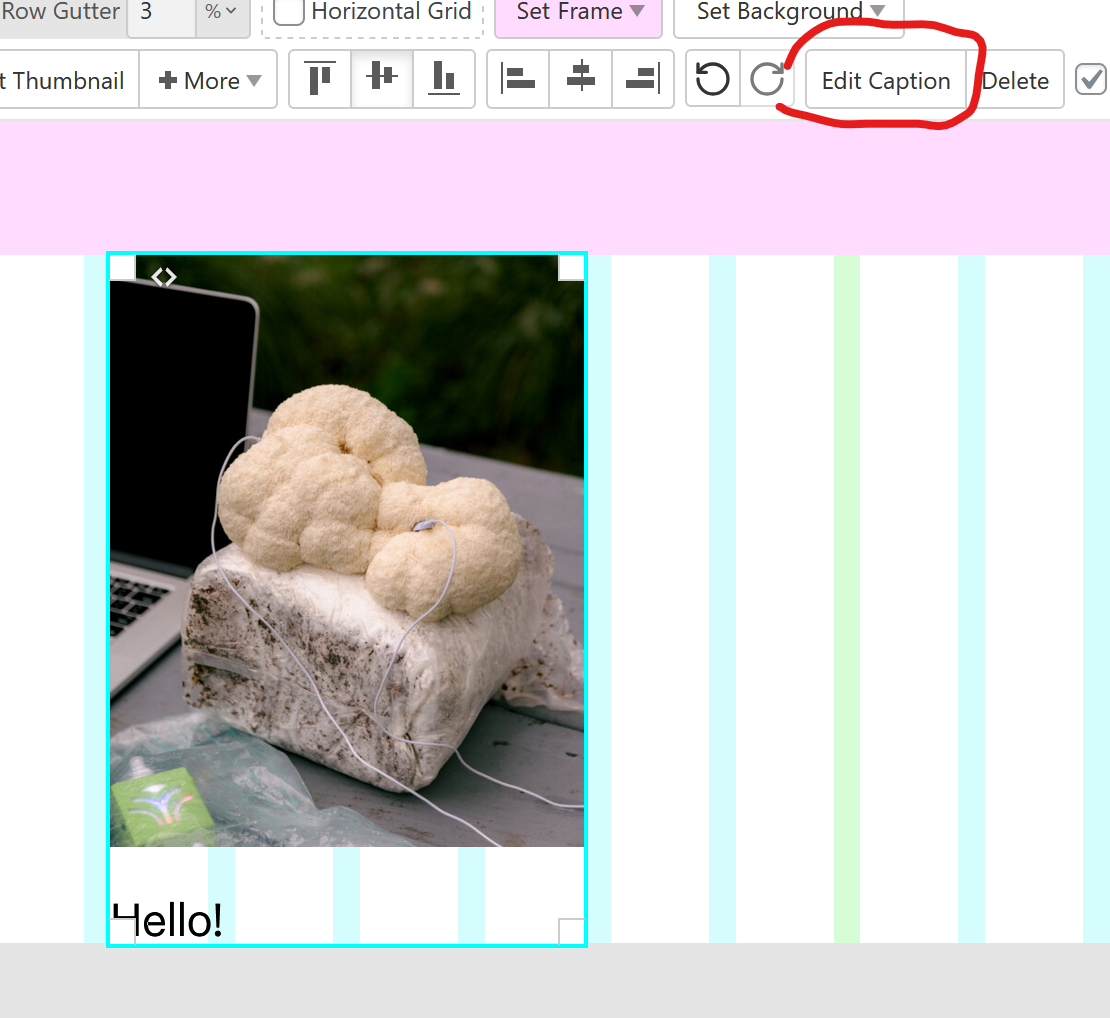
                  5ef66593-affb-4d8b-9886-28497e9405d5-image.png

                  1 Reply Last reply
                  0
                  • arminunruhA Offline
                    arminunruhA Offline
                    arminunruh
                    Global Moderator
                    wrote on last edited by
                    #9

                    actually there is a new way to do this thats easier.
                    simply put text on the images using the new settings in the sidebar:
                    https://laytheme.com/documentation/gridder-elements.html#text-on-image

                    and use this CSS to make them appear on hover:

                    html.no-touchevents .lay-text-on-element-overlay{
                    opacity: 0;
                    transition: opacity 300ms ease;
                    }
                    
                    html.no-touchevents .col:hover .lay-text-on-element-overlay{
                    opacity: 1;
                    }
                    
                    E 1 Reply Last reply
                    0
                    • arminunruhA arminunruh

                      actually there is a new way to do this thats easier.
                      simply put text on the images using the new settings in the sidebar:
                      https://laytheme.com/documentation/gridder-elements.html#text-on-image

                      and use this CSS to make them appear on hover:

                      html.no-touchevents .lay-text-on-element-overlay{
                      opacity: 0;
                      transition: opacity 300ms ease;
                      }
                      
                      html.no-touchevents .col:hover .lay-text-on-element-overlay{
                      opacity: 1;
                      }
                      
                      E Offline
                      E Offline
                      erdnussgerd
                      wrote on last edited by
                      #10

                      @arminunruh Thank you! I was looking for this feature. I cant implement the CSS though. Can you explain this a bit more detailed? Where do i have to put in the CSS? Just copy the code into "Edit Desktop CSS"? It doesnt work for me...

                      1 Reply Last reply
                      0
                      • arminunruhA Offline
                        arminunruhA Offline
                        arminunruh
                        Global Moderator
                        wrote on last edited by
                        #11

                        yes just put it here:

                        image.png

                        and then make sure you added the text on top of the image within the sidebar:
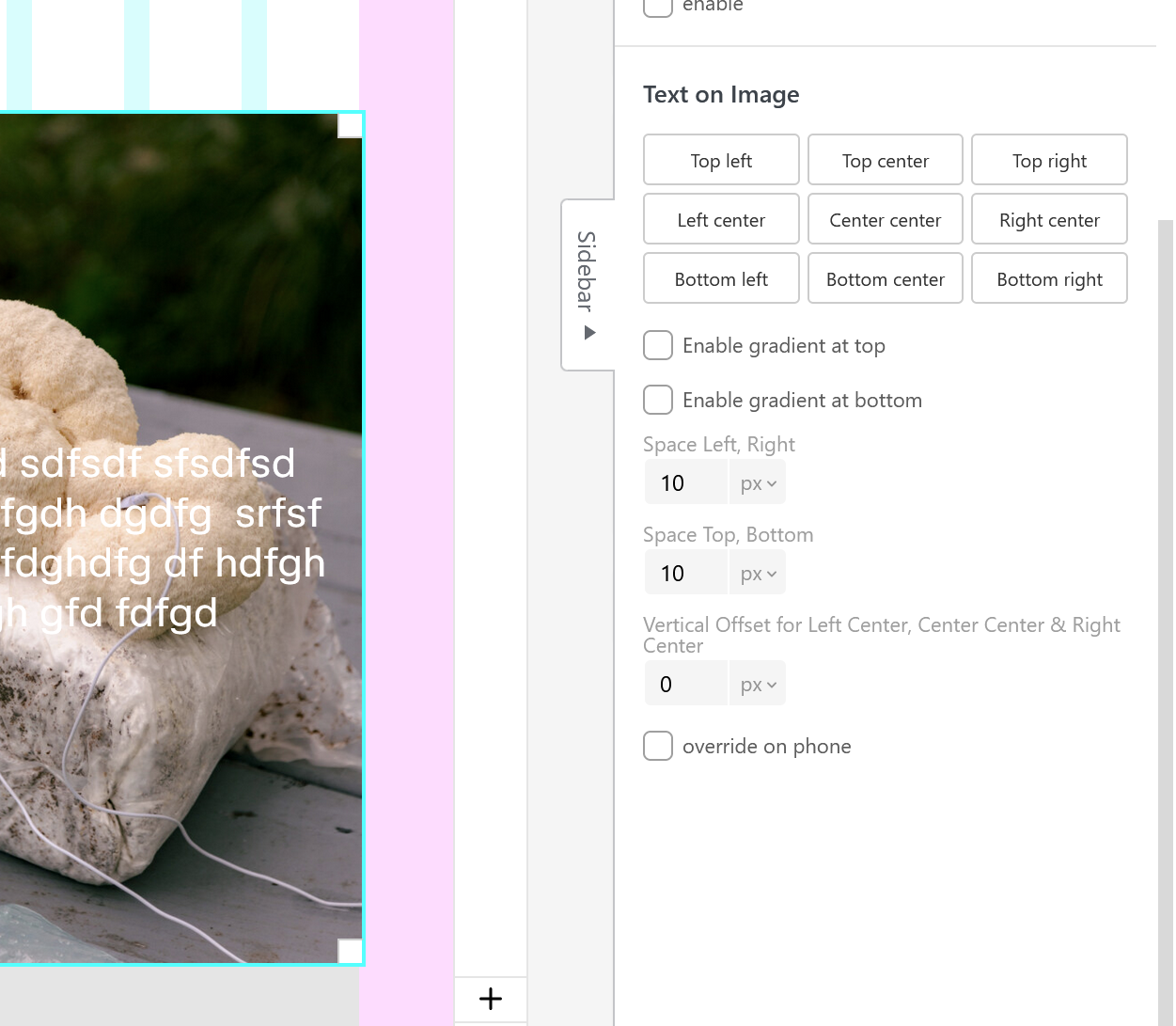
                        image.png

                        E 1 Reply Last reply
                        0
                        • E Offline
                          E Offline
                          erdnussgerd
                          wrote last edited by
                          #12
                          This post is deleted!
                          1 Reply Last reply
                          0
                          • arminunruhA arminunruh

                            yes just put it here:

                            image.png

                            and then make sure you added the text on top of the image within the sidebar:

                            image.png

                            E Offline
                            E Offline
                            erdnussgerd
                            wrote last edited by
                            #13

                            @arminunruh

                            Thank you!!! Got it to work. :)

                            Is there a way to make the gradient color only appear with the text (for readability)?

                            And is there a way to display a second image (on the image) when i hover over it?

                            1 Reply Last reply
                            0
                            • arminunruhA Offline
                              arminunruhA Offline
                              arminunruh
                              Global Moderator
                              wrote last edited by
                              #14

                              you'll need to use this CSS instead:

                              html.no-touchevents .lay-text-on-element-dark-gradient,
                              html.no-touchevents .lay-text-on-element-overlay{
                              opacity: 0;
                              transition: opacity 300ms ease;
                              }
                              
                              html.no-touchevents .col:hover .lay-text-on-element-dark-gradient,
                              html.no-touchevents .col:hover .lay-text-on-element-overlay{
                              opacity: 1;
                              }
                              

                              if you want this without the fade animation:

                              html.no-touchevents .lay-text-on-element-dark-gradient,
                              html.no-touchevents .lay-text-on-element-overlay{
                              opacity: 0;
                              }
                              
                              html.no-touchevents .col:hover .lay-text-on-element-dark-gradient,
                              html.no-touchevents .col:hover .lay-text-on-element-overlay{
                              opacity: 1;
                              }
                              

                              there is no mouseover image functionality for images and no easy way to do this with custom css, but i wrote it down as an idea

                              1 Reply Last reply
                              0
                              Reply
                              • Reply as topic
                              Log in to reply
                              • Oldest to Newest
                              • Newest to Oldest
                              • Most Votes


                              I also code custom websites or custom Lay features.
                              💿 Email me here: 💿
                              info@laytheme.com

                              Our Web Development company: 100k.studio

                              Want to tip me? https://www.paypal.com/paypalme/arminunruh

                              Before you post:
                              1. When using a WordPress Cache plugin, disable it or clear your cache.
                              2. Update Lay Theme and all Lay Theme Addons
                              3. Disable all Plugins
                              4. Go to Lay Options → Custom CSS & HTML, click "Turn Off All Custom Code", click "Save Changes"

                              This often solves issues you might run into

                              When you post:
                              1. Post a link to where the problem is
                              2. Does the problem happen on Chrome, Firefox, Safari or iPhone or Android?
                              3. If the problem is difficult to explain, post screenshots / link to a video to explain it
                              Online Users
                              Forgot your key, lost your files, need a previous Lay Theme or Addon version? Go to www.laykeymanager.com
                              laytheme.com
                              • Login

                              • Don't have an account? Register

                              • Login or register to search.
                              • First post
                                Last post
                              0
                              • Recent
                              • Tags
                              • Popular
                              • Users
                              • Search