Skip to content
  • Recent
  • Tags
  • Popular
  • Users
  • Search
Skins
  • Light
  • Brite
  • Cerulean
  • Cosmo
  • Flatly
  • Journal
  • Litera
  • Lumen
  • Lux
  • Materia
  • Minty
  • Morph
  • Pulse
  • Sandstone
  • Simplex
  • Sketchy
  • Spacelab
  • United
  • Yeti
  • Zephyr
  • Dark
  • Cyborg
  • Darkly
  • Quartz
  • Slate
  • Solar
  • Superhero
  • Vapor

  • Default (No Skin)
  • No Skin
Collapse

Lay Theme Forum

  1. Home
  2. General Discussion
  3. Costume mobile layout - menue + thumbnail

Costume mobile layout - menue + thumbnail

Scheduled Pinned Locked Moved General Discussion
2 Posts 2 Posters 635 Views 1 Watching
  • Oldest to Newest
  • Newest to Oldest
  • Most Votes
Reply
  • Reply as topic
Log in to reply
This topic has been deleted. Only users with topic management privileges can see it.
  • A
    A
    AJ
    wrote on last edited by
    #1

    Hi there,

    I must say I love the LAY theme. so intuitive and flexible!
    I just got some questions on the mobile layout:

    1.) In the Customizer window I set the mobile phone menu as "Use desktop menu as mobile menu" -> looks all good but only one thing is missing: the stroke when I am on a page eg CONTACT.

    2.) For my work/portfolio page I use thumbnails which show the work title (whit custom set type size/colour etc) as a mouseover.
    The mobile version uses just the same thumbnails but only the type is way too big for the phone.
    -> where can I customize the mobile phone version of the thumbnails?

    Any Ideas?
    Thank you so so much!!

    1 Reply Last reply
    0
    • mariusjopenM
      mariusjopenM
      mariusjopen
      Global Moderator
      wrote on last edited by
      #2

      Hi AJ,

      great you like to use Laytheme. Very happy to hear :-)

      1. Without having a look at your page it is a bit difficult to help you. Sometimes you need to add a custom CSS code for the mobile. Because some things will not be active in the mobile version.

      You can do this here:
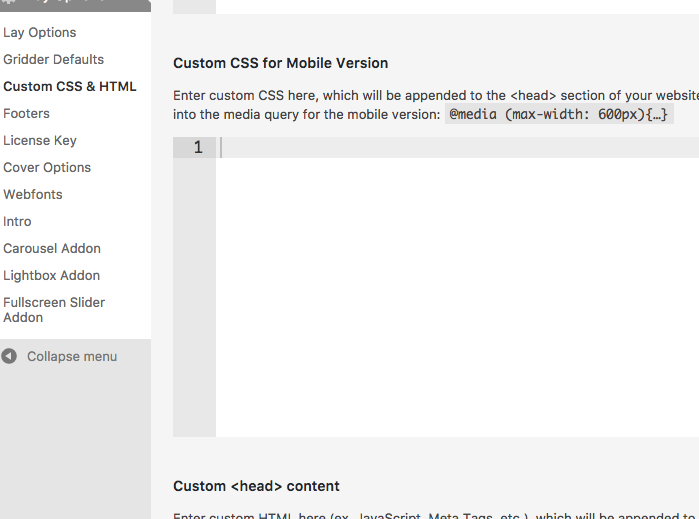
      0_1499690266304_Bildschirmfoto 2017-07-10 um 14.37.31.png

      1. This might be the case that you have to change the text manually in the mobile CSS (above)
        Or you can try to use the LAytheme Text Formats:
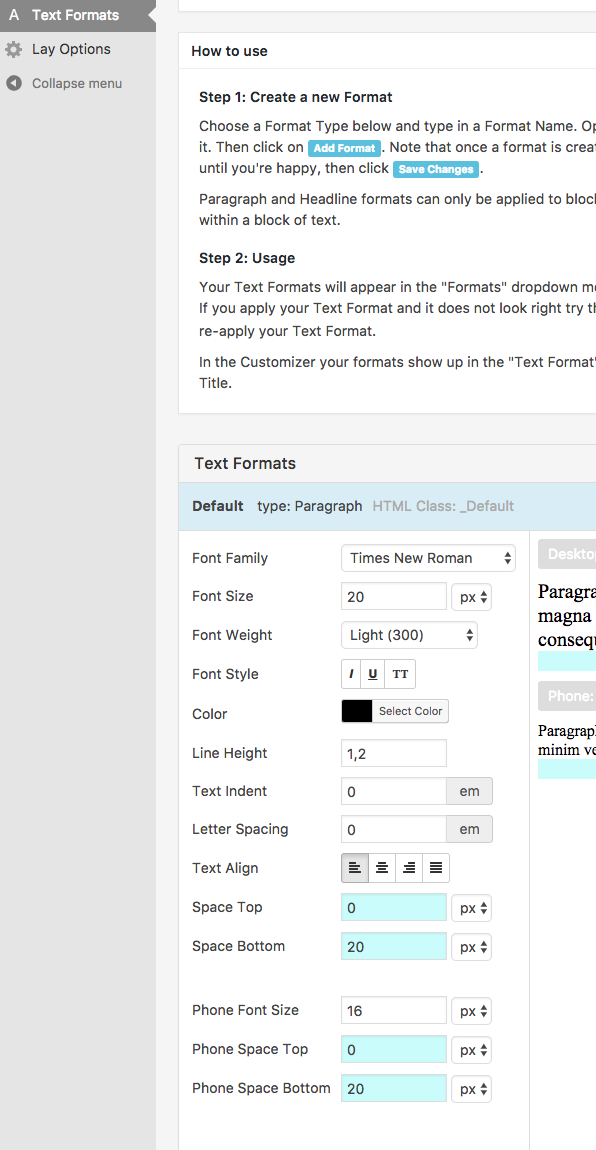
        0_1499690325005_Bildschirmfoto 2017-07-10 um 14.38.31.png

      On the bottom you can see Phone Font Size.

      Good luck!

      Marius

      www.mariusjopen.world

      1 Reply Last reply
      0

      Hello! It looks like you're interested in this conversation, but you don't have an account yet.

      Getting fed up of having to scroll through the same posts each visit? When you register for an account, you'll always come back to exactly where you were before, and choose to be notified of new replies (either via email, or push notification). You'll also be able to save bookmarks and upvote posts to show your appreciation to other community members.

      With your input, this post could be even better 💗

      Register Login
      Reply
      • Reply as topic
      Log in to reply
      • Oldest to Newest
      • Newest to Oldest
      • Most Votes


      Online Users
      I
      itsbadjujuju
      Forgot your key, lost your files, need a previous Lay Theme or Addon version? Go to www.laykeymanager.com
      laytheme.com
      • Login

      • Don't have an account? Register

      • Login or register to search.
      • First post
        Last post
      0
      • Recent
      • Tags
      • Popular
      • Users
      • Search