Text links: different color per page?
-
I've designed a portfolio page that has two pages with different background color (black and blue). I wish to have blue links on the black background and black links on the blue background...is there any way I can manually code this adding CSS or similar since the customization for "text links" only offers one option (and overwrites type style sheets).
Would be super thankful for some guidance.
-
Hi JennyPenny,
this is possible with Custom CSS.
First you need to get the Slug of the page you want to style.
You can get it by inspecting the page and have a look in the body tag:
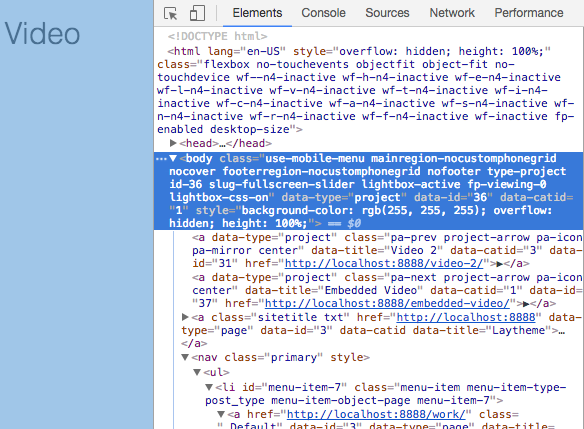
In my body tag you can see
slug-fullscreen-slider. That is the name of the page.You can now use that slug as a parent div class for all elements you want to style on that page.
For example:
.slug-fullscreen-slider .a {
    color: red !important;
}
You might need the important or not. That depends sometimes.
Just play around with it.
All the best and good luck!
Marius

Hello! It looks like you're interested in this conversation, but you don't have an account yet.
Getting fed up of having to scroll through the same posts each visit? When you register for an account, you'll always come back to exactly where you were before, and choose to be notified of new replies (either via email, or push notification). You'll also be able to save bookmarks and upvote posts to show your appreciation to other community members.
With your input, this post could be even better 💗
Register Login