Skip to content
  • Recent
  • Tags
  • Popular
  • Users
  • Search
Skins
  • Light
  • Brite
  • Cerulean
  • Cosmo
  • Flatly
  • Journal
  • Litera
  • Lumen
  • Lux
  • Materia
  • Minty
  • Morph
  • Pulse
  • Sandstone
  • Simplex
  • Sketchy
  • Spacelab
  • United
  • Yeti
  • Zephyr
  • Dark
  • Cyborg
  • Darkly
  • Quartz
  • Slate
  • Solar
  • Superhero
  • Vapor

  • Default (No Skin)
  • No Skin
Collapse

Lay Theme Forum

  1. Home
  2. General Discussion
  3. Mobile Redirect

Mobile Redirect

Scheduled Pinned Locked Moved General Discussion
12 Posts 2 Posters 2.5k Views 2 Watching
  • Oldest to Newest
  • Newest to Oldest
  • Most Votes
Reply
  • Reply as topic
Log in to reply
This topic has been deleted. Only users with topic management privileges can see it.
  • C
    C
    Cristina Poelk
    wrote on last edited by
    #1

    Hej Armin,

    I have two problems, as follow:

    1. My Sitename is also my menu. but i wanted an extra button that is right aligned on the side. i tried to get that done by using CSS Classes and then shift it to the right in the Style Sheet. but for some reason its not responsive and sticks to a certain width to the last menu item...any idea why?

    here you can see: shaneschneck.com

    1. I used the redirect to go from my old domain to the new one, that i set up to temporarily layout the site. After finished i redirected but unfortunately the mobile version doesn't respond to the redirect, is there any trick i can use?

    thanks in advance,
    Cristina

    1 Reply Last reply
    0
    • arminunruhA
      arminunruhA
      arminunruh
      Global Moderator
      wrote on last edited by
      #2

      Hey!

      1. Try this:
      .become-far-right {
          position: absolute;
          right: 0;
      }
      nav.primary {
      right: 5%;
      }
      
      1. Well how do you redirect? I'm not sure if I understand. You mean when you visit your old website's mobile version it doesn't redirect to the new website? In this case maybe talk to the person who coded your old website.
      1 Reply Last reply
      0
      • C
        C
        Cristina Poelk
        wrote on last edited by
        #3

        Thanks Armin,

        I found a compromise solution for both my answers.

        In the meantime I've gathered another question:

        Is there a method to make the menu bar transparent in the mobile version?
        I've tried a lot of codes, but nothing seems to work :/

        Thanks in advance!

        1 Reply Last reply
        0
        • arminunruhA
          arminunruhA
          arminunruh
          Global Moderator
          wrote on last edited by
          #4

          Ok!
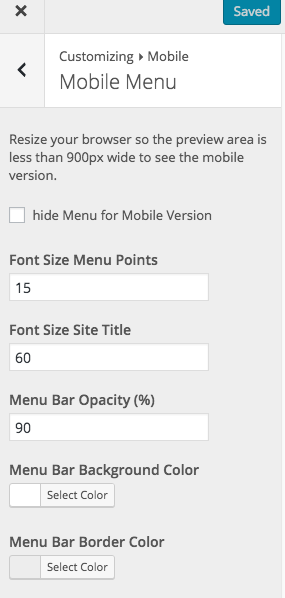
          Go to Customize -> Mobile -> Mobile Menu
          And then it's the point "Menu Bar Opacity"
          Screen Shot 2016-05-02 at 11.10.24.png

          1 Reply Last reply
          0
          • C
            C
            Cristina Poelk
            wrote on last edited by
            #5

            i dont have that option in my panel...was this an update?

            My settings will stay the same if i make the update right?

            1 Reply Last reply
            0
            • C
              C
              Cristina Poelk
              wrote on last edited by
              #6

              Hey Armin,

              I've tried to update the theme and my website is down.

              The latest version of the lay theme is compatible with the latest version of wordpress or?

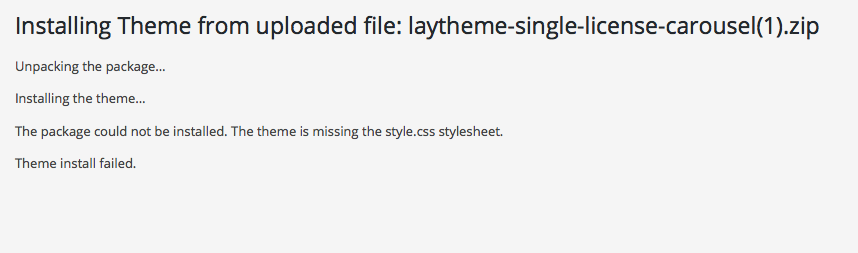
              when is try to install the pack manually it says that the theme is missing the style.css stylesheet

              1 Reply Last reply
              0
              • C
                C
                Cristina Poelk
                wrote on last edited by
                #7

                Bildschirmfoto 2016-05-02 um 15.29.30.png

                1 Reply Last reply
                0
                • C
                  C
                  Cristina Poelk
                  wrote on last edited by
                  #8

                  okay sorry, fixed it...made the update and so on.

                  1 Reply Last reply
                  0
                  • C
                    C
                    Cristina Poelk
                    wrote on last edited by
                    #9

                    so but theres no way to make ONLY the background transparent in the mobile?

                    im sorry for all these questions, Im trying to please the client :)

                    1 Reply Last reply
                    0
                    • arminunruhA
                      arminunruhA
                      arminunruh
                      Global Moderator
                      wrote on last edited by
                      #10

                      Hey Christina!
                      The settings for the menu bar for the desktop version are here: "Customize" -> "Menu Style" -> "Menu Bar".
                      There is a setting "Opacity %". There you can set the opacity for the menu bar on desktop. Then for mobile you can set the menu bar opacity in Customize -> Mobile -> Mobile Menu

                      1 Reply Last reply
                      0
                      • C
                        C
                        Cristina Poelk
                        wrote on last edited by
                        #11

                        Hej!

                        yeah i figured :)

                        the problem is, when i lower the Opacity for the Menu bar on the mobile, the title becomes ghosty as well...no way to keep the title font 100%?

                        1 Reply Last reply
                        0
                        • arminunruhA
                          arminunruhA
                          arminunruh
                          Global Moderator
                          wrote on last edited by
                          #12

                          Hey Christina!
                          Ah yea, will fix that for the next update.
                          For now you can set that opacity back to 100% and use this css in "lay options" -> "custom css" -> "css for mobile version":

                          .navbar{
                          background-color: rgba(255,255,255,0.7);
                          }
                          

                          You can change the number 255,255,255 to get a different color (rgb). the last one 0.7 is the opacity (0-1)

                          1 Reply Last reply
                          0

                          Hello! It looks like you're interested in this conversation, but you don't have an account yet.

                          Getting fed up of having to scroll through the same posts each visit? When you register for an account, you'll always come back to exactly where you were before, and choose to be notified of new replies (either via email, or push notification). You'll also be able to save bookmarks and upvote posts to show your appreciation to other community members.

                          With your input, this post could be even better 💗

                          Register Login
                          Reply
                          • Reply as topic
                          Log in to reply
                          • Oldest to Newest
                          • Newest to Oldest
                          • Most Votes


                          Online Users
                          A
                          alasdair17
                          Forgot your key, lost your files, need a previous Lay Theme or Addon version? Go to www.laykeymanager.com
                          laytheme.com
                          • Login

                          • Don't have an account? Register

                          • Login or register to search.
                          • First post
                            Last post
                          0
                          • Recent
                          • Tags
                          • Popular
                          • Users
                          • Search