Skip to content
  • Recent
  • Tags
  • Popular
  • Users
  • Search
Skins
  • Light
  • Brite
  • Cerulean
  • Cosmo
  • Flatly
  • Journal
  • Litera
  • Lumen
  • Lux
  • Materia
  • Minty
  • Morph
  • Pulse
  • Sandstone
  • Simplex
  • Sketchy
  • Spacelab
  • United
  • Yeti
  • Zephyr
  • Dark
  • Cyborg
  • Darkly
  • Quartz
  • Slate
  • Solar
  • Superhero
  • Vapor

  • Default (No Skin)
  • No Skin
Collapse

Lay Theme Forum

  1. Home
  2. General Discussion
  3. Anchor tags from main menu (one-page site)

Anchor tags from main menu (one-page site)

Scheduled Pinned Locked Moved General Discussion
8 Posts 4 Posters 1.4k Views 3 Watching
  • Oldest to Newest
  • Newest to Oldest
  • Most Votes
Reply
  • Reply as topic
Log in to reply
This topic has been deleted. Only users with topic management privileges can see it.
  • Z
    Z
    zippitybop
    wrote on last edited by
    #1

    Hi again,

    I have another issue -

    I'm trying to use anchor links to scroll to sections, but its not working - I have tried this method

    and also via the page editor > right click > edit html class and id > id.

    In both cases I have added a custom link in the menu with the id #lokaleveranstalter in the url.
    Either way, when I click on the menu item it opens a new window to the URL and doesn't scroll to the section. If I enter the full URL with anchor link and press enter whilst the page has already loaded, it teleports to that section.

    How can I stop the new tab opening and is there a way to make the transition a little more fluid?

    This thread is close to what I want to do, but I'm not sure how to integrate the functionality into the menu items.

    Can you help with this?

    Cheers,
    Darius

    1 Reply Last reply
    0
    • mariusjopenM
      mariusjopenM
      mariusjopen
      Global Moderator
      wrote on last edited by
      #2

      Dear @zippitybop
      in the first example you showed, there is a jQuery code which you also need to use?
      Did you use that?

      Best!

      Marius

      www.mariusjopen.world

      1 Reply Last reply
      0
      • Z
        Z
        zippitybop
        wrote on last edited by
        #3

        HI Marius,

        thanks so much for getting back to me. Unfortunately (fortunately?) we decided against a menu all together since the page was so short.

        If I get time I will test out what you suggested. But for now the page has gone live without a menu!

        Thanks again,
        Darius

        1 Reply Last reply
        0
        • mariusjopenM
          mariusjopenM
          mariusjopen
          Global Moderator
          wrote on last edited by
          #4

          Dear @zippitybop
          sure. no problem.
          Have a good day!

          Marius

          www.mariusjopen.world

          1 Reply Last reply
          0
          • A
            A
            andsampson
            wrote on last edited by andsampson
            #5

            Hi @mariusjopen ! I am also trying to get a custom link to an anchor on a one-pager to stop opening in a new window. I know I need to get Lay Theme to remove the "target=_blank" part of the created <a> tag, but how do I accomplish this ?

            Anchor linking to site sections in the footer works just fine: the transition is smooth and joyful.
            Cheers, Andrew

            1 Reply Last reply
            0
            • A
              A
              andsampson
              wrote on last edited by
              #6

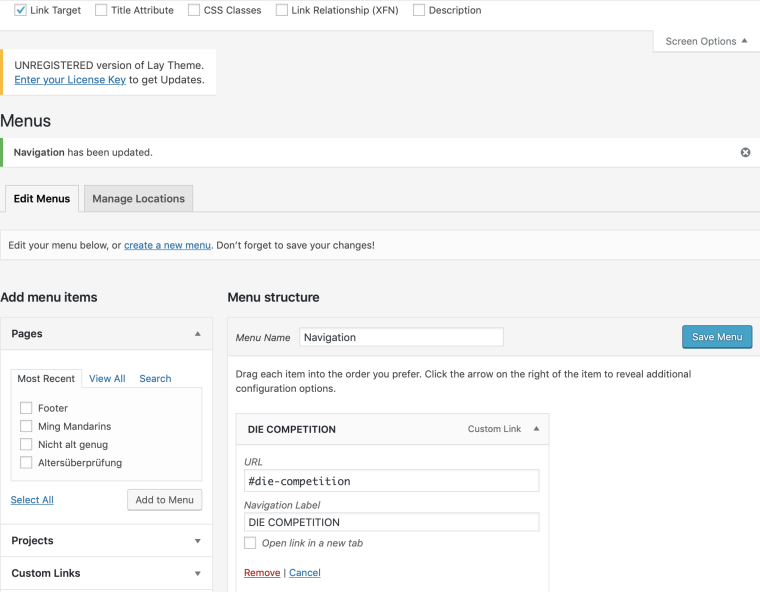
              PS: I have 'Link Target' selected in 'Screen Options', but unchecking the 'Open link in new tab' box is not doing the trick.0_1553686768879_Screenshot 2019-03-27 at 12.38.24.png

              PPS: The info@laytheme email isn't working, and I still need my registration key. Posted about this in General Discussion a couple days ago.

              Thanks for the help !

              1 Reply Last reply
              0
              • mariusjopenM
                mariusjopenM
                mariusjopen
                Global Moderator
                wrote on last edited by
                #7

                Dear @zippitybop
                yes. I was able to reproduce this.
                The link always opens in a new window.

                There is the option to do that with jQuery. But I think that this should work in general.

                I will talk with Armin about it.

                Best!

                Marius

                www.mariusjopen.world

                1 Reply Last reply
                0
                • arminunruhA
                  arminunruhA
                  arminunruh
                  Global Moderator
                  wrote on last edited by
                  #8

                  In Lay Options disable "Menu links of type "Custom Links" always open in new tab"

                  1 Reply Last reply
                  0

                  Hello! It looks like you're interested in this conversation, but you don't have an account yet.

                  Getting fed up of having to scroll through the same posts each visit? When you register for an account, you'll always come back to exactly where you were before, and choose to be notified of new replies (either via email, or push notification). You'll also be able to save bookmarks and upvote posts to show your appreciation to other community members.

                  With your input, this post could be even better 💗

                  Register Login
                  Reply
                  • Reply as topic
                  Log in to reply
                  • Oldest to Newest
                  • Newest to Oldest
                  • Most Votes


                  Online Users
                  Forgot your key, lost your files, need a previous Lay Theme or Addon version? Go to www.laykeymanager.com
                  laytheme.com
                  • Login

                  • Don't have an account? Register

                  • Login or register to search.
                  • First post
                    Last post
                  0
                  • Recent
                  • Tags
                  • Popular
                  • Users
                  • Search