Skip to content
  • Recent
  • Tags
  • Popular
  • Users
  • Search
Skins
  • Light
  • Brite
  • Cerulean
  • Cosmo
  • Flatly
  • Journal
  • Litera
  • Lumen
  • Lux
  • Materia
  • Minty
  • Morph
  • Pulse
  • Sandstone
  • Simplex
  • Sketchy
  • Spacelab
  • United
  • Yeti
  • Zephyr
  • Dark
  • Cyborg
  • Darkly
  • Quartz
  • Slate
  • Solar
  • Superhero
  • Vapor

  • Default (No Skin)
  • No Skin
Collapse

Lay Theme Forum

  1. Home
  2. General Discussion
  3. Upgrade makes thumbnails images HUGE

Upgrade makes thumbnails images HUGE

Scheduled Pinned Locked Moved General Discussion
19 Posts 4 Posters 3.0k Views 2 Watching
  • Oldest to Newest
  • Newest to Oldest
  • Most Votes
Reply
  • Reply as topic
Log in to reply
This topic has been deleted. Only users with topic management privileges can see it.
  • edgrbnzE
    edgrbnzE
    edgrbnz
    wrote on last edited by edgrbnz
    #5

    Hi!

    I can also see the “HUGE” thumbnails for a glimpse on my site after my intro is gone. But they disappear really quick. Doesn’t seem to be related to your custom code.

    It seems to be related to the loadnig of single page app components for the and in your case it doesn’t load the gridder at all.

    Do you use any plugins?
    Do you use YOAST?
    There have been some issues with the latter recently.

    ✦ ✦ ✦

    1 Reply Last reply
    0
    • D
      D
      dsinclair
      wrote on last edited by
      #6

      Hey @edgrbnz thanks for the reply! I don't use any plugins outside of what is available for LayTheme. It's so weird. The issue only started right after updating to the latest Wordpress and LayTheme versions.

      1 Reply Last reply
      0
      • edgrbnzE
        edgrbnzE
        edgrbnz
        wrote on last edited by
        #7

        Did you try deactivating the plugins / addons one by one and checking if it changes anything?

        When I inspect your site I seems to me that you are running google analytics. Is that true?
        Is there any plugin that’s running that?
        If so,… could you deactivate it and check if the error persists?

        I haven’t updated to the lateast wordpress version, yet. Might be something about that but I don’t know really. I think best is @mariusjopen or @arminunruh take a look what’s going on there.

        ✦ ✦ ✦

        1 Reply Last reply
        0
        • D
          D
          dsinclair
          wrote on last edited by
          #8

          Yes! I did see a couple plugins that I deactivated. I can at least see the gridder to make edits now. However, the issue of super huge thumbnails still exists. Not sure what to do on this one.

          1 Reply Last reply
          0
          • edgrbnzE
            edgrbnzE
            edgrbnz
            wrote on last edited by
            #9

            Did you try and save the pages showing the huge thumbnails again? Or recreate the frontpage and see if that fixes the behaviour.
            Perhaps anything went wrong during the update.

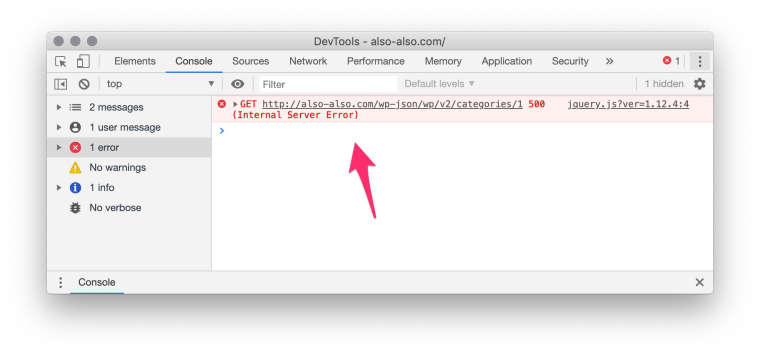
            When I inspected your site yesterday I saw a brief JSON error in the console but was unable to recreate it since.

            ✦ ✦ ✦

            1 Reply Last reply
            0
            • edgrbnzE
              edgrbnzE
              edgrbnz
              wrote on last edited by edgrbnz
              #10

              Aaand! There it is!!
              Got this one after a refresh – dunno what it exactly means but Marius or Armin can surely shed some light.

              0_1557817971722_Pasted_Image_14_05_19__09_11.jpg

              ✦ ✦ ✦

              1 Reply Last reply
              1
              • D
                D
                dsinclair
                wrote on last edited by
                #11

                Oh wow thank you so much. Yeah I wonder how to fix it. If it's on my end and easy to fix it would be awesome.

                1 Reply Last reply
                0
                • mariusjopenM
                  mariusjopenM
                  mariusjopen
                  Global Moderator
                  wrote on last edited by
                  #12

                  Dear @dsinclair
                  yes. We will look into this!
                  @edgrbnz thank you for your help!

                  Best!

                  Marius

                  www.mariusjopen.world

                  D 2 Replies Last reply
                  0
                  • mariusjopenM mariusjopen

                    Dear @dsinclair
                    yes. We will look into this!
                    @edgrbnz thank you for your help!

                    Best!

                    Marius

                    D
                    D
                    dsinclair
                    wrote on last edited by
                    #13

                    @mariusjopen Thank you!

                    1 Reply Last reply
                    0
                    • mariusjopenM mariusjopen

                      Dear @dsinclair
                      yes. We will look into this!
                      @edgrbnz thank you for your help!

                      Best!

                      Marius

                      D
                      D
                      dsinclair
                      wrote on last edited by
                      #14

                      @mariusjopen Please let me know if you need anything else from me. I provided info to @Armin-Unruh . I'm hoping to get the landing page thumbnails fixed as soon as possible. Please do let me know if it seems to be an issue that might take a longer amount of time. If so I can plan accordingly for other portfolio online options for hiring clients to access my work until the issue is fixed. Thanks!

                      1 Reply Last reply
                      0
                      • mariusjopenM
                        mariusjopenM
                        mariusjopen
                        Global Moderator
                        wrote on last edited by
                        #15

                        Dear @dsinclair
                        I sent it to Armin.

                        Best!

                        Marius

                        www.mariusjopen.world

                        D 1 Reply Last reply
                        0
                        • mariusjopenM mariusjopen

                          Dear @dsinclair
                          I sent it to Armin.

                          Best!

                          Marius

                          D
                          D
                          dsinclair
                          wrote on last edited by
                          #16

                          @mariusjopen Thank you! @Armin-Unruh Thank you for you help and let me know if you need any other information from me.

                          1 Reply Last reply
                          0
                          • D
                            D
                            dsinclair
                            wrote on last edited by
                            #17

                            @mariusjopen or @Armin-Unruh can you recommend an affordable developer I could contact to fix the issues with my website? I'm losing clients who visit my site and am hoping to get it fixed soon.

                            Thanks!

                            1 Reply Last reply
                            0
                            • mariusjopenM
                              mariusjopenM
                              mariusjopen
                              Global Moderator
                              wrote on last edited by
                              #18

                              Dear @dsinclair
                              I will forward it to Armin.

                              Best!

                              Marius

                              www.mariusjopen.world

                              1 Reply Last reply
                              0
                              • arminunruhA
                                arminunruhA
                                arminunruh
                                Global Moderator
                                wrote on last edited by
                                #19

                                ok we were writing about this. not sure what cause it but clicking "update" on the category page fixed it

                                1 Reply Last reply
                                0

                                Hello! It looks like you're interested in this conversation, but you don't have an account yet.

                                Getting fed up of having to scroll through the same posts each visit? When you register for an account, you'll always come back to exactly where you were before, and choose to be notified of new replies (either via email, or push notification). You'll also be able to save bookmarks and upvote posts to show your appreciation to other community members.

                                With your input, this post could be even better 💗

                                Register Login
                                Reply
                                • Reply as topic
                                Log in to reply
                                • Oldest to Newest
                                • Newest to Oldest
                                • Most Votes


                                Online Users
                                Forgot your key, lost your files, need a previous Lay Theme or Addon version? Go to www.laykeymanager.com
                                laytheme.com
                                • Login

                                • Don't have an account? Register

                                • Login or register to search.
                                • First post
                                  Last post
                                0
                                • Recent
                                • Tags
                                • Popular
                                • Users
                                • Search

