Skip to content
  • Recent
  • Tags
  • Popular
  • Users
  • Search
Skins
  • Light
  • Brite
  • Cerulean
  • Cosmo
  • Flatly
  • Journal
  • Litera
  • Lumen
  • Lux
  • Materia
  • Minty
  • Morph
  • Pulse
  • Sandstone
  • Simplex
  • Sketchy
  • Spacelab
  • United
  • Yeti
  • Zephyr
  • Dark
  • Cyborg
  • Darkly
  • Quartz
  • Slate
  • Solar
  • Superhero
  • Vapor

  • Default (No Skin)
  • No Skin
Collapse

Lay Theme Forum

  1. Home
  2. General Discussion
  3. How can I change the font size in a drop down menu?

How can I change the font size in a drop down menu?

Scheduled Pinned Locked Moved General Discussion
18 Posts 5 Posters 2.0k Views 2 Watching
  • Oldest to Newest
  • Newest to Oldest
  • Most Votes
Reply
  • Reply as topic
Log in to reply
This topic has been deleted. Only users with topic management privileges can see it.
  • mariusjopenM mariusjopen

    Dear @piero101
    You want to create a dropdown on the website and then there select the font styles of the website?

    Probably you need to assign Classes containing the font-styles with jQuery to the body.

    Best!

    Marius

    P
    P
    prazzo101
    wrote on last edited by
    #5
    This post is deleted!
    1 Reply Last reply
    0
    • mariusjopenM mariusjopen

      Dear @piero101
      You want to create a dropdown on the website and then there select the font styles of the website?

      Probably you need to assign Classes containing the font-styles with jQuery to the body.

      Best!

      Marius

      P
      P
      prazzo101
      wrote on last edited by
      #6

      @mariusjopen Ah sorry, no, you misunderstood. I don’t want to change the fontstyle of the website from a dropdown menu, I just want the links in the dropdown to be smaller than the menu button itself. Same typeface and everything, just smaller.

      1 Reply Last reply
      0
      • N
        N
        ninaverena
        wrote on last edited by
        #7

        Any solution to this question yet? I'd also really like to change the font size of my drop-down menu. Best, nina

        P 1 Reply Last reply
        0
        • N ninaverena

          Any solution to this question yet? I'd also really like to change the font size of my drop-down menu. Best, nina

          P
          P
          prazzo101
          wrote on last edited by
          #8

          @ninaverena No, I didn’t get any answer. I just ended up not using a drop down menu at all.

          1 Reply Last reply
          0
          • N
            N
            ninaverena
            wrote on last edited by
            #9

            ok, thanks anyway. :) Best, nina

            1 Reply Last reply
            0
            • RichardR
              RichardR
              Richard
              Global Moderator
              wrote on last edited by
              #10

              Dear @ninaverena @piero101

              Ah older thread!
              Have just seen this now, apologies for the delay!

              Could you both please post a link to your website with the drop-down menu in question and i can take a better look :)

              Best wishes
              Richard

              P 1 Reply Last reply
              0
              • RichardR Richard

                Dear @ninaverena @piero101

                Ah older thread!
                Have just seen this now, apologies for the delay!

                Could you both please post a link to your website with the drop-down menu in question and i can take a better look :)

                Best wishes
                Richard

                P
                P
                prazzo101
                wrote on last edited by prazzo101
                #11

                @Richard-Keith Thanks Richard, but that state of the website is long gone now ;) Still looking forward to any input for the future because that question will definitely pop up again for me. Thanks!

                1 Reply Last reply
                0
                • RichardR
                  RichardR
                  Richard
                  Global Moderator
                  wrote on last edited by
                  #12

                  Dear @piero101

                  Thank you for the kind reply :)

                  Best wishes and i will be ready when the time comes!

                  Sincerely
                  Richard

                  1 Reply Last reply
                  0
                  • N
                    N
                    ninaverena
                    wrote on last edited by
                    #13

                    Hey @Richard-Keith :)
                    My website is not yet online. But here is a screenshot. I was wandering whether it is possible to change the font / font size of the menu items (portrait, advertising, etc.)?

                    1 Reply Last reply
                    0
                    • N
                      N
                      ninaverena
                      wrote on last edited by
                      #14

                      Bildschirmfoto-2020-10-20-um-17.04.43.jpg

                      1 Reply Last reply
                      0
                      • RichardR
                        RichardR
                        Richard
                        Global Moderator
                        wrote on last edited by
                        #15

                        Dear @ninaverena

                        I understand that sometimes access to the website is not possible :)

                        I hope i can run you through and you apply this to your case:

                        For this we will need help of the Inspection tools provided within Google Chrome's browser:
                        https://www.khanacademy.org/computing/computer-programming/html-css/web-development-tools/a/using-the-browser-developer-tools

                        along with adding our own Custom CSS within "Lay options- custom css & html" :

                        Screen Shot 2020-09-14 at 2.51.54 PM.png

                        When we right click on your webpage we can choose "inspect" from the menu:

                        Screen Shot 2020-10-21 at 11.26.41 AM.png

                        So clicking on the menu which you wish to change:
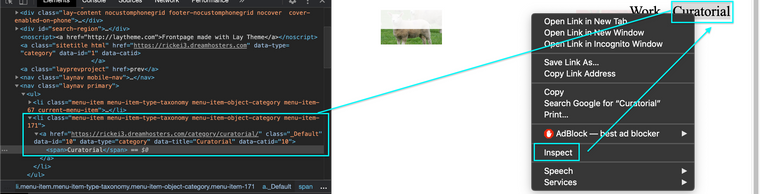
                        Screen Shot 2020-10-21 at 11.28.00 AM.png

                        Here on the left we have some related data, that we will use to target the menu with CSS e.g:

                        .menu-item-171
                        
                        a
                        
                        [data-id="10"]
                        
                        span
                        

                        I changed my menu item's font size by targeting it like this:

                        .menu-item-171 a {
                            font-size:48px;
                        }
                        

                        Because this is a link <a> i have added the 'a' to be sure that the change occurs, you could also target it further to be sure by adding 'span' to the code.

                        I hope this help's you - target the Menu-item area or the individual menu-items this is your choice - then use 'font-size:20px;' ( change the 20 px to your preferred size ) - adding the code to Custom CSS

                        Let me know how you go! :)

                        Best wishes and have a wonderful day

                        Sincerely
                        Richard

                        1 Reply Last reply
                        0
                        • N
                          N
                          ninaverena
                          wrote on last edited by
                          #16

                          dear @Richard-Keith, thanks so much for your detailed help! Whoop-whoop - I did it! ;) (although now I'm not sure if I really like it better.. :) ) All the best, nina

                          1 Reply Last reply
                          0
                          • RichardR
                            RichardR
                            Richard
                            Global Moderator
                            wrote on last edited by
                            #17

                            Dear @ninaverena

                            Great to hear! :)

                            Best wishes and good luck on the rest of your Lay Theme Journey

                            Sincerely
                            Richard

                            1 Reply Last reply
                            0
                            • N
                              N
                              ninaverena
                              wrote on last edited by
                              #18

                              thanks a lot! :)

                              1 Reply Last reply
                              0

                              Hello! It looks like you're interested in this conversation, but you don't have an account yet.

                              Getting fed up of having to scroll through the same posts each visit? When you register for an account, you'll always come back to exactly where you were before, and choose to be notified of new replies (either via email, or push notification). You'll also be able to save bookmarks and upvote posts to show your appreciation to other community members.

                              With your input, this post could be even better 💗

                              Register Login
                              Reply
                              • Reply as topic
                              Log in to reply
                              • Oldest to Newest
                              • Newest to Oldest
                              • Most Votes


                              Online Users
                              Forgot your key, lost your files, need a previous Lay Theme or Addon version? Go to www.laykeymanager.com
                              laytheme.com
                              • Login

                              • Don't have an account? Register

                              • Login or register to search.
                              • First post
                                Last post
                              0
                              • Recent
                              • Tags
                              • Popular
                              • Users
                              • Search

