block mouse click navigation from carousel
-
Dear @mariusjopen ,
i removed all sorts of navigation buttons or gestures from a carousel, which only autoplays now. The only thing i can't block is the mouse click on the images, which causes the navigation to the next image.
Is there a way to avoid the mouse to click on the images entirely?
thank you greatly in advance!
Francesca -
-
Dear @mariusjopen
thank you for the answer and suggestion, i tried to set a class for the carousel element in the page and give the pointer-events: none; instruction but it didn't work.
Any idea on how to proceed?
many thanks
Francesca -
-
Dear @mariusjopen,
I also just wondered if there is a simple way to do this. I have a simple carousel with a selection of images and I would like to disable the click. I tried the CSS that was posted in another thread but it didn't work.
This is a link to my site: https://www.organ-studio.com/
Many thanks in advance,
Norman -
-
Ok, set a class of "noclick" to the element by right clicking on it in the gridder -> "edit html class and id":
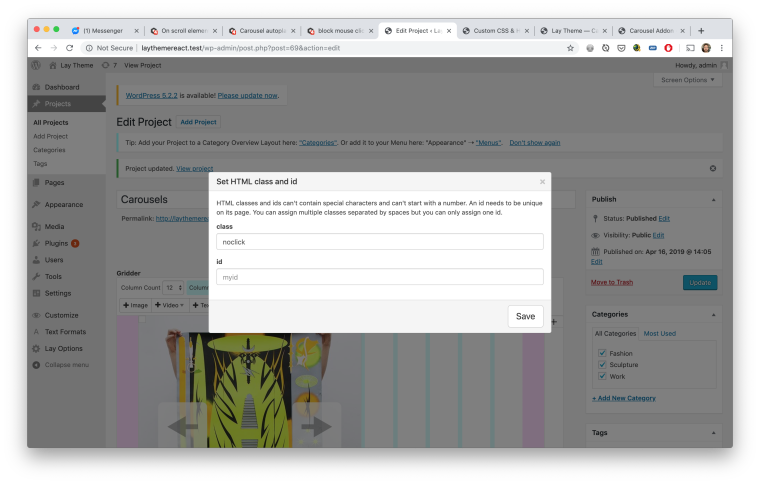
Now in "lay options" -> "Custom CSS & HTML" enter this in "Custom CSS":
.noclick *{ pointer-events: none!important; } -
This works perfectly @arminunruh @mariusjopen – thanks so much!!



Hello! It looks like you're interested in this conversation, but you don't have an account yet.
Getting fed up of having to scroll through the same posts each visit? When you register for an account, you'll always come back to exactly where you were before, and choose to be notified of new replies (either via email, or push notification). You'll also be able to save bookmarks and upvote posts to show your appreciation to other community members.
With your input, this post could be even better 💗
Register Login