Thumbnail without featured image but with title – mobile only
-
Re: Thumbnail without featured image
Hi. Perfect, I understood how to hide all thumbnails, thanks.
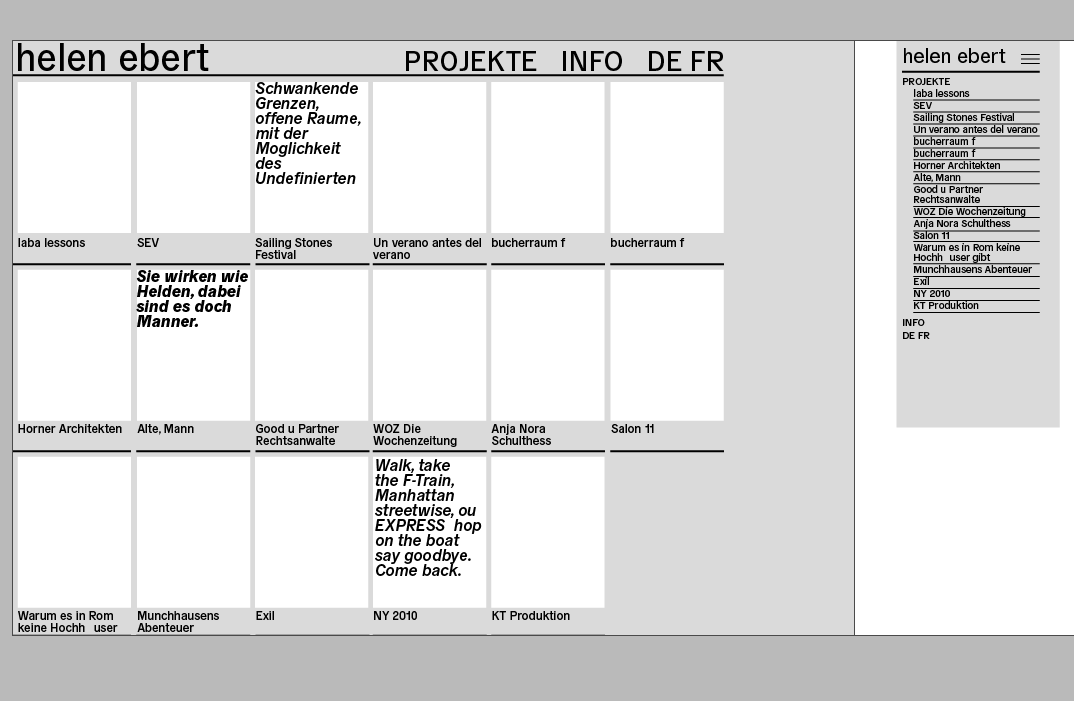
My question now is about a different appearance for desktop and mobile, that's what I'd like to achieve:

Desktop: Thumbnail Grid showing thumbnails and project titles
Mobile: Only Project titles (btw: projects should be all listed under the category "projekte")This is the category page showing all projects and should be the first page you see when coming to the site.
I tried one thing as a workaround, but it didn't work: to hide the thumbnails with "hideformobile", hide project titles and to instead insert a project description – but I found out that descriptions are (of course) linked to the project thumbnail and therefore remain hidden as well.
Thank you very much for some help.
Helen -
hey please try to learn some css, there are links provided here:
http://laytheme.com/documentation.html#custom-css-stylingyou can maybe use custom phone layouts to have just a list of projects for mobile:
http://laytheme.com/documentation.html#custom-phone-layouts

Hello! It looks like you're interested in this conversation, but you don't have an account yet.
Getting fed up of having to scroll through the same posts each visit? When you register for an account, you'll always come back to exactly where you were before, and choose to be notified of new replies (either via email, or push notification). You'll also be able to save bookmarks and upvote posts to show your appreciation to other community members.
With your input, this post could be even better 💗
Register Login