Update
-
How do I update the LayTheme, or where do I download the newest version?
-
Dear @SaulAppelbaum
if a new update is there, you can update it on the top, left corner inside your Wordpress backend.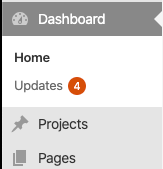
Best!
Marius
-
Hi Marius,
Thanks for the response. I don't see any new updates for LayTheme or its plugins in the location you showed. I'm trying to speed up these sites https://bradmitchellcohen.com/overview/ and https://imadjie.com The image heavy pages are taking way too long to load on the first go. I have WP Super Cache set up so on the second go, it's ok. For clients, this is not good at all.
Noticed in this forum that a Lightbox update may help, for the option to go to "lay options" -> "lightbox addon" and disable "Preload Images in Lightbox" http://laythemeforum.com/topic/4178/slow-loading/8 Not seeing this option in the admin panels for both sites.
Any other suggestions for updating and/or downloading the most up to date files?
Please let me know. Thanks.
Peace,
Saul

Hello! It looks like you're interested in this conversation, but you don't have an account yet.
Getting fed up of having to scroll through the same posts each visit? When you register for an account, you'll always come back to exactly where you were before, and choose to be notified of new replies (either via email, or push notification). You'll also be able to save bookmarks and upvote posts to show your appreciation to other community members.
With your input, this post could be even better 💗
Register Login