custom "margin-top" CSS no longer works
-
Hello,
I'm having an issue with my custom "margin-top" CSS post-update.
The code looks like this:
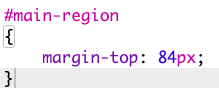

Before the update my top margins were precise but the code is no longer working.
For now I've set custom top-margins for each page but I'm simply trying to create the same fixed top-margin for all pages.
Any idea how to fix this? Thanks in advance!
website: roscross.com
-
Dear @mrrpringle
the mobile gridder changed a bit. Did you inspect the website with Google Chrome Inspect?
Best!
Marius -
Hi Marius,
Would you mind pointing me to this? I am unable to find the source of the issue when I inspect on google chrome. Thank you.
-
Dear @mrrpringle
Which area of your website (#main-region) did you wish the have margin-top?
Was it the Carousel you have on the front page?
Best
Richard


Hello! It looks like you're interested in this conversation, but you don't have an account yet.
Getting fed up of having to scroll through the same posts each visit? When you register for an account, you'll always come back to exactly where you were before, and choose to be notified of new replies (either via email, or push notification). You'll also be able to save bookmarks and upvote posts to show your appreciation to other community members.
With your input, this post could be even better 💗
Register Login