Customized project arrow fixed position
-
Hi,
I am trying to figure out if there is a way to include customized project arrows within the page's footer instead of having it fixed at the position of the screen. I didn't find the option in the customization.
I tried to use footer, but then it is only possible using text?I guess I can manually link each project within the project page, but I have quite a lot of projects to work with, so was wondering if there is a possible trick?
Thank you!
-
Dear @hkim83
There are ways of creating your own arrows to your choosing that can navigate between previous and next projects.
This will require basic knowledge of HTML and CSS
https://www.khanacademy.org/computing/computer-programming/html-css
Adding your own "HTML" either in the Footer:
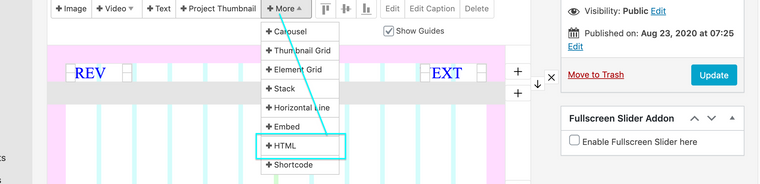
Across the whole website if you wish within "Lay Options" "Custom CSS & HTML"

I have created a very basic setup - i hope this helps you on your journey :)
When you create a Link <a> and give it the class "layprevproject" or "laynextproject" it automatically receives the necessary data to take us to the next-prev project.

So in "Custom HTML & CSS" I have created two simple links with the correct class names
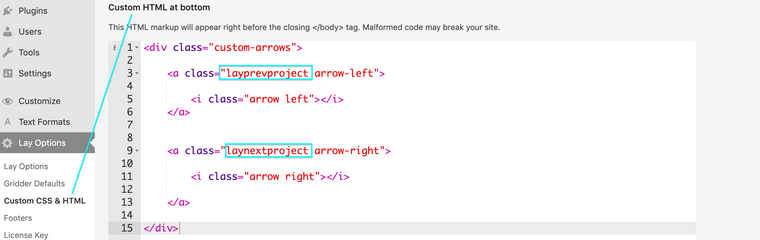
Now what goes within the Link <a> is completely up to you! it could be Text, An image, an arrow etc - ( very basic arrow )
https://www.w3schools.com/howto/howto_css_arrows.asp
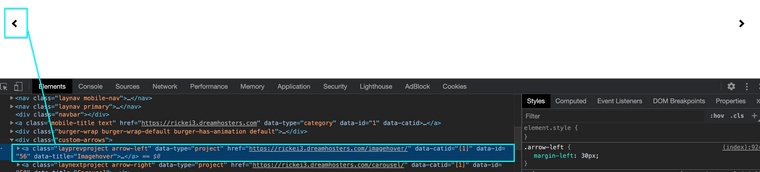
And now i can place arrows in my website - page or footer that operate as links to the next and previous projects.
I hope this answers your question and you have a wonderful day,
Thank you for using Lay Theme
Best
Richard

Hello! It looks like you're interested in this conversation, but you don't have an account yet.
Getting fed up of having to scroll through the same posts each visit? When you register for an account, you'll always come back to exactly where you were before, and choose to be notified of new replies (either via email, or push notification). You'll also be able to save bookmarks and upvote posts to show your appreciation to other community members.
With your input, this post could be even better 💗
Register Login