New website not loading (old cache issue)
-
Does anyone know a simple way to fix this?
I recently redesigned a website with LayTheme but visitors who had previously accessed it keep seeing a blank page when they type in the URL (new visitors see the new site fine). I assume it is to do with cache but is there a way to force the site to reload instead of asking people to clear cache and history?
I read on a support forum that:
"You can implement a PHP script that must be the first line of code in your index file . It is an http header typically issued by web servers. You can also rename the resource that is considered "stale".
<?php Header("Cache-Control: max-age=3000, must-revalidate"); ?>
But as I'm not a developer I'm a bit uneasy about pasting it into the LayTheme Custom CSS.
If anyone knows the answer to this it would be very much appreciated!
Thanks!
-
Dear @billykioso
Sorry for the delay,
Have you come to any solution since posting?Best wishes
Richard -
Thank you Richard, no it still persists.
Do you know if there is a simple fix to this? (I don't even know if the PHP thing I posted is relevant).
The website I'm having trouble with is http://studiosyn.co.uk -
Dear @billykioso
Sorry for the delay:
Have you looked into this simple line of code?https://stackoverflow.com/questions/6985507/one-time-page-refresh-after-first-page-load
I think it will achieve your needs :)
Best
Richard -
Dear @billykioso
Sorry for the delay:
Have you looked into this simple line of code?https://stackoverflow.com/questions/6985507/one-time-page-refresh-after-first-page-load
I think it will achieve your needs :)
Best
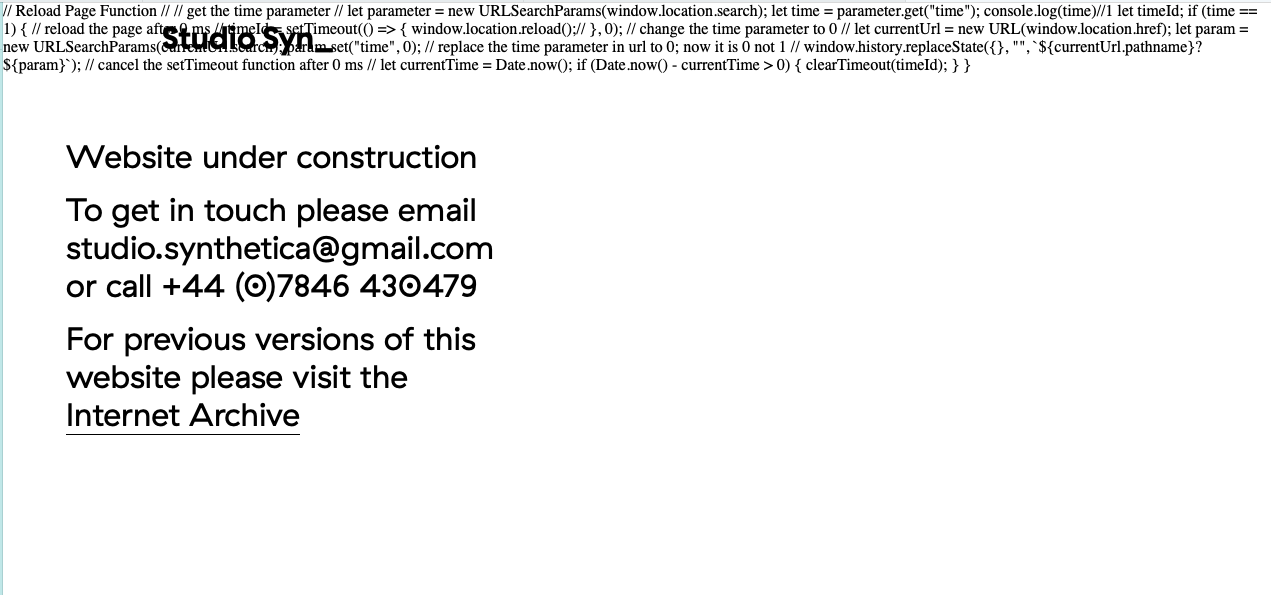
Richard@Richard thank you, I used the code in HTML at top:
// Reload Page Function //
// get the time parameter //
let parameter = new URLSearchParams(window.location.search);
let time = parameter.get("time");
console.log(time)//1
let timeId;
if (time == 1) {
// reload the page after 0 ms //
timeId = setTimeout(() => {
window.location.reload();//
}, 0);
// change the time parameter to 0 //
let currentUrl = new URL(window.location.href);
let param = new URLSearchParams(currentUrl.search);
param.set("time", 0);
// replace the time parameter in url to 0; now it is 0 not 1 //
window.history.replaceState({}, "",${currentUrl.pathname}?${param});
// cancel the setTimeout function after 0 ms //
let currentTime = Date.now();
if (Date.now() - currentTime > 0) {
clearTimeout(timeId);
}
}...but it comes out like this. Have I done something wrong?
-
Dear @billykioso
Cool :)
Javascript must be wrapped in <script> tags for your browser to recognise it as <script>
<script>

// insert code in between opening and closing brackets

</script>
Also please refer to this documentation page about using JS with Laytheme & attention to the 'newpageevent'
Likely you will want to add your custom code into:
Lay Options > Custom <head> Content
Best wishes and good luck @billykioso !
Richard

Hello! It looks like you're interested in this conversation, but you don't have an account yet.
Getting fed up of having to scroll through the same posts each visit? When you register for an account, you'll always come back to exactly where you were before, and choose to be notified of new replies (either via email, or push notification). You'll also be able to save bookmarks and upvote posts to show your appreciation to other community members.
With your input, this post could be even better 💗
Register Login