background video
-
Re: video background
hi there,
Is it possible to have a fixed background video (mute, autoplay, loop) on the landing page?
I put it in the gridder now:
http://schreinerwehr.schreinerwehr.de/but actually I want it to be the background (on landing page).
like this: https://lump200.com/
Can you help me?
Thanks a lot,
Sunnyi -
Dear @Sunnyi
@Sunnyi
Lets Do That!

- Right-click first row in Gridder
- Set Row Video Background
- Use Browser Height For Row Height
- Edit HTML Class and Id
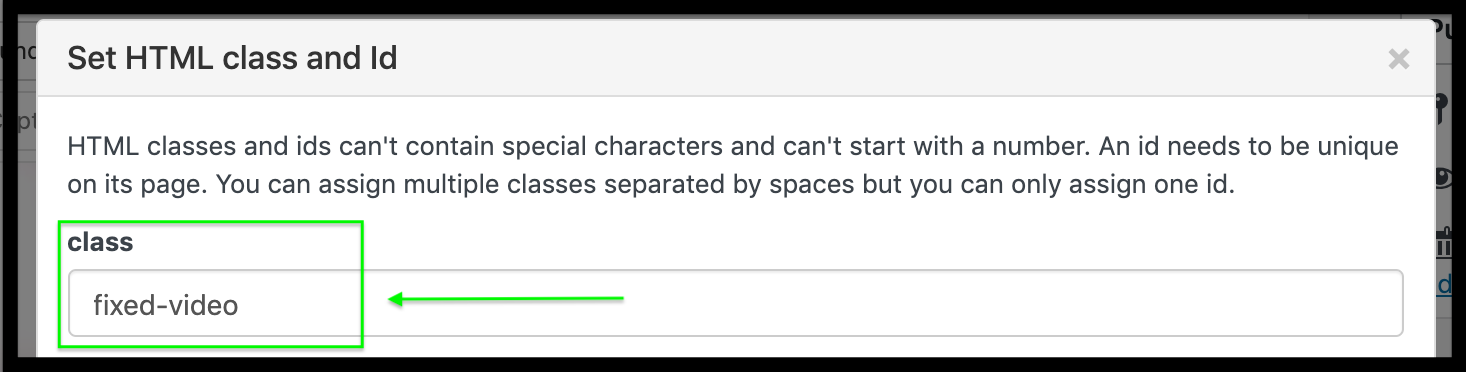
- Give the row the Class name: fixed-video
In:
Lay Options > Custom CSS & HTML > Custom CSS
Add the following code:
.fixed-video {
    position:fixed;
    width:100vw;
    height:auto;
}
Best wishes Sunnyi, hope this helps & have a wonderful day 🌼
Sincerely
Richard
-
-
Dear Richard,
thanks for the instruction and the code, it helped out a lot and it's a step in the right direction.
Unfortunately the linked icons/thumbnails are now stuck at the top of the video when entering the page. But I want them to appear/move up by scrolling down (like here: https://lump200.com/).
Also the footer (Imprint/Scroll to top buttom) should appear by scrolling (underneath the icons) on the video background.
The background picture (with the smoke) should not appear on the landing page, just on the subpages.
I'm not quite sure, but I think a need the video as a "real" background on the landing page and not a row background.Thanks for the help,
Sunnyi

Hello! It looks like you're interested in this conversation, but you don't have an account yet.
Getting fed up of having to scroll through the same posts each visit? When you register for an account, you'll always come back to exactly where you were before, and choose to be notified of new replies (either via email, or push notification). You'll also be able to save bookmarks and upvote posts to show your appreciation to other community members.
With your input, this post could be even better 💗
Register Login