Skip to content
  • Recent
  • Tags
  • Popular
  • Users
  • Search
Skins
  • Light
  • Brite
  • Cerulean
  • Cosmo
  • Flatly
  • Journal
  • Litera
  • Lumen
  • Lux
  • Materia
  • Minty
  • Morph
  • Pulse
  • Sandstone
  • Simplex
  • Sketchy
  • Spacelab
  • United
  • Yeti
  • Zephyr
  • Dark
  • Cyborg
  • Darkly
  • Quartz
  • Slate
  • Solar
  • Superhero
  • Vapor

  • Default (No Skin)
  • No Skin
Collapse

Lay Theme Forum

  1. Home
  2. Shop / WooCommerce
  3. Shop Navigation active

Shop Navigation active

Scheduled Pinned Locked Moved Shop / WooCommerce
28 Posts 3 Posters 5.6k Views 1 Watching
  • Oldest to Newest
  • Newest to Oldest
  • Most Votes
Reply
  • Reply as topic
Log in to reply
This topic has been deleted. Only users with topic management privileges can see it.
  • RichardR Richard

    Dear @dingdong

    Thank you for bringing this to attention. The Class:
    .current-menu-item
    Is not being added to the Shop page.

    Standard menu item:
    Screen Shot 2021-05-19 at 1.36.41 PM.png

    Shop menu item:
    Screen Shot 2021-05-19 at 1.36.12 PM.png


    Will forward this ➡️


    Thank you @dingdong & have a wonderful day
    Sincerely
    Richard
    D
    D
    dingdong
    wrote on last edited by dingdong
    #17

    @Richard said in Shop Navigation active:

    Dear @dingdong

    Thank you for bringing this to attention. The Class:
    .current-menu-item
    Is not being added to the Shop page.

    Standard menu item:
    Screen Shot 2021-05-19 at 1.36.41 PM.png

    Shop menu item:
    Screen Shot 2021-05-19 at 1.36.12 PM.png


    Will forward this ➡️


    Thank you @dingdong & have a wonderful day
    Sincerely
    Richard

    @arminunruh said in Shop Navigation active:

    hey oh, i think this was already solved in the last update. when i look at your website it works for me.

    YES it did!
    but since the last update, this "current" is missing again?!
    worked for a while...
    now its not working anymore?!
    www.mikeabmaier.com/shop

    1 Reply Last reply
    0
    • RichardR
      RichardR
      Richard
      Global Moderator
      wrote on last edited by
      #18

      Dear @dingdong

      Thanks for the update, i can confirm this and will let Armin know.

      Screen Shot 2021-09-17 at 12.15.02 PM.png


      Best wishes 🌝
      Richard
      D 1 Reply Last reply
      0
      • RichardR Richard

        Dear @dingdong

        Thanks for the update, i can confirm this and will let Armin know.

        Screen Shot 2021-09-17 at 12.15.02 PM.png


        Best wishes 🌝
        Richard
        D
        D
        dingdong
        wrote on last edited by
        #19

        @Richard thank you so much!
        btw, great support!!!! <3

        1 Reply Last reply
        0
        • RichardR
          RichardR
          Richard
          Global Moderator
          wrote on last edited by
          #20

          Thanks @dingdong have a wonderful day! 🌝🏖

          1 Reply Last reply
          0
          • D
            D
            dingdong
            wrote on last edited by
            #21

            @Richard Unfortunately the last update didnt include this "bug" :(
            maybe the next one? :)

            1 Reply Last reply
            0
            • RichardR
              RichardR
              Richard
              Global Moderator
              wrote on last edited by
              #22

              Dear @dingdong

              Unfortunately not but i have updated Armin.

              If needed urgently - the following JS can be added into:

              Lay Options > Custom CSS & HTML > Custom <head> Content >

              <script>
              window.laytheme.on("newpageshown", function(layoutObj, type, obj){
              
              	if(obj.slug == 'product'){
              	    jQuery('.menu-item-101').addClass('current-menu-item');
              	}
              });
              </script>
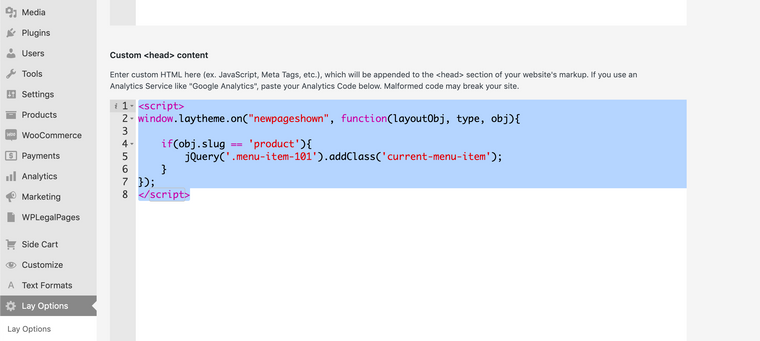
              

              Screen Shot 2021-09-28 at 12.26.34 PM.png

              https://laytheme.com/documentation.html#custom-javascript


              You may have a different 'menu-item' number e.g ```menu-item-195' that you need to insert into the above code. You can always 'inspect' the Shop menu item to find out:
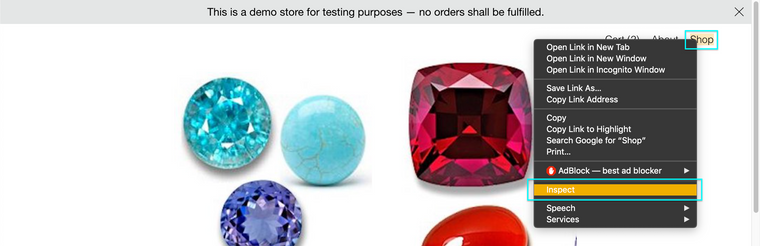
              Screen Shot 2021-09-28 at 12.30.50 PM.png

              Then look at the 'classes' of the shop menu item:
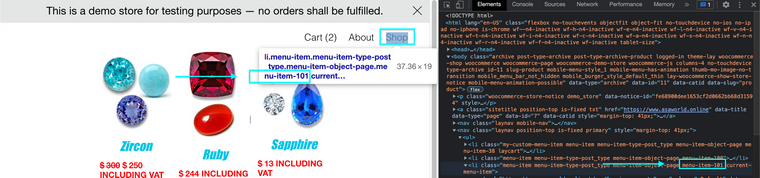
              Screen Shot 2021-09-28 at 12.32.22 PM.png

              https://laytheme.com/documentation.html#custom-css-styling


              If for example your menu-item is .menu-item-123 the above code would change to:

              <script>
              window.laytheme.on("newpageshown", function(layoutObj, type, obj){
              
              	if(obj.slug == 'product'){
              	    jQuery('.menu-item-123').addClass('current-menu-item');
              	}
              });
              </script>
              

              Hope this helps @dingdong & have a wonderful day 🏖
              Richard
              1 Reply Last reply
              0
              • D
                D
                dingdong
                wrote on last edited by
                #23

                @Richard its not that urgent, but i was wondering, because it already worked?!

                1 Reply Last reply
                1
                • D
                  D
                  dingdong
                  wrote on last edited by
                  #24

                  hm again an update but no fix :(

                  1 Reply Last reply
                  0
                  • RichardR
                    RichardR
                    Richard
                    Global Moderator
                    wrote on last edited by
                    #25

                    Sorry @dingdong unsure why will forward again ✅

                    D 1 Reply Last reply
                    0
                    • RichardR Richard

                      Sorry @dingdong unsure why will forward again ✅

                      D
                      D
                      dingdong
                      wrote on last edited by
                      #26

                      @Richard thanks :)

                      1 Reply Last reply
                      1
                      • RichardR
                        RichardR
                        Richard
                        Global Moderator
                        wrote on last edited by Richard
                        #27

                        If needed I will start a new thread about this problem with Short term fixes.


                        Have a great day & thank you for using Lay Theme 🌞
                        Richard
                        1 Reply Last reply
                        0
                        • arminunruhA
                          arminunruhA
                          arminunruh
                          Global Moderator
                          wrote on last edited by
                          #28

                          sorry everybody!

                          im releasing an update later today that fixes this

                          1 Reply Last reply
                          1

                          Hello! It looks like you're interested in this conversation, but you don't have an account yet.

                          Getting fed up of having to scroll through the same posts each visit? When you register for an account, you'll always come back to exactly where you were before, and choose to be notified of new replies (either via email, or push notification). You'll also be able to save bookmarks and upvote posts to show your appreciation to other community members.

                          With your input, this post could be even better 💗

                          Register Login
                          Reply
                          • Reply as topic
                          Log in to reply
                          • Oldest to Newest
                          • Newest to Oldest
                          • Most Votes


                          Online Users
                          L
                          lukas123
                          Forgot your key, lost your files, need a previous Lay Theme or Addon version? Go to www.laykeymanager.com
                          laytheme.com
                          • Login

                          • Don't have an account? Register

                          • Login or register to search.
                          • First post
                            Last post
                          0
                          • Recent
                          • Tags
                          • Popular
                          • Users
                          • Search


