Skip to content
  • Recent
  • Tags
  • Popular
  • Users
  • Search
Skins
  • Light
  • Brite
  • Cerulean
  • Cosmo
  • Flatly
  • Journal
  • Litera
  • Lumen
  • Lux
  • Materia
  • Minty
  • Morph
  • Pulse
  • Sandstone
  • Simplex
  • Sketchy
  • Spacelab
  • United
  • Yeti
  • Zephyr
  • Dark
  • Cyborg
  • Darkly
  • Quartz
  • Slate
  • Solar
  • Superhero
  • Vapor

  • Default (No Skin)
  • No Skin
Collapse

Lay Theme Forum

  1. Home
  2. General Discussion
  3. Menu on the left/right side!

Menu on the left/right side!

Scheduled Pinned Locked Moved General Discussion
8 Posts 3 Posters 1.4k Views 1 Watching
  • Oldest to Newest
  • Newest to Oldest
  • Most Votes
Reply
  • Reply as topic
Log in to reply
This topic has been deleted. Only users with topic management privileges can see it.
  • J
    J
    JanneKern
    wrote on last edited by
    #1

    Hey guys,

    im searching for an option to show the menu like this:
    -https://www.ramonhaindl.com

    As far as I know he is using lay theme too. So if you guys have a good hint, let me know!

    Thank you very much <3
    Cheers Janne

    1 Reply Last reply
    0
    • RichardR
      RichardR
      Richard
      Global Moderator
      wrote on last edited by
      #2

      Dear Janne

      @JanneKern

      You are correct that www.ramonhaindl.com is using Lay Theme.

      To help better understand what is happening.

      Firstly Lay Theme's Primary and Secondary menu's are used ( 2 menu style ) 1 on the left & 1 on the right.

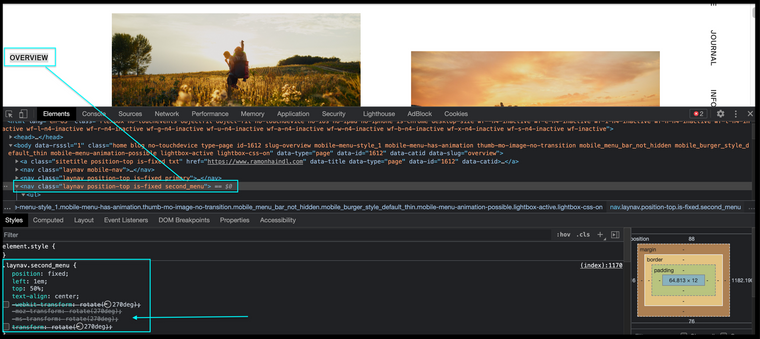
      Then the following Custom CSS had been applied ( this case for the left menu: )

          position: fixed;
          left: 1em;
          top: 50%;
          text-align: center;
          -webkit-transform: rotate(
      270deg
      );
          -moz-transform: rotate(270deg);
          -ms-transform: rotate(270deg);
          transform: rotate(
      270deg
      );
      

      The main thing being a 270 degree rotation.


      & for the right menu:

      position: fixed;
          right: -5em;
          top: 50%;
          text-align: center;
          -webkit-transform: rotate(
      90deg
      );
          -moz-transform: rotate(90deg);
          -ms-transform: rotate(90deg);
          transform: rotate(
      90deg
      );
      

      Mainly a 90 degree rotation.


      Here in the below image are the results if i remove the 270 degree adjustment off the left menu:
      Screen Shot 2021-06-30 at 6.50.18 PM.png


      Custom Code can be added to Lay Theme via:

      Lay options > Custom CSS & HTML >

      Also refer to the documentation page for help if needed:

      https://laytheme.com/documentation.html#custom-css-styling


      Best wishes Janne and good luck! 🌝

      Richard
      J 1 Reply Last reply
      0
      • RichardR Richard

        Dear Janne

        @JanneKern

        You are correct that www.ramonhaindl.com is using Lay Theme.

        To help better understand what is happening.

        Firstly Lay Theme's Primary and Secondary menu's are used ( 2 menu style ) 1 on the left & 1 on the right.

        Then the following Custom CSS had been applied ( this case for the left menu: )

            position: fixed;
            left: 1em;
            top: 50%;
            text-align: center;
            -webkit-transform: rotate(
        270deg
        );
            -moz-transform: rotate(270deg);
            -ms-transform: rotate(270deg);
            transform: rotate(
        270deg
        );
        

        The main thing being a 270 degree rotation.


        & for the right menu:

        position: fixed;
            right: -5em;
            top: 50%;
            text-align: center;
            -webkit-transform: rotate(
        90deg
        );
            -moz-transform: rotate(90deg);
            -ms-transform: rotate(90deg);
            transform: rotate(
        90deg
        );
        

        Mainly a 90 degree rotation.


        Here in the below image are the results if i remove the 270 degree adjustment off the left menu:

        Screen Shot 2021-06-30 at 6.50.18 PM.png


        Custom Code can be added to Lay Theme via:

        Lay options > Custom CSS & HTML >

        Also refer to the documentation page for help if needed:

        https://laytheme.com/documentation.html#custom-css-styling


        Best wishes Janne and good luck! 🌝

        Richard
        J
        J
        JanneKern
        wrote on last edited by JanneKern
        #3

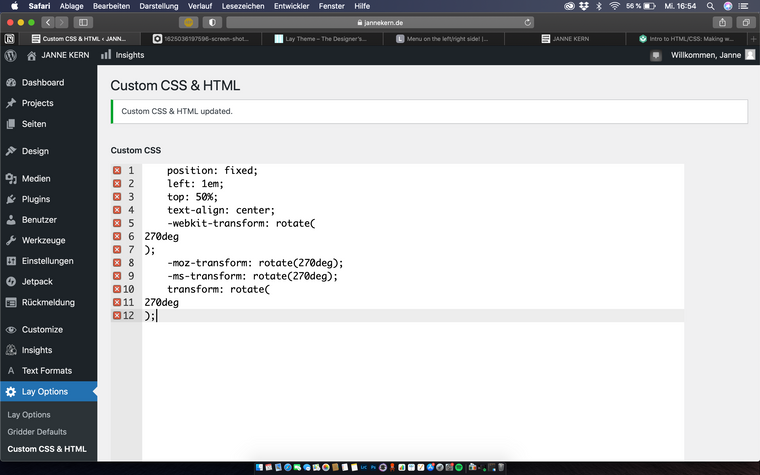
        @Richard hey Richard, thanks for the quick response. I pasted it but didn't worked. I switched from "(" to "{" made no difference. Did I pasted it in the wrong column for css code?
        Or do I need to take the window for the Top/Head CSS Code?
        Bildschirmfoto 2021-06-30 um 16.54.07.png

        can you tell me what is wrong?. Sorry for bothering with that (hopefully) easy stupidity of mine.

        I think the CSS need like a navigation where he applies the code?

        Cheers Janne

        1 Reply Last reply
        0
        • K
          K
          kalamakumaran
          wrote on last edited by kalamakumaran
          #4

          Right:

          .primary {
           position: fixed;
              left: 1em;
              top: 50%;
              text-align: center;
              -webkit-transform: rotate(
          270deg
          );
              -moz-transform: rotate(270deg);
              -ms-transform: rotate(270deg);
              transform: rotate(
          270deg
          );
          }
          

          Left:

          .second-menu {
          position: fixed;
              right: -5em;
              top: 50%;
              text-align: center;
              -webkit-transform: rotate(
          90deg
          );
              -moz-transform: rotate(90deg);
              -ms-transform: rotate(90deg);
              transform: rotate(
          90deg
          );
          
          }
          

          Not show if left and right are correct this way. I’m on my phone and can’t check. Otherwise just put it the other way round. :)

          1 Reply Last reply
          0
          • RichardR
            RichardR
            Richard
            Global Moderator
            wrote on last edited by Richard
            #5

            Thanks @kalamakumaran !! πŸ’₯🌝

            1 Reply Last reply
            0
            • J
              J
              JanneKern
              wrote on last edited by
              #6

              @kalamakumaran said in Menu on the left/right side!:

              .primary {
              position: fixed;
              left: 1em;
              top: 50%;
              text-align: center;
              -webkit-transform: rotate(
              270deg
              );
              -moz-transform: rotate(270deg);
              -ms-transform: rotate(270deg);
              transform: rotate(
              270deg
              );
              }

              big thanks to both of you, it worked!

              1 Reply Last reply
              0
              • J
                J
                JanneKern
                wrote on last edited by
                #7

                just in case somebody needs the same code, this code worked for my layout:

                .primary {
                 position: fixed;
                    left: 1em;
                    top: 50%;
                    text-align: center;
                    -webkit-transform: rotate(
                270deg
                );
                    -moz-transform: rotate(270deg);
                    -ms-transform: rotate(270deg);
                    transform: rotate(
                270deg
                );
                }
                
                .laynav.second_menu {
                position: fixed;
                    right: -5em;
                    top: 50%;
                    text-align: center;
                    -webkit-transform: rotate(
                90deg
                );
                    -moz-transform: rotate(90deg);
                    -ms-transform: rotate(90deg);
                    transform: rotate(
                90deg
                );
                }
                

                here's the link for the site.
                www.jannekern.de

                thanks to all the kind help guys!

                1 Reply Last reply
                0
                • RichardR
                  RichardR
                  Richard
                  Global Moderator
                  wrote on last edited by
                  #8

                  Dear @JanneKern

                  Thank you for posting! thats great for others in the future!! πŸ’₯


                  Best wishes
                  Richard
                  1 Reply Last reply
                  0

                  Hello! It looks like you're interested in this conversation, but you don't have an account yet.

                  Getting fed up of having to scroll through the same posts each visit? When you register for an account, you'll always come back to exactly where you were before, and choose to be notified of new replies (either via email, or push notification). You'll also be able to save bookmarks and upvote posts to show your appreciation to other community members.

                  With your input, this post could be even better πŸ’—

                  Register Login
                  Reply
                  • Reply as topic
                  Log in to reply
                  • Oldest to Newest
                  • Newest to Oldest
                  • Most Votes


                  Online Users
                  I
                  itsbadjujuju
                  Forgot your key, lost your files, need a previous Lay Theme or Addon version? Go to www.laykeymanager.com
                  laytheme.com
                  • Login

                  • Don't have an account? Register

                  • Login or register to search.
                  • First post
                    Last post
                  0
                  • Recent
                  • Tags
                  • Popular
                  • Users
                  • Search
