Skip to content
  • Recent
  • Tags
  • Popular
  • Users
  • Search
Skins
  • Light
  • Brite
  • Cerulean
  • Cosmo
  • Flatly
  • Journal
  • Litera
  • Lumen
  • Lux
  • Materia
  • Minty
  • Morph
  • Pulse
  • Sandstone
  • Simplex
  • Sketchy
  • Spacelab
  • United
  • Yeti
  • Zephyr
  • Dark
  • Cyborg
  • Darkly
  • Quartz
  • Slate
  • Solar
  • Superhero
  • Vapor

  • Default (No Skin)
  • No Skin
Collapse

Lay Theme Forum

  1. Home
  2. Shop / WooCommerce
  3. Online shop and product thumbnail grid element not showing

Online shop and product thumbnail grid element not showing

Scheduled Pinned Locked Moved Shop / WooCommerce
13 Posts 5 Posters 1.8k Views 1 Watching
  • Oldest to Newest
  • Newest to Oldest
  • Most Votes
Reply
  • Reply as topic
Log in to reply
This topic has been deleted. Only users with topic management privileges can see it.
  • K
    K
    kerstin_cool
    wrote on last edited by
    #3

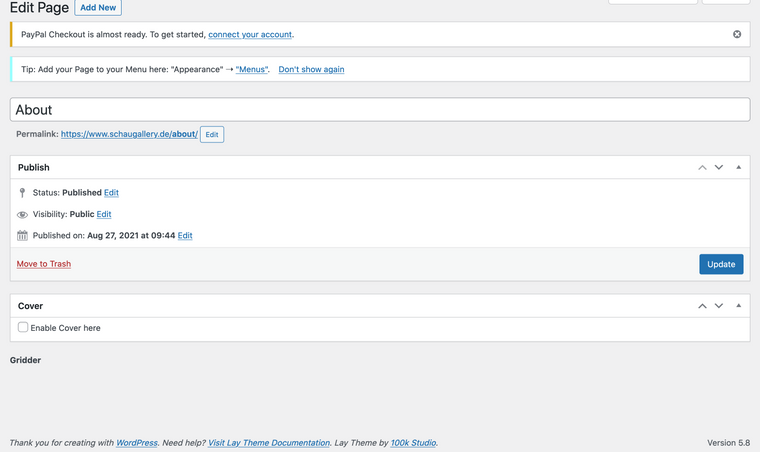
    Thank you, I did that. The only code that could be custom is Google Analytics but I don't know where the web designer put it. I am not an WordPress or web There is no gridder as you see in the image. It was there before updating Lay Theme. Bildschirmfoto 2021-08-31 um 09.14.52.png expert unfortunately.
    1 Reply Last reply
    0
    • RichardR
      RichardR
      Richard
      Global Moderator
      wrote on last edited by Richard
      #4

      Dear @kerstin_cool

      Thanks for the update, the Google Analytics is likely in:

      Lay Options > Custom CSS & HTML > Custom <Head> Content Screen Shot 2021-09-01 at 10.54.51 AM.png
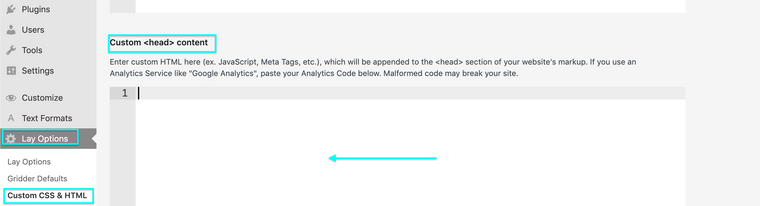
      Worth checking out if there is anything suspect there. 🔍


      In your screenshot "PayPal checkout is almost ready".

      Do you have the PayPal payments installed? These threads may help, Armin references issue with PayPal:

      http://laythemeforum.com/topic/6983/fatal-error-after-update-woocommerce-paypal-payments/3

      http://laythemeforum.com/topic/7078/woo-commerce-payments-gridder-disappears/7


      Talk soon & best wishes
      Richard
      1 Reply Last reply
      0
      • K
        K
        kerstin_cool
        wrote on last edited by
        #5

        I don't want to use Paypal. I didn't activate it, only bank transfer.

        1 Reply Last reply
        0
        • K
          K
          kerstin_cool
          wrote on last edited by
          #6

          Google Anaytics wasn't a problem before...

          1 Reply Last reply
          0
          • RichardR
            RichardR
            Richard
            Global Moderator
            wrote on last edited by
            #7

            Dear @kerstin_cool

            Have sent you a message via Chats ✨


            Thank you for supporting Lay Theme
            Richard
            1 Reply Last reply
            0
            • P
              P
              pascal
              wrote on last edited by
              #8

              Hey there,
              I have the same problem. How did you solve it?

              Shop, Cart page etc not working (white page). When Twenty Twenty-one theme is activated everything works fine.

              No plugins, no custom code. Only custom font.

              http://s882631967.online.de/shop/

              1 Reply Last reply
              0
              • RichardR
                RichardR
                Richard
                Global Moderator
                wrote on last edited by
                #9

                Dear @pascal

                Hard to say from the initial page - i may have to login to get a better idea of whats going on (Note: do not disclose your personal details on the thread- only via 'Chats' 🌝)

                Could you also make sure your carousel plugin is up to date as well as Lay Theme - you may need to go into > appearance > themes > lay theme to check for the update if it is not prompted.


                Talk soon Pascal & have a wonderful day 🏖
                Richard
                1 Reply Last reply
                0
                • P
                  P
                  pascal
                  wrote on last edited by
                  #10

                  Turning off "Cover for pages" option in Lay Options fixed this for me.

                  oof...this took a while... :)

                  1 Reply Last reply
                  0
                  • RichardR
                    RichardR
                    Richard
                    Global Moderator
                    wrote on last edited by
                    #11

                    Amazing! thanks for the update @pascal this is great for others in the future, will keep this in mind, as well as letting Armin know 🌝


                    Best wishes
                    Richard
                    1 Reply Last reply
                    0
                    • N
                      N
                      nnscnc
                      wrote on last edited by
                      #12

                      I have the same problem the gridder does not appear, even if I turned the cover mode off …

                      1 Reply Last reply
                      0
                      • arminunruhA
                        arminunruhA
                        arminunruh
                        Global Moderator
                        wrote on last edited by
                        #13

                        hello do you have a link?
                        did you try all the steps in the blue box? here
                        https://laytheme.com/support.html

                        1 Reply Last reply
                        0

                        Hello! It looks like you're interested in this conversation, but you don't have an account yet.

                        Getting fed up of having to scroll through the same posts each visit? When you register for an account, you'll always come back to exactly where you were before, and choose to be notified of new replies (either via email, or push notification). You'll also be able to save bookmarks and upvote posts to show your appreciation to other community members.

                        With your input, this post could be even better 💗

                        Register Login
                        Reply
                        • Reply as topic
                        Log in to reply
                        • Oldest to Newest
                        • Newest to Oldest
                        • Most Votes


                        Online Users
                        I
                        itsbadjujuju
                        Forgot your key, lost your files, need a previous Lay Theme or Addon version? Go to www.laykeymanager.com
                        laytheme.com
                        • Login

                        • Don't have an account? Register

                        • Login or register to search.
                        • First post
                          Last post
                        0
                        • Recent
                        • Tags
                        • Popular
                        • Users
                        • Search
