Change position of close-icon mobile menu
-
Hi guys,
sorry, could you maybe help me with changing the position of the X-icon of the mobile menu? what's the class for it , I can't find it?
website: olgaveer.de
thanks a lot in advance,
olga -
Dear @Olga-V
The Class for the X-icon ( there are a few depending on container heirachy) is
burger-wrap(outer) ormobile-menu-icon(inner).
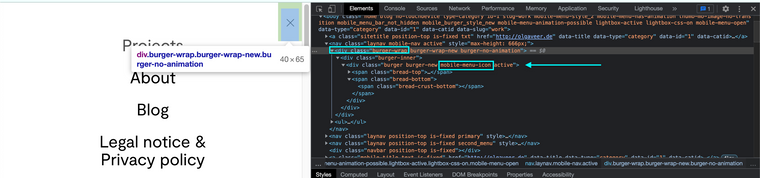
It should be noted however that the x icon (open) has the same class naming as the default (closed) burger icon:
Open Burger:

Closed Burger:

To get around this we can take advantage of
activeclass. When the burger menu opens and changes to the x-icon, the classactiveis added tolaynavormobile-nav.So you can specify to make sure you are dealing with the x-icon, E.g:
.active .burger-wrap{
background:red;
}
or
.active .mobile-menu-icon{
background:red;
Hope this helps Olga and have a wonderful day 🏖
Richard

Hello! It looks like you're interested in this conversation, but you don't have an account yet.
Getting fed up of having to scroll through the same posts each visit? When you register for an account, you'll always come back to exactly where you were before, and choose to be notified of new replies (either via email, or push notification). You'll also be able to save bookmarks and upvote posts to show your appreciation to other community members.
With your input, this post could be even better 💗
Register Login