Custom Jquery for the Shop
-
Hey y'all
I would like to know how I can target the Shop (just the main page with all the products) with jQuery, as it apparently does not fall into the “Page” categorie but into the “Archive” categorie? I cannot use the if statement (type == "page" && obj.id == XX) right ??
Thanks in advance for your answer!
Théo
-
Dear Théo
@TYLM
My main shop page is a
pageis your's not?
When applying the following code (documentation):<script> window.laytheme.on("newpageshown", function(layoutObj, type, obj){ console.log("layoutObj", layoutObj); console.log("type", type); console.log("obj", obj); }); </script>I get a console readout:
obj
{id: '11', type: 'page', slug: 'shop', catid: ''}
catid: ""
id: "11"
slug: "shop"
type: "page"
[[Prototype]]: Object
Then i can use the following
ifstatement to be sure:<script> window.laytheme.on("newpageshown", function(layoutObj, type, obj){ if(type == "page" && obj.id == 11){ console.log("fantastic!"); } }); </script>Result:
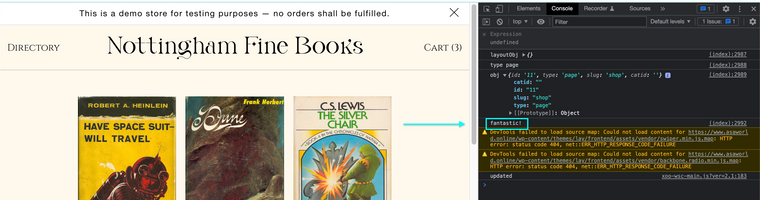
So i know the code that i use within the
ifstatement will be applied to this page.
Hope this helps & best wishes Théo ✨
Richard
-
Dear Théo
@TYLM
My main shop page is a
pageis your's not?
When applying the following code (documentation):<script> window.laytheme.on("newpageshown", function(layoutObj, type, obj){ console.log("layoutObj", layoutObj); console.log("type", type); console.log("obj", obj); }); </script>I get a console readout:
obj
{id: '11', type: 'page', slug: 'shop', catid: ''}
catid: ""
id: "11"
slug: "shop"
type: "page"
[[Prototype]]: Object
Then i can use the following
ifstatement to be sure:<script> window.laytheme.on("newpageshown", function(layoutObj, type, obj){ if(type == "page" && obj.id == 11){ console.log("fantastic!"); } }); </script>Result:
So i know the code that i use within the
ifstatement will be applied to this page.
Hope this helps & best wishes Théo ✨
Richard
@Richard Thanks for your answer
I don't know why but my shop page is not a page but an archive – it's not supposed to be tho. I applied the code to have the console readout and I get this :
obj
Object { id: "553", type: "archive", slug: "product", catid: "" }
catid: ""
id: "553"
slug: "product"
type: "archive"
<prototype>: Object { … }
That's probably why I can't use the if statement correctly.
It's weird that the slug here is "product" when the actual slug is "shop"…
And I really don't understand that “Archive” thing. -
Dear Theo
@TYLM
Unsure why myself (could be your product page?), but regardless you can still use this information to apply jQuery:
<script>
window.laytheme.on("newpageshown", function(layoutObj, type, obj){

	if(type == "archive" && obj.id == 553){
		console.log("fantastic!");
	}
});
</script>
Best wishes ✨
Richard
-
Dear Theo
@TYLM
Unsure why myself (could be your product page?), but regardless you can still use this information to apply jQuery:
<script>
window.laytheme.on("newpageshown", function(layoutObj, type, obj){

	if(type == "archive" && obj.id == 553){
		console.log("fantastic!");
	}
});
</script>
Best wishes ✨
Richard
-

Hello! It looks like you're interested in this conversation, but you don't have an account yet.
Getting fed up of having to scroll through the same posts each visit? When you register for an account, you'll always come back to exactly where you were before, and choose to be notified of new replies (either via email, or push notification). You'll also be able to save bookmarks and upvote posts to show your appreciation to other community members.
With your input, this post could be even better 💗
Register Login