Skip to content
  • Recent
  • Tags
  • Popular
  • Users
  • Search
Skins
  • Light
  • Brite
  • Cerulean
  • Cosmo
  • Flatly
  • Journal
  • Litera
  • Lumen
  • Lux
  • Materia
  • Minty
  • Morph
  • Pulse
  • Sandstone
  • Simplex
  • Sketchy
  • Spacelab
  • United
  • Yeti
  • Zephyr
  • Dark
  • Cyborg
  • Darkly
  • Quartz
  • Slate
  • Solar
  • Superhero
  • Vapor

  • Default (No Skin)
  • No Skin
Collapse

Lay Theme Forum

  1. Home
  2. General Discussion
  3. 3 Menu points: left, center, right aligned & thumbnail max-height

3 Menu points: left, center, right aligned & thumbnail max-height

Scheduled Pinned Locked Moved General Discussion
max-heightthumbnailviewport height
11 Posts 3 Posters 3.4k Views 2 Watching
  • Oldest to Newest
  • Newest to Oldest
  • Most Votes
Reply
  • Reply as topic
Log in to reply
This topic has been deleted. Only users with topic management privileges can see it.
  • arminunruhA
    arminunruhA
    arminunruh
    Global Moderator
    wrote on last edited by
    #2

    hey, well the size of an image or an element will always be width-based in lay theme. Not sure if you can change that by custom css.

    Yes you can give a row a background color like that:
    http://laytheme.com/documentation.html#background-colors

    1 Reply Last reply
    0
    • M
      M
      Mariinus
      wrote on last edited by Mariinus
      #3

      Hey, thanks for the tips... though it's not completely working out for me.
      Is it possible to give text blocks a background?

      So I don't have the problem of text overlaying the images as shown as in the example but the advantage of showing the page in browser height?

      (Maybe with CSS or a different solution?)

      1 Reply Last reply
      0
      • arminunruhA
        arminunruhA
        arminunruh
        Global Moderator
        wrote on last edited by
        #4

        Hey, how about using the "menu bar"? In "customize" -> "menu style" -> "menu bar".
        This bar can be underneath your menu and above your content so it will overlay your content.

        1 Reply Last reply
        0
        • M
          M
          Mariinus
          wrote on last edited by
          #5

          I think that could really work!
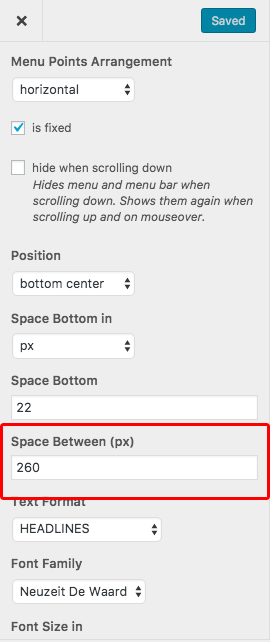
          Is there a way to have the space in between the title in % instead of px?

          (Sorry for asking so many questions...)

          1 Reply Last reply
          0
          • arminunruhA
            arminunruhA
            arminunruh
            Global Moderator
            wrote on last edited by
            #6

            Hey I'm not sure which space you mean. In between the title?

            1 Reply Last reply
            0
            • M
              M
              Mariinus
              wrote on last edited by
              #7

              Yeah inbetween the menu titles/ buttonsScreen Shot 2016-11-09 at 12.46.04.jpg

              1 Reply Last reply
              0
              • arminunruhA
                arminunruhA
                arminunruh
                Global Moderator
                wrote on last edited by
                #8

                Ah ok hmm seems its only in px.

                Try this css for "css for desktop version" in "lay options" -> "custom css & html":

                nav.primary li{
                margin-right: 5%;
                }
                

                :)

                Do you want to accomplish a certain special design with percentage based space between the menu points? Like a certain type of menu layout?

                1 Reply Last reply
                0
                • M
                  M
                  Mariinus
                  wrote on last edited by
                  #9

                  I would like to accomplish that the placing of the text is like the image in the first post.
                  here the text is centre aligned and the place from the left text to left the side is the same as the right text to the right. Also when it is scaled down/ the browser made less wide.

                  I noticed with this custom CSS it doesn't work...

                  1 Reply Last reply
                  0
                  • arminunruhA
                    arminunruhA
                    arminunruh
                    Global Moderator
                    wrote on last edited by
                    #10

                    Hey please insert this css into "lay options" -> "custom css & html" -> "Custom CSS for Desktop Version":

                    nav.primary{
                        left: 10px;
                        right: 10px;
                    }
                    
                    nav.primary li{
                        margin-right: 0;
                    }
                    
                    nav.primary li:nth-child(2){
                        position: fixed;
                        left: 50%;
                        transform: translateX(-50%);
                    }
                    
                    nav.primary li:last-child{
                        right: 10px;
                        position: fixed;
                    }
                    

                    Please note this only works with 3 menu points.

                    One feature that I want to do for lay theme in the future is to be able to have multiple menus that you can place anywhere you want. Then this type of thing will work without custom css.

                    1 Reply Last reply
                    0
                    • L
                      L
                      leandrodisler
                      wrote on last edited by
                      #11

                      Is it possible to have this on Desktop with the 2 menu Points but

                      1 Reply Last reply
                      0

                      Hello! It looks like you're interested in this conversation, but you don't have an account yet.

                      Getting fed up of having to scroll through the same posts each visit? When you register for an account, you'll always come back to exactly where you were before, and choose to be notified of new replies (either via email, or push notification). You'll also be able to save bookmarks and upvote posts to show your appreciation to other community members.

                      With your input, this post could be even better 💗

                      Register Login
                      Reply
                      • Reply as topic
                      Log in to reply
                      • Oldest to Newest
                      • Newest to Oldest
                      • Most Votes


                      Online Users
                      Forgot your key, lost your files, need a previous Lay Theme or Addon version? Go to www.laykeymanager.com
                      laytheme.com
                      • Login

                      • Don't have an account? Register

                      • Login or register to search.
                      • First post
                        Last post
                      0
                      • Recent
                      • Tags
                      • Popular
                      • Users
                      • Search