product customization
-
Hello Richard,
I am wondering a few things, see this test product for example:
https://rosereichart.com/product/test/- how can I change the color of the line around the quantity in the single product?
- how can I change the order of the shown information? For example how would I put the price and the button below the product description?
Thank you
-
Dear @Bella
Best wishes & hope you are well ✨
-
how can I change the color of the line around the quantity in the single product?
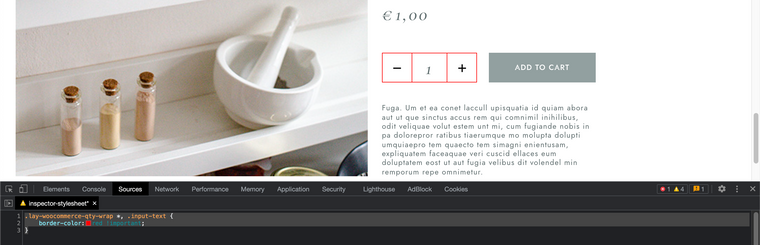
It's actually three boxes with borders so the following code relates to all, let me know if it works for you
(w e may need to specify the input-text with an ID if it affects other input-texts):.lay-woocommerce-qty-wrap *, .input-text { border-color:red !important; }Result:
-
how can I change the order of the shown information? For example how would I put the price and the button below the product description?
The following Code:
<script>
window.laytheme.on("newpageshown", function(){

jQuery( ".cart" ).insertAfter( jQuery( ".lay-woocommerce-product-tab" ) );

});
</script>
Gives the result:
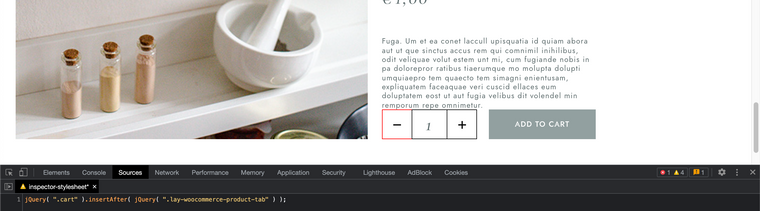
This is added into Custom <head> Content in Lay Options > Custom CSS & HTML >
We also need a little space between the Quantity and Description now that they have been switched:
.woocommerce div.product form.cart {
    margin-top: 50px;
}
Hope this helps Bella! 🏖
Richard
-

Hello! It looks like you're interested in this conversation, but you don't have an account yet.
Getting fed up of having to scroll through the same posts each visit? When you register for an account, you'll always come back to exactly where you were before, and choose to be notified of new replies (either via email, or push notification). You'll also be able to save bookmarks and upvote posts to show your appreciation to other community members.
With your input, this post could be even better 💗
Register Login