Change position of background image
-
Hey!
How can I change the position of a background image?
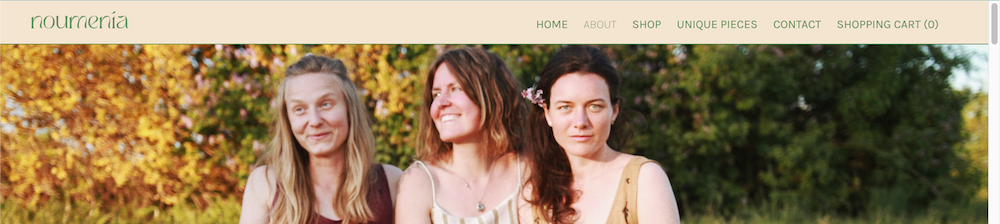
I need to change the placement of the cover image on this sub page only:
http://ud09-319.ud09.udmedia.de/wp/about/It needs to be placed so that the ladies heads aren't cut off.
Now it is somehow centered so that the actual start of the image disappears under the menu bar.I already tried adding the pixel of the menu bar as a top frame on that sub page but this didn't work properly.
And another CSS related question I have:
Is there a way to change the preset default colour globally for the whole site? I want it to change from black to #548B54. -
Dear @Janina
"I need to change the placement of the cover image on this sub page only:"
.slug-about .cover-region {
    margin-top:55px;
}
Result:
"is there a way to change the preset default colour globally for the whole site? I want it to change from black to #548B54"
This would depend on what the colour applies to, for example you could set all text (except for links) with the following:
body{
colour:#548B54;
}
There are many root colours for Lay Theme, some are for the Carousel and some are for other Addons. Happy to help, just wish to know more about what you mean by "default color for whole site" 🌝
Talk soon & best wishes
Richard


Hello! It looks like you're interested in this conversation, but you don't have an account yet.
Getting fed up of having to scroll through the same posts each visit? When you register for an account, you'll always come back to exactly where you were before, and choose to be notified of new replies (either via email, or push notification). You'll also be able to save bookmarks and upvote posts to show your appreciation to other community members.
With your input, this post could be even better 💗
Register Login