Parallax Row Gutter Bug
-
Hi @Armin-Unruh
This is the site without parallax:
http://maxfrischknecht.ch/wordpress/home-2-2-2When I give all the "thumbnail-rows" a greater speed (1.5), the Row Gutter becomes bigger and different from row to row.
Like this: http://maxfrischknecht.ch/wordpress/home-2-2
How can I fix that? Do I have to ajust the speed from row to row individually?
Thank you for your help!Kind Regards
Max -
hey Max!
Ok so before I redid the parallax effect, it worked differently. Every parallax-element would move when you scroll. If you had used parallax on every element, the following would happen: you scroll down, all elements move up kind of faster and then at the bottom there would be a huge empty space because all the parallax elements have moved up already.
So I decided to make the parallax elements only move if they are visible in your browser viewport. This leads to this behaviour which u see.
I suggest if you want some kind of parallax effect without elements moving in different speeds, then why not try the cover effect?
http://laytheme.com/documentation.html#covers -
hey Max!
Ok so before I redid the parallax effect, it worked differently. Every parallax-element would move when you scroll. If you had used parallax on every element, the following would happen: you scroll down, all elements move up kind of faster and then at the bottom there would be a huge empty space because all the parallax elements have moved up already.
So I decided to make the parallax elements only move if they are visible in your browser viewport. This leads to this behaviour which u see.
I suggest if you want some kind of parallax effect without elements moving in different speeds, then why not try the cover effect?
http://laytheme.com/documentation.html#coversHi @arminunruh
Thank you for the explanation! This makes totally sense.
And thank you for the hint about the cover effect, I didn't knew about, it looks very interessting. Thank you!Best,
Max -
hey Max!
Ok so before I redid the parallax effect, it worked differently. Every parallax-element would move when you scroll. If you had used parallax on every element, the following would happen: you scroll down, all elements move up kind of faster and then at the bottom there would be a huge empty space because all the parallax elements have moved up already.
So I decided to make the parallax elements only move if they are visible in your browser viewport. This leads to this behaviour which u see.
I suggest if you want some kind of parallax effect without elements moving in different speeds, then why not try the cover effect?
http://laytheme.com/documentation.html#coversHey Armin,
i couldn´t find a way to start the parallax elements only when they are visible in the viewport. How do you have realized this?
Thanks for the great theme and your help,
Marco -
Hi marco,
not sure if I understood your question right.
But you can activate the Parallax effect like this:
Go to Lay Options (there you can also find the old version of the parallax effect)
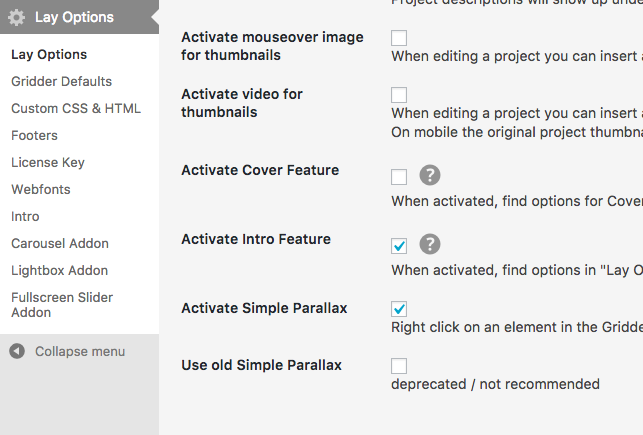
And then right click on an image and move the slider:
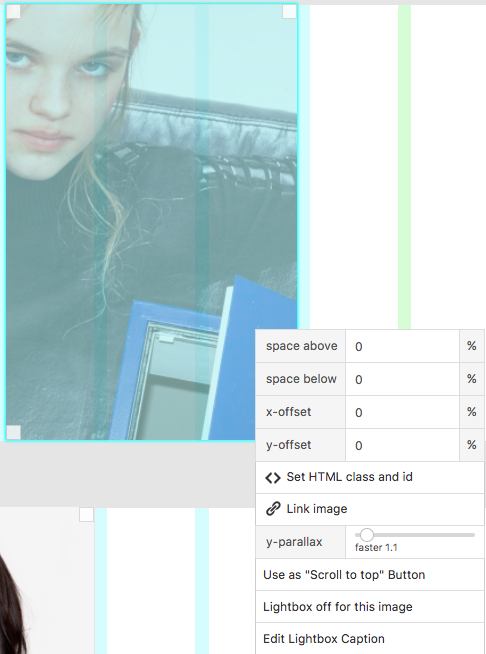
I hope that helped!
Let me know if you face problems!
All the best!
Marius


Hello! It looks like you're interested in this conversation, but you don't have an account yet.
Getting fed up of having to scroll through the same posts each visit? When you register for an account, you'll always come back to exactly where you were before, and choose to be notified of new replies (either via email, or push notification). You'll also be able to save bookmarks and upvote posts to show your appreciation to other community members.
With your input, this post could be even better 💗
Register Login