Skip to content
  • Recent
  • Tags
  • Popular
  • Users
  • Search
Skins
  • Light
  • Brite
  • Cerulean
  • Cosmo
  • Flatly
  • Journal
  • Litera
  • Lumen
  • Lux
  • Materia
  • Minty
  • Morph
  • Pulse
  • Sandstone
  • Simplex
  • Sketchy
  • Spacelab
  • United
  • Yeti
  • Zephyr
  • Dark
  • Cyborg
  • Darkly
  • Quartz
  • Slate
  • Solar
  • Superhero
  • Vapor

  • Default (No Skin)
  • No Skin
Collapse

Lay Theme Forum

  1. Home
  2. General Discussion
  3. Text titles with thumbnail rollover

Text titles with thumbnail rollover

Scheduled Pinned Locked Moved General Discussion
rollovertextthumbnail
10 Posts 6 Posters 2.9k Views 2 Watching
  • Oldest to Newest
  • Newest to Oldest
  • Most Votes
Reply
  • Reply as topic
Log in to reply
This topic has been deleted. Only users with topic management privileges can see it.
  • M
    M
    mike
    wrote on last edited by
    #1

    Hi Armin

    Hope all is well with you.

    I wondered if it is possible to flip the conventional layout of a page of project thumbnails. Instead of a series of images with a rollover state that shows the project title...is it possible to have a series of text project titles with a rollover state to show the project thumbnail!?

    Thanks

    Mike

    1 Reply Last reply
    0
    • arminunruhA
      arminunruhA
      arminunruh
      Global Moderator
      wrote on last edited by
      #2

      Hey mike, not easily possible. :/

      1 Reply Last reply
      0
      • G
        G
        gjb
        wrote on last edited by gjb
        #3

        Would love to do that as well! Has the situation changed in the last updates, Armin?
        Thank you!

        1 Reply Last reply
        0
        • mariusjopenM
          mariusjopenM
          mariusjopen
          Global Moderator
          wrote on last edited by
          #4

          Hi @gjb
          still not possible yet.

          All the best!

          Marius

          www.mariusjopen.world

          1 Reply Last reply
          0
          • ToskaT
            ToskaT
            Toska
            wrote on last edited by
            #5

            I would be very interested by this feature!
            Will it be possible in one of your next updates? Thanks.

            1 Reply Last reply
            0
            • P
              P
              pitscher
              wrote on last edited by
              #6

              I found a solution, but it is not very elegant:

              Add "Activate mouseover image for thumbnails" in the "lay options". Upload a transparent .png file and use it as the thumbnail. For the mouseoverstate choose the image you actually want users to see.

              Problem with this is that the transparent .png needs to be the same dimensions then the mouseover picture to fully portray it. Also it appears when you are anywhere inside the container not just over the text.

              Armin, how do I address the specific thumbnail image over JavaScript?
              My idea was to display:none; the thumbnail image and write a function to show it somewhere random in the viewport.

              1 Reply Last reply
              1
              • mariusjopenM
                mariusjopenM
                mariusjopen
                Global Moderator
                wrote on last edited by
                #7

                Hi @pitscher
                yes. This is a workaround.

                When you look here you can see that each thumbnail has the ID in the link:
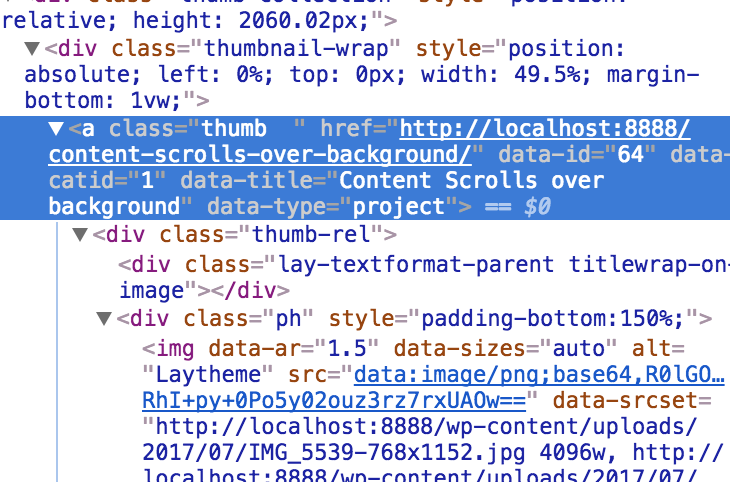
                0_1511701340977_Bildschirmfoto 2017-11-26 um 14.01.18.png

                You can use this to address the image.

                All the best!

                Marius

                www.mariusjopen.world

                1 Reply Last reply
                0
                • ToskaT
                  ToskaT
                  Toska
                  wrote on last edited by Toska
                  #8

                  Quick bump in case anyone could help.

                  Looking to achieve something similar to this : https://garret.fi/

                  @mariusjopen @arminunruh Are you considering to implement this sort of feature in the near future?

                  1 Reply Last reply
                  0
                  • mariusjopenM
                    mariusjopenM
                    mariusjopen
                    Global Moderator
                    wrote on last edited by
                    #9

                    HI @Toska
                    yes. This would be a great implemented feature. We have it already written down for the future.

                    Thank you for proposing that.

                    All the best!

                    Marius

                    www.mariusjopen.world

                    ToskaT 1 Reply Last reply
                    1
                    • mariusjopenM mariusjopen

                      HI @Toska
                      yes. This would be a great implemented feature. We have it already written down for the future.

                      Thank you for proposing that.

                      All the best!

                      Marius

                      ToskaT
                      ToskaT
                      Toska
                      wrote on last edited by
                      #10

                      @mariusjopen Awesome! Great news, really ;-) Thanks!

                      1 Reply Last reply
                      0

                      Hello! It looks like you're interested in this conversation, but you don't have an account yet.

                      Getting fed up of having to scroll through the same posts each visit? When you register for an account, you'll always come back to exactly where you were before, and choose to be notified of new replies (either via email, or push notification). You'll also be able to save bookmarks and upvote posts to show your appreciation to other community members.

                      With your input, this post could be even better 💗

                      Register Login
                      Reply
                      • Reply as topic
                      Log in to reply
                      • Oldest to Newest
                      • Newest to Oldest
                      • Most Votes


                      Online Users
                      Forgot your key, lost your files, need a previous Lay Theme or Addon version? Go to www.laykeymanager.com
                      laytheme.com
                      • Login

                      • Don't have an account? Register

                      • Login or register to search.
                      • First post
                        Last post
                      0
                      • Recent
                      • Tags
                      • Popular
                      • Users
                      • Search