Button width 100%
-
I'm using buttons that add a shop product straight to the cart. I'm doing it via "Add HTML".
I found the code to do that somewhere else and it works but it doesn't look right.
It doesn't sit centered. It should fill the whole width of the box as placed in the gridder. How do I achieve that? Especially on mobile it's important that the button fills the whole width. See screenshot attached.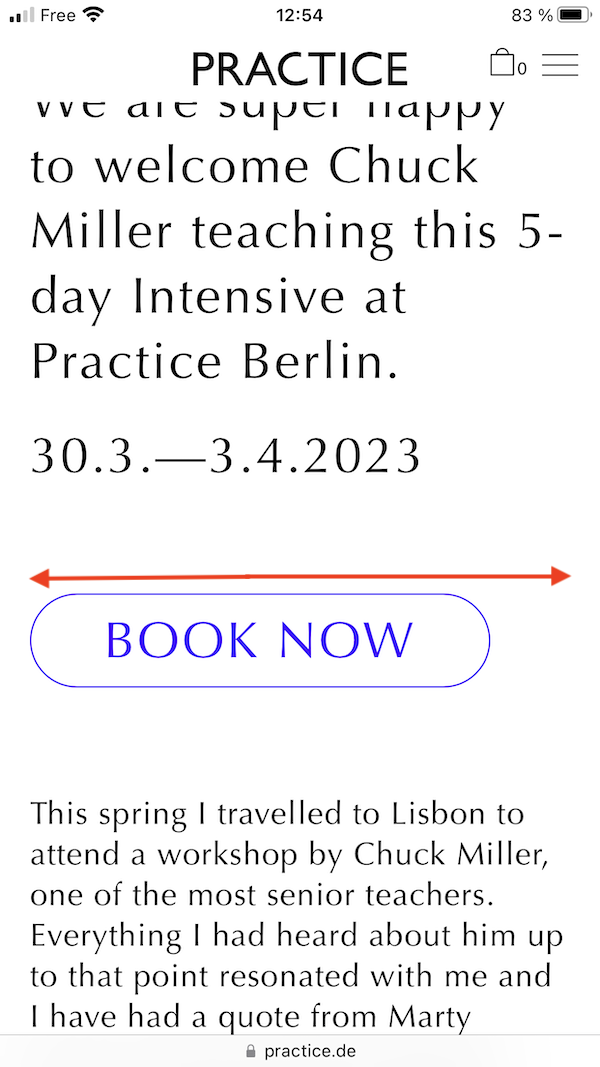
That's the code I use right now:
<a class="laybutton1 product_type_simple add_to_cart_button ajax_add_to_cart" rel="nofollow" href="?add-to-cart=817" data-quantity="1" data-product_id="817" data-product_sku="" aria-label="Add “Chuck Miller Workshop” to your cart">BOOK NOW</a></p>And here's the link to the page:
https://practice.de/2022/chuck-miller-workshop-2023How do I do it?
1000 thanks -
@doorofperception said in Button width 100%:
add_to_cart_button
what about
. add_to_cart_button{
width: 100%!important;
}


Hello! It looks like you're interested in this conversation, but you don't have an account yet.
Getting fed up of having to scroll through the same posts each visit? When you register for an account, you'll always come back to exactly where you were before, and choose to be notified of new replies (either via email, or push notification). You'll also be able to save bookmarks and upvote posts to show your appreciation to other community members.
With your input, this post could be even better 💗
Register Login