Skip to content
  • Recent
  • Tags
  • Popular
  • Users
  • Search
Skins
  • Light
  • Brite
  • Cerulean
  • Cosmo
  • Flatly
  • Journal
  • Litera
  • Lumen
  • Lux
  • Materia
  • Minty
  • Morph
  • Pulse
  • Sandstone
  • Simplex
  • Sketchy
  • Spacelab
  • United
  • Yeti
  • Zephyr
  • Dark
  • Cyborg
  • Darkly
  • Quartz
  • Slate
  • Solar
  • Superhero
  • Vapor

  • Default (No Skin)
  • No Skin
Collapse

Lay Theme Forum

  1. Home
  2. General Discussion
  3. anchor links don't jump to the proper place

anchor links don't jump to the proper place

Scheduled Pinned Locked Moved General Discussion
3 Posts 2 Posters 305 Views 1 Watching
  • Oldest to Newest
  • Newest to Oldest
  • Most Votes
Reply
  • Reply as topic
Log in to reply
This topic has been deleted. Only users with topic management privileges can see it.
  • JaninaJ Offline
    JaninaJ Offline
    Janina
    wrote on last edited by
    #1

    hi

    so i have this page: https://atelierparadiso.com/services
    the 3 elements are anchor links.

    if i click them they don't jump to the proper place & slightly cut off the heading.

    it works okay-ish for the first link/section but section 2 + 3 are cut off.

    i found this code snippet and added it to the global custom css section but it didn't work:

    a[data-hs-anchor="true"] {
    display: block;
    position: relative;
    visibility: hidden;
    top: -100px;
    }

    https://community.hubspot.com/t5/Share-Your-Work/Anchor-links-leading-to-the-wrong-section-of-the-page-SOLVED/m-p/364418

    do you have a suggestion of how to fix this? maybe i did insert the code at the wrong place?

    1 Reply Last reply
    0
    • arminunruhA Offline
      arminunruhA Offline
      arminunruh
      Global Moderator
      wrote on last edited by
      #2

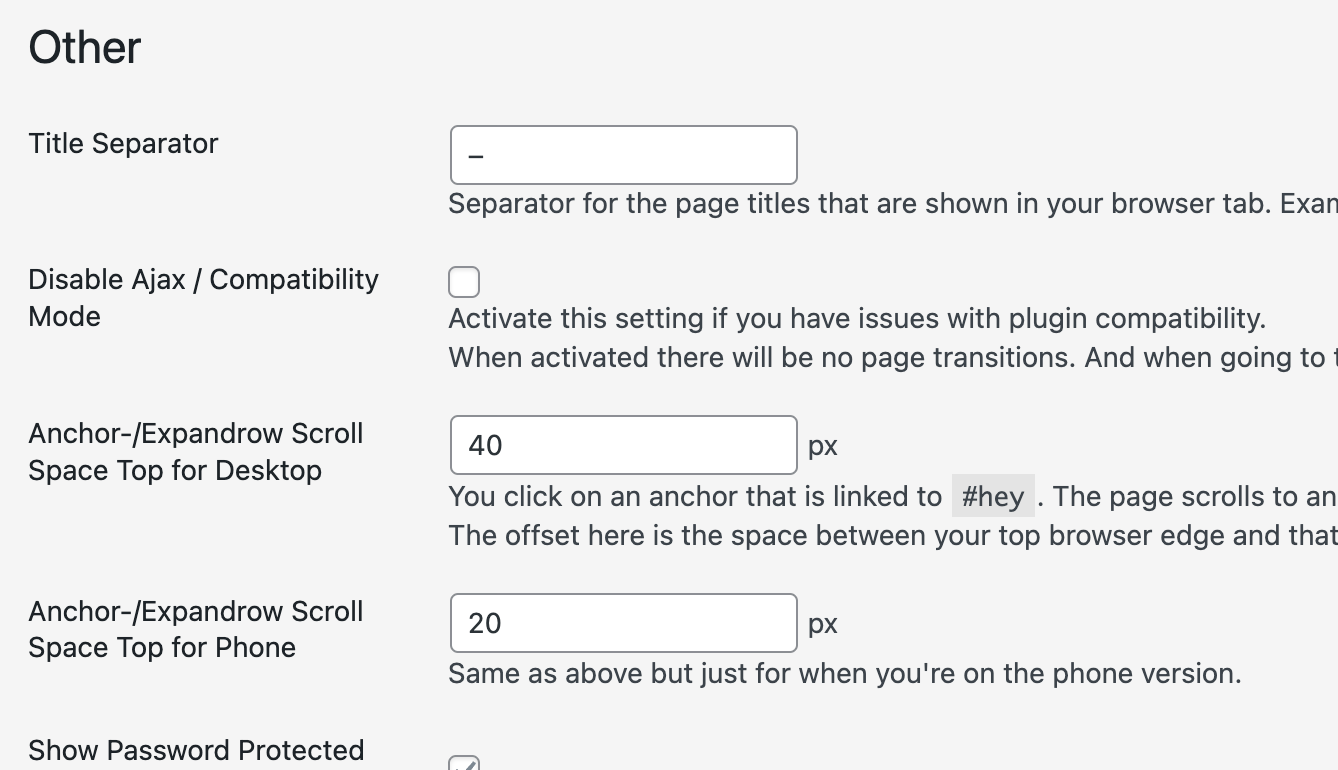
      hey in lay options Screenshot 2023-02-15 at 14.31.16.png

      see "anchor/expandrow scroll space top for desktop"

      try a value here like 100 or you can try a negative value

      mmh remove that code, i think it doesnt do anything:
      a[data-hs-anchor="true"] {
      display: block;
      position: relative;
      visibility: hidden;
      top: -100px;
      }

      1 Reply Last reply
      0
      • JaninaJ Offline
        JaninaJ Offline
        Janina
        wrote on last edited by
        #3

        perfect!! thank you

        1 Reply Last reply
        0
        Reply
        • Reply as topic
        Log in to reply
        • Oldest to Newest
        • Newest to Oldest
        • Most Votes


        Online Users
        Forgot your key, lost your files, need a previous Lay Theme or Addon version? Go to www.laykeymanager.com
        laytheme.com
        • Login

        • Don't have an account? Register

        • Login or register to search.
        • First post
          Last post
        0
        • Recent
        • Tags
        • Popular
        • Users
        • Search