project index disable click (keep image hover)
-
hello,
Is it possible to disable click for the project index?
I want to keep the imagehover..projectindex-project-link[data-id="123"]{
pointer-events: none;
}This disables both things.
Is there a way to do this?
THANKS -
-
@arminunruh Maybe i'm missing the point, but i just tried to follow and still didn't work. :(
-
alright alright
mh can u send a link?
-
alright alright
mh can u send a link?
-
<script>
jQuery(document).on('.projectindex-project-slug-stageclothing  a', 'click', function(e)){
e.preventDefault();
e.stopPropagation();
return;
});
</script>
look, u need to look at the html code and find the slugs, i underlined them here
(in google: right click → inspect element)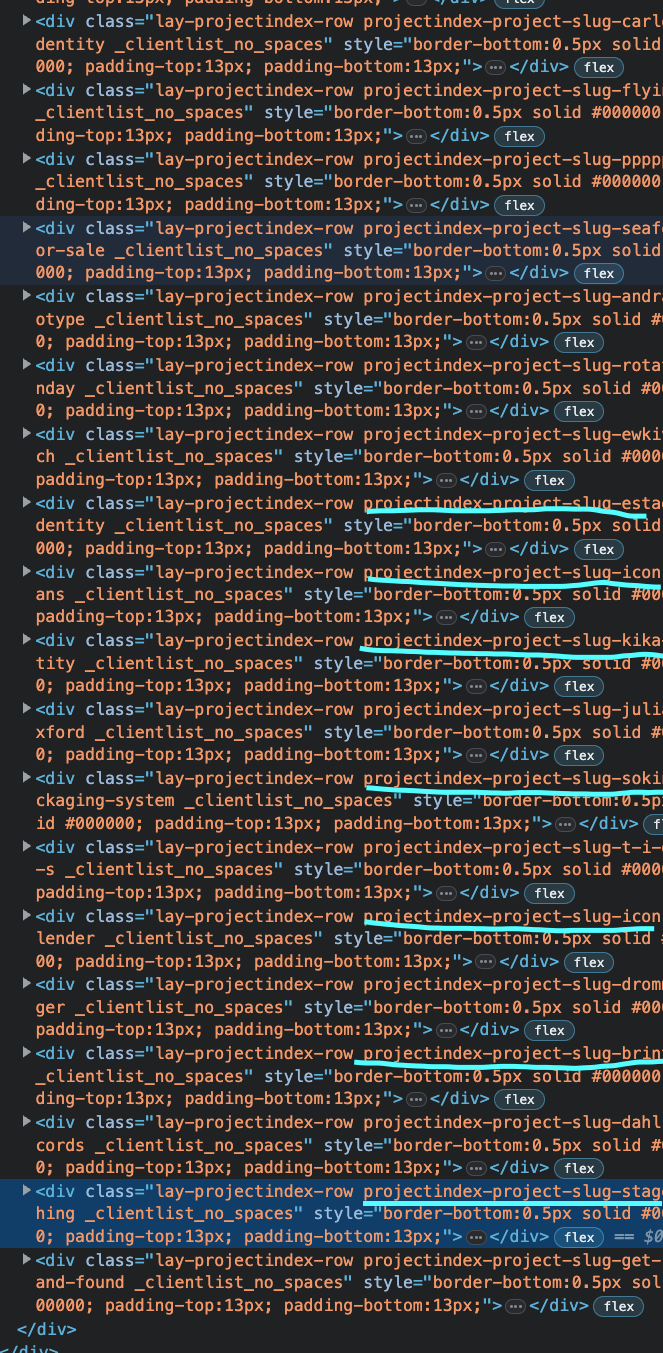
then use the code above
so for .projectindex-project-slug-stageclothing and .projectindex-project-slug-iconic-calender
it would be:
<script>
jQuery(document).on('.projectindex-project-slug-stageclothing  a, .projectindex-project-slug-iconic-calender a', 'click', function(e)){
e.preventDefault();
e.stopPropagation();
return;
});
</script>
and css:
.projectindex-project-slug-stageclothing a, .projectindex-project-slug-iconic-calender a{
cursor: default;
}

Hello! It looks like you're interested in this conversation, but you don't have an account yet.
Getting fed up of having to scroll through the same posts each visit? When you register for an account, you'll always come back to exactly where you were before, and choose to be notified of new replies (either via email, or push notification). You'll also be able to save bookmarks and upvote posts to show your appreciation to other community members.
With your input, this post could be even better 💗
Register Login