Skip to content
  • Recent
  • Tags
  • Popular
  • Users
  • Search
Skins
  • Light
  • Brite
  • Cerulean
  • Cosmo
  • Flatly
  • Journal
  • Litera
  • Lumen
  • Lux
  • Materia
  • Minty
  • Morph
  • Pulse
  • Sandstone
  • Simplex
  • Sketchy
  • Spacelab
  • United
  • Yeti
  • Zephyr
  • Dark
  • Cyborg
  • Darkly
  • Quartz
  • Slate
  • Solar
  • Superhero
  • Vapor

  • Default (No Skin)
  • No Skin
Collapse

Lay Theme Forum

  1. Home
  2. General Discussion
  3. Burger menu in desktop website

Burger menu in desktop website

Scheduled Pinned Locked Moved General Discussion
21 Posts 9 Posters 6.0k Views 6 Watching
  • Oldest to Newest
  • Newest to Oldest
  • Most Votes
Reply
  • Reply as topic
Log in to reply
This topic has been deleted. Only users with topic management privileges can see it.
  • arminunruhA arminunruh

    At the moment no :/

    G
    G
    gdk
    wrote on last edited by
    #5

    @arminunruh I would also love to use this. Is it possible (2 years later)?

    1 Reply Last reply
    1
    • B
      B
      brogr
      wrote on last edited by
      #6

      Would like this too.

      1 Reply Last reply
      1
      • T
        T
        thomasmaier
        wrote on last edited by
        #7

        Is there an update on this?

        Would appreciate - even a workaround for - this

        1 Reply Last reply
        0
        • arminunruhA
          arminunruhA
          arminunruh
          Global Moderator
          wrote on last edited by
          #8

          its still on my list

          theres no workaround

          1 Reply Last reply
          0
          • B
            B
            brogr
            wrote on last edited by
            #9

            It's possible but messy. You can hide the desktop menu in the Customizer and copy the CSS code pertaining to the mobile menu from the laytheme files into the custom CSS desktop code in the laytheme options to render the mobile menu visible on desktop. I've done this here: https://annafrei.net/

            Generally it works well but the critical problem is that laytheme upgrades often render the custom code obsolete, which then needs to be painstakingly updated.

            B H 2 Replies Last reply
            0
            • B brogr

              It's possible but messy. You can hide the desktop menu in the Customizer and copy the CSS code pertaining to the mobile menu from the laytheme files into the custom CSS desktop code in the laytheme options to render the mobile menu visible on desktop. I've done this here: https://annafrei.net/

              Generally it works well but the critical problem is that laytheme upgrades often render the custom code obsolete, which then needs to be painstakingly updated.

              B
              B
              brogr
              wrote on last edited by
              #10

              A less messy way is to use custom CSS and JS to adjust the appearance and
              behaviour of the desktop menu itself. I've done this here: http://clients.ateliervarga.ch/nz/

              1 Reply Last reply
              0
              • B brogr

                It's possible but messy. You can hide the desktop menu in the Customizer and copy the CSS code pertaining to the mobile menu from the laytheme files into the custom CSS desktop code in the laytheme options to render the mobile menu visible on desktop. I've done this here: https://annafrei.net/

                Generally it works well but the critical problem is that laytheme upgrades often render the custom code obsolete, which then needs to be painstakingly updated.

                H
                H
                heleneleuzinger
                wrote on last edited by
                #11

                Dear @brogr, thank you for this invaluable tip!
                The burger menu on your website annafrei.net is exactly what I'm looking for.

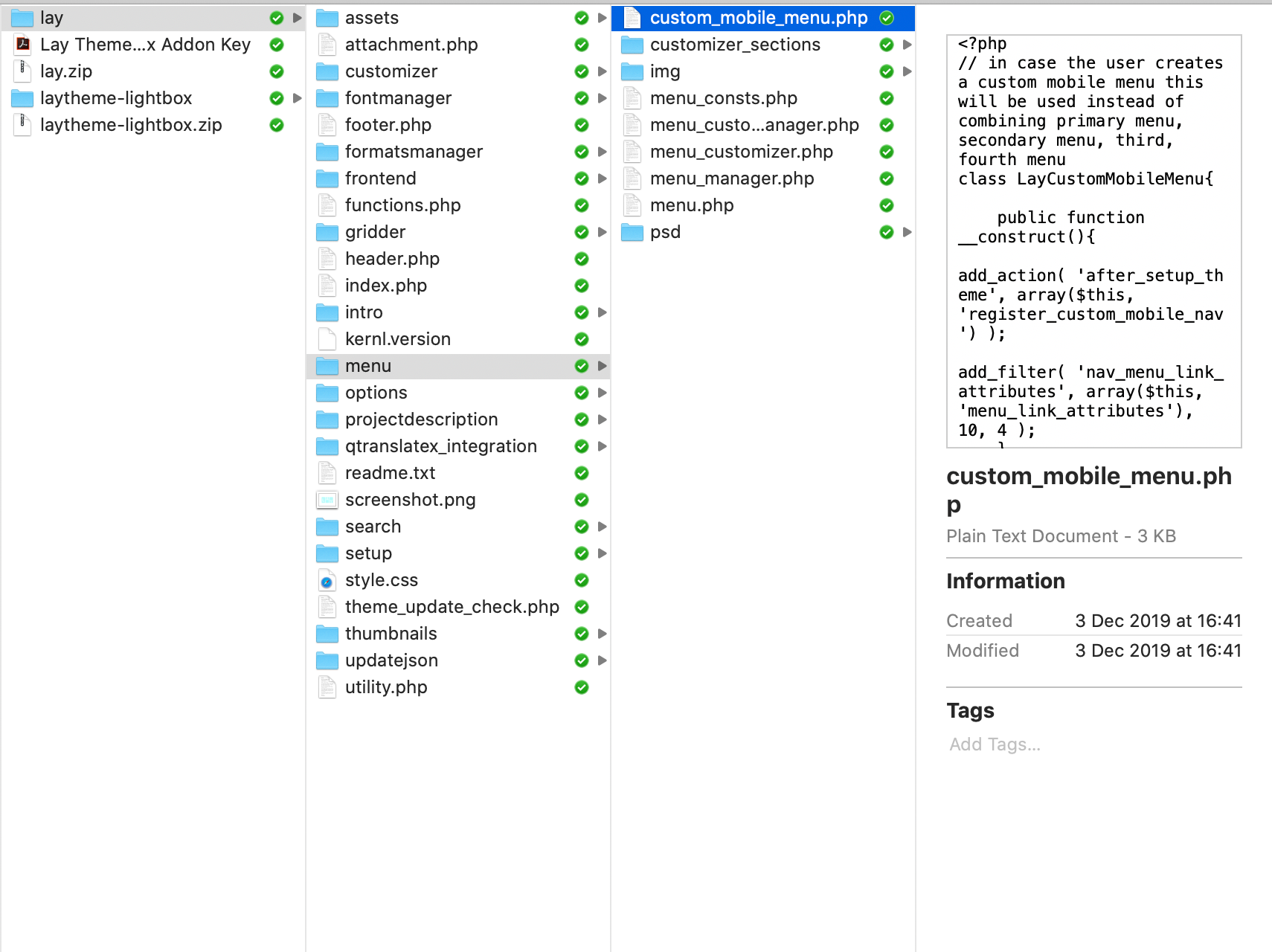
                I'm trying to copy my mobile menu into the custom CSS desktop code in my lay theme options, but am unsure which parts exactly I ought to copy and paste, worried I might mess up something as I'm a total newbie with CSS.

                Is this what you were referring to as the mobile menu from the laytheme files?
                Screenshot 2020-05-04 at 00.17.18.png

                Thank you so much for any and all help!

                1 Reply Last reply
                0
                • mariusjopenM
                  mariusjopenM
                  mariusjopen
                  Global Moderator
                  wrote on last edited by
                  #12

                  Dear @heleneleuzinger
                  We would not recommend to change the code inside the theme folder. It will get overwritten with the next update. Try to use the CUSTOM CSS and JQUERY section.
                  Best!
                  Marius

                  www.mariusjopen.world

                  B 2 Replies Last reply
                  0
                  • B
                    B
                    brogr
                    wrote on last edited by
                    #13

                    Hi @heleneleuzinger
                    You'd find most of the relevant CSS code in frontend/style_phone.php: look for .mobile-nav and the relevant mobile-menu-style. As I said, this solution isn't ideal, as lay upgrades might make your custom CSS code faulty.
                    The more stable approach I'd recommend is to use custom CSS and JS to adjust the appearance and behaviour of the desktop menu itself...
                    Best

                    1 Reply Last reply
                    0
                    • mariusjopenM mariusjopen

                      Dear @heleneleuzinger
                      We would not recommend to change the code inside the theme folder. It will get overwritten with the next update. Try to use the CUSTOM CSS and JQUERY section.
                      Best!
                      Marius

                      B
                      B
                      brogr
                      wrote on last edited by
                      #14
                      This post is deleted!
                      1 Reply Last reply
                      0
                      • mariusjopenM mariusjopen

                        Dear @heleneleuzinger
                        We would not recommend to change the code inside the theme folder. It will get overwritten with the next update. Try to use the CUSTOM CSS and JQUERY section.
                        Best!
                        Marius

                        B
                        B
                        brogr
                        wrote on last edited by
                        #15

                        @mariusjopen That's the idea...

                        1 Reply Last reply
                        0
                        • H
                          H
                          heleneleuzinger
                          wrote on last edited by
                          #16

                          Thank you very much! I'll try my hand at that :-)

                          1 Reply Last reply
                          0
                          • mariusjopenM
                            mariusjopenM
                            mariusjopen
                            Global Moderator
                            wrote on last edited by
                            #17

                            Dear @heleneleuzinger
                            Perfect! Glad to hear!
                            Many wishes!
                            Marius

                            www.mariusjopen.world

                            1 Reply Last reply
                            0
                            • U
                              U
                              umdoistres
                              wrote on last edited by
                              #18

                              Is there any way of doing this now? Or any kind soul would share their work around?

                              Thanks :))

                              1 Reply Last reply
                              0
                              • B
                                B
                                brogr
                                wrote on last edited by
                                #19

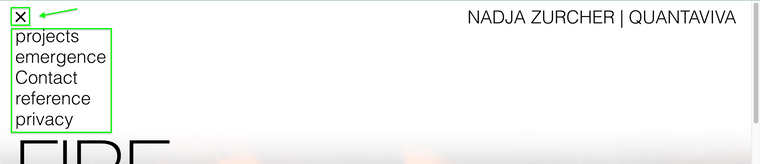
                                Use the following custom CSS and JS to adjust the appearance and behaviour of the desktop menu. You can see it in action on https://quantaviva.ch

                                Custom CSS for Desktop Version:

                                nav.laynav.primary:before {
                                    display: block;
                                    content: "–––\A–––\A–––";
                                    white-space: pre-wrap;
                                    line-height: 0.6em;
                                    font-weight: 900;
                                    cursor: pointer;
                                }
                                    nav.laynav.primary.toggled:before {
                                        content: "✕";
                                        font-size: 1.5em;
                                        line-height: 1.15em;
                                    }
                                nav.laynav ul {
                                    display: none;
                                    width: 96vw;
                                    background: #fff;
                                }
                                

                                Custom <head> content:

                                <script>
                                jQuery( document ).ready(function( $ ) {
                                    $(".laynav.primary").on("click", function(e){
                                        $(this).toggleClass("toggled").children("ul").toggle();
                                    });
                                });
                                </script>
                                
                                1 Reply Last reply
                                0
                                • RichardR
                                  RichardR
                                  Richard
                                  Global Moderator
                                  wrote on last edited by
                                  #20

                                  Thanks @brogr 👍
                                  Screen Shot 2022-03-03 at 5.03.37 PM.png

                                  1 Reply Last reply
                                  0
                                  • U
                                    U
                                    umdoistres
                                    wrote on last edited by
                                    #21

                                    oh cool - thanks @brogr :))

                                    1 Reply Last reply
                                    1

                                    Hello! It looks like you're interested in this conversation, but you don't have an account yet.

                                    Getting fed up of having to scroll through the same posts each visit? When you register for an account, you'll always come back to exactly where you were before, and choose to be notified of new replies (either via email, or push notification). You'll also be able to save bookmarks and upvote posts to show your appreciation to other community members.

                                    With your input, this post could be even better 💗

                                    Register Login
                                    Reply
                                    • Reply as topic
                                    Log in to reply
                                    • Oldest to Newest
                                    • Newest to Oldest
                                    • Most Votes


                                    Online Users
                                    I
                                    itsbadjujuju
                                    Forgot your key, lost your files, need a previous Lay Theme or Addon version? Go to www.laykeymanager.com
                                    laytheme.com
                                    • Login

                                    • Don't have an account? Register

                                    • Login or register to search.
                                    • First post
                                      Last post
                                    0
                                    • Recent
                                    • Tags
                                    • Popular
                                    • Users
                                    • Search