styling quantity and button
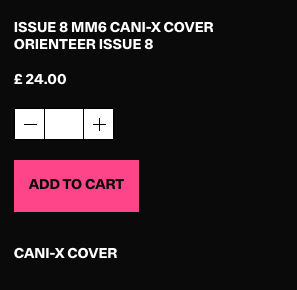
-
-
hey!
so the shop works best in general if you use a white background.
try this for the add to cart button:
.lay-woocommerce-small-buttons.single-product .single_add_to_cart_button{
height: 32px;
line-height: 30px;
}
quantitiy buttons:
.lay-woocommerce-qty-wrap{
filter: invert(1);
-webkit-filter: invert(1);
}
-
i think you will run into issues with other pages where you'll have some white background somwhere where it should be black
i still need to add options for shops to look ok when using a black background
-
hey!
so the shop works best in general if you use a white background.
try this for the add to cart button:
.lay-woocommerce-small-buttons.single-product .single_add_to_cart_button{
height: 32px;
line-height: 30px;
}
quantitiy buttons:
.lay-woocommerce-qty-wrap{ filter: invert(1); -webkit-filter: invert(1); }@arminunruh Nice one! This works for the quantity apart from the actual number?
 image url)
 -
ah i see
probably you need some css for the number input!
google "how to use chrome inspector"
google "how to change text color for input"
good luck
for now i think its best to not use a black background color for your website if you have a shop, because you'll run into other parts of the shop that dont work well with black backgrounds


Hello! It looks like you're interested in this conversation, but you don't have an account yet.
Getting fed up of having to scroll through the same posts each visit? When you register for an account, you'll always come back to exactly where you were before, and choose to be notified of new replies (either via email, or push notification). You'll also be able to save bookmarks and upvote posts to show your appreciation to other community members.
With your input, this post could be even better 💗
Register Login