Skip to content
  • Recent
  • Tags
  • Popular
  • Users
  • Search
Skins
  • Light
  • Brite
  • Cerulean
  • Cosmo
  • Flatly
  • Journal
  • Litera
  • Lumen
  • Lux
  • Materia
  • Minty
  • Morph
  • Pulse
  • Sandstone
  • Simplex
  • Sketchy
  • Spacelab
  • United
  • Yeti
  • Zephyr
  • Dark
  • Cyborg
  • Darkly
  • Quartz
  • Slate
  • Solar
  • Superhero
  • Vapor

  • Default (No Skin)
  • No Skin
Collapse

Lay Theme Forum

  1. Home
  2. General Discussion
  3. Drop down menu

Drop down menu

Scheduled Pinned Locked Moved General Discussion
29 Posts 12 Posters 10.2k Views 5 Watching
  • Oldest to Newest
  • Newest to Oldest
  • Most Votes
Reply
  • Reply as topic
Log in to reply
This topic has been deleted. Only users with topic management privileges can see it.
  • E
    E
    erikbunger
    wrote on last edited by
    #19

    Thanks @mariusjopen for your answer. The real problem for me is that there no way to do a second menu. I would prefer this to a dropdown menu. I really like laytheme but I find this to be a major disadvantage. So if I could suggest anything it would be to add that feature. It seems like there are more users waiting for this feature. I imagine it would not be too hard to add this possibility?

    Cheers

    1 Reply Last reply
    0
    • L
      L
      louis999
      wrote on last edited by
      #20

      Hi ! Nice option here. Thanks for the help. I am wondering, is there anyway to animate the dropdown so the submenu list item appears one by one ?

      1 Reply Last reply
      0
      • mariusjopenM
        mariusjopenM
        mariusjopen
        Global Moderator
        wrote on last edited by
        #21

        Dear @lucienng
        to understand you correctly.
        You do not want a dropdown-sub-menu? You want a second menu?
        This is possible with Laytheme. In menu-options.

        Sorry for asking.

        Best!

        Marius

        www.mariusjopen.world

        1 Reply Last reply
        0
        • L
          L
          Laura S.
          wrote on last edited by
          #22

          Hello,
          I am also currently creating a dropdown-sub-menu and have two questions.

          1. I am wondering how to make just the writing visible (no background colour at all).
            In the thread above was a solution for transparent but not invisible.
          2. Is it possible to regulate the space between the menu points?
            I would like to shorten the space between the menu point "about" and
            "documentation" and to enlarge it between "documentation" and "event"

          Thank you very much in advance!

          Here also my link: https://www.udk-schau.de

          Screen Shot 2020-08-14 at 18.20.13.png

          L 1 Reply Last reply
          0
          • L Laura S.

            Hello,
            I am also currently creating a dropdown-sub-menu and have two questions.

            1. I am wondering how to make just the writing visible (no background colour at all).
              In the thread above was a solution for transparent but not invisible.
            2. Is it possible to regulate the space between the menu points?
              I would like to shorten the space between the menu point "about" and
              "documentation" and to enlarge it between "documentation" and "event"

            Thank you very much in advance!

            Here also my link: https://www.udk-schau.de

            Screen Shot 2020-08-14 at 18.20.13.png

            L
            L
            Laura S.
            wrote on last edited by
            #23

            Sorry I think I have to tag you. @mariusjopen
            My first time posting.

            1 Reply Last reply
            0
            • RichardR
              RichardR
              Richard
              Global Moderator
              wrote on last edited by
              #24

              Dear @lucienng

              I am currently seeing no top menu? -

              However using the "Custom CSS" area in "Lay options" you can achieve the spacing you desire.
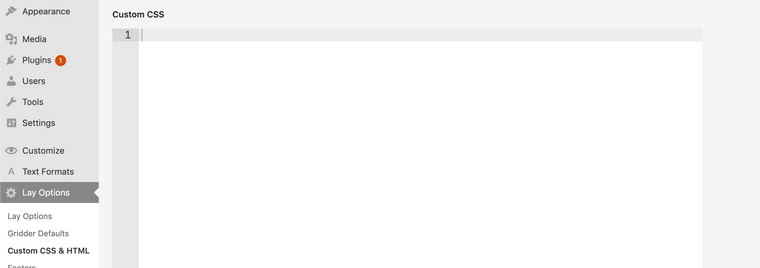
              Screen Shot 2020-08-17 at 3.34.00 PM.png

              Each Menu item will have its own ID which you can target with CSS

              For Example

              
              #menu-item-119{
              
              padding-bottom: 50px;
              
              }


              Would create 50px of "padding" - distance underneath e.g Documentation.

              For More information on how to find the ID of the Menu items first make sure they exist on the page and then use the inspection tool:

              https://www.khanacademy.org/computing/computer-programming/html-css/web-development-tools/a/using-the-browser-developer-tools

              And for More information on CSS:

              https://www.khanacademy.org/computing/computer-programming/html-css

              Once you have the menu visible we can take a look at making it invisible :)

              Best wishes
              Richard

              1 Reply Last reply
              0
              • L
                L
                Laura S.
                wrote on last edited by
                #25

                @Richard-Keith said in Drop down menu:

                Hey Thank you! I will try it now -

                Sorry I just tried something out and accidentally hide it for a short time. Its on now again :) (and most importantly wound disappear ;)

                1 Reply Last reply
                0
                • RichardR
                  RichardR
                  Richard
                  Global Moderator
                  wrote on last edited by
                  #26

                  @Laura-S

                  Cool! :)

                  Let me know how you go

                  Best
                  Richard

                  1 Reply Last reply
                  0
                  • N
                    N
                    ninaverena
                    wrote on last edited by
                    #27
                    This post is deleted!
                    1 Reply Last reply
                    0
                    • L
                      L
                      laboka
                      wrote on last edited by
                      #28
                      This post is deleted!
                      1 Reply Last reply
                      0
                      • B
                        B
                        bdale
                        wrote on last edited by bdale
                        #29
                        This post is deleted!
                        1 Reply Last reply
                        0

                        Hello! It looks like you're interested in this conversation, but you don't have an account yet.

                        Getting fed up of having to scroll through the same posts each visit? When you register for an account, you'll always come back to exactly where you were before, and choose to be notified of new replies (either via email, or push notification). You'll also be able to save bookmarks and upvote posts to show your appreciation to other community members.

                        With your input, this post could be even better 💗

                        Register Login
                        Reply
                        • Reply as topic
                        Log in to reply
                        • Oldest to Newest
                        • Newest to Oldest
                        • Most Votes


                        Online Users
                        L
                        lstark
                        Forgot your key, lost your files, need a previous Lay Theme or Addon version? Go to www.laykeymanager.com
                        laytheme.com
                        • Login

                        • Don't have an account? Register

                        • Login or register to search.
                        • First post
                          Last post
                        0
                        • Recent
                        • Tags
                        • Popular
                        • Users
                        • Search

