Page transition
-
-
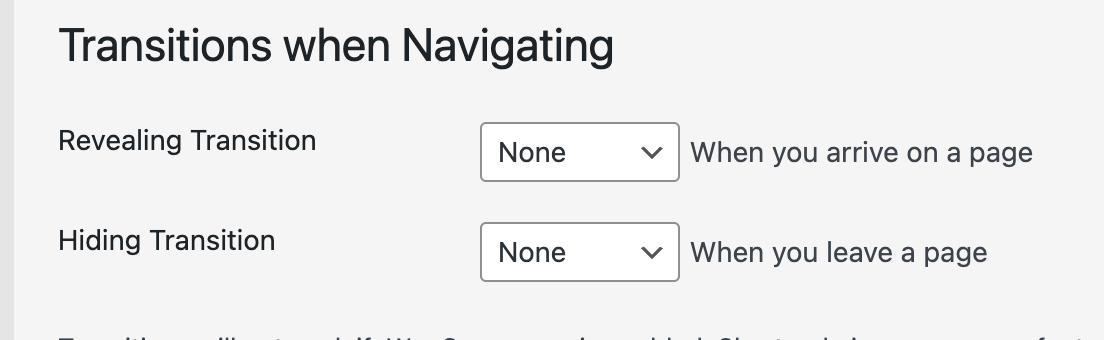
can you go to lay options -> then in "transitions when navigating"
set both of these to None
then the website wont fade in and out when you click on the navigation
but im not entirely sure if i understood the issue correctly
can you post a link? -
can you go to lay options -> then in "transitions when navigating"
set both of these to None
then the website wont fade in and out when you click on the navigation
but im not entirely sure if i understood the issue correctly
can you post a link?Hi Armin , thank you for your answer.
Yes, this i did this in the lay options, but this is not what i meant.I dont know if this what i want is really possible..
i try to explain again :)
I build a test page with many projects Thumbnails, with a mouseover thumnail. this works amazing, but now i want that: when u click on the image i want have a text box (background white). but that i cant do. So i build the same page with projects, and when u click on the image you jump on the project page with the same images but now with the text box.
And now what i thought is that when u have no page transition then the image will not load again.Hope you know what i mean, sorry :)
Thanks, Julian
thats the test page: https://passant.ch/visch_test/
-
do you mean you just want an overlay?
kind of like this
https://www.instagram.com/p/Cvf6YC6rSFX/ -
do you mean you just want an overlay?
kind of like this
https://www.instagram.com/p/Cvf6YC6rSFX/Yes :) but that isnt possible with the Project Tumbnails , right ?
-
i think you could just insert an image, right click the image and link it to a page :⁄
other than that, no not possible mh

Hello! It looks like you're interested in this conversation, but you don't have an account yet.
Getting fed up of having to scroll through the same posts each visit? When you register for an account, you'll always come back to exactly where you were before, and choose to be notified of new replies (either via email, or push notification). You'll also be able to save bookmarks and upvote posts to show your appreciation to other community members.
With your input, this post could be even better 💗
Register Login