Overlay feature - height specification for overlay page
-
-
sure!
.lay-overlay{ box-shadow: 5px 5px 5px rgba(0,0,0,0.5); } -
sure!
.lay-overlay{ box-shadow: 5px 5px 5px rgba(0,0,0,0.5); }@arminunruh You are Yoda. Thankyou.
-
use these settings:
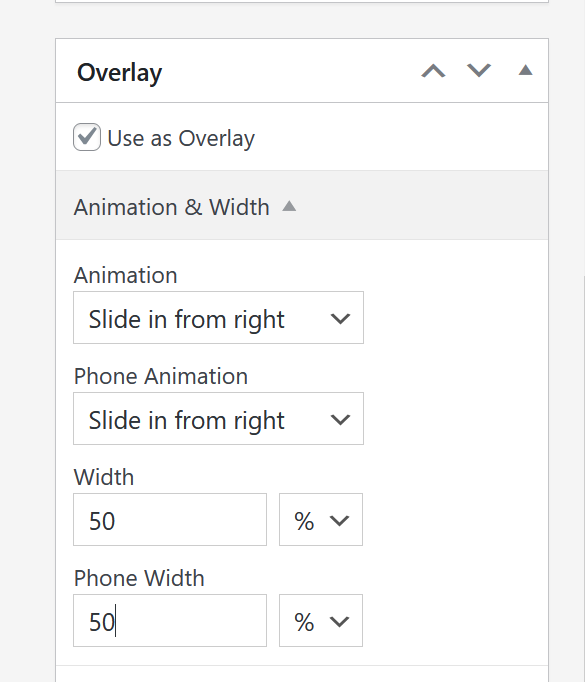
add this in:
lay options -> custom css & html -> custom css for desktop.lay-show-overlay.lay-slide-from-right{ transform: translateX(-50px)!important; } .lay-slide-from-right{ top: auto!important; bottom: 50px!important; } .lay-overlay > .lay-content{ height: 500px!important; }add this in:
lay options -> custom css & html -> custom css for mobile.lay-show-overlay.lay-slide-from-right{ transform: translateX(-50px)!important; } .lay-slide-from-right{ top: auto!important; bottom: 50px!important; } .lay-overlay > .lay-content{ height: 300px!important; }will result in:

@arminunruh I have tested the positioning code you have shown, the challenge is I only want to apply it to one overlay, not all of them (because I use overlays as slide out menus). I have tried to target the overlay id, but it won't work no matter what I do. This is the code I keep arriving at but still no luck. What am I doing wrong here?
/* 1. Only transform this specific overlay */ .lay-overlay .overlay-id-974.lay-show-overlay.lay-slide-from-right { transform: translateX(-50px) !important; } /* 2. Only reposition this specific overlay */ .lay-overlay .overlay-id-974.lay-slide-from-right { top: auto !important; bottom: 50px !important; } /* 3. Only set height for this specific overlay */ .lay-overlay .overlay-id-974 { height: 300px !important; } -
your selectors are not correct, they should be like:
desktop CSS:
.overlay-id-2381.lay-show-overlay.lay-slide-from-right{
    transform: translateX(-50px)!important;
}
.overlay-id-2381.lay-slide-from-right{
    top: auto!important;
    bottom: 50px!important;
}
.overlay-id-2381.lay-overlay > .lay-content{
    height: 500px!important;
}

.overlay-id-2381.lay-overlay{
    box-shadow: 5px 5px 5px rgba(0,0,0,0.5);
}
mobile CSS
.overlay-id-2381.lay-show-overlay.lay-slide-from-right{
    transform: translateX(-50px)!important;
}
.overlay-id-2381.lay-slide-from-right{
    top: auto!important;
    bottom: 50px!important;
}
.overlay-id-2381.lay-overlay > .lay-content{
    height: 300px!important;
}
(instead of 2381 use 974)
-
-
Sorry one more query on this. On mobile, I want the overlay to site centred full width at the bottom of the screen with 10px on each side. However again struggling to get this working. I've gotten this far but it causes issues. The overlay close button no loner works and its become buggy.
.overlay-id-974.lay-slide-from-right { top: auto !important; bottom: 30px !important; left: 50% !important; transform: translateX(-50%) !important; } -

mobile css:
.overlay-id-3506.lay-show-overlay.lay-phone-slide-from-right{
    transform: translateX(0px)!important;
}
.overlay-id-3506.lay-phone-slide-from-right{
    top: auto!important;
    bottom: 0px!important;
    left: 10px!important;
    right: 10px!important;
    width: auto!important;
}
.overlay-id-3506.lay-overlay > .lay-content{
    height: 50svh!important;
    /* or height: 300px!important; */
}
use your id instead of 3506
-
-
sure no problem!

Hello! It looks like you're interested in this conversation, but you don't have an account yet.
Getting fed up of having to scroll through the same posts each visit? When you register for an account, you'll always come back to exactly where you were before, and choose to be notified of new replies (either via email, or push notification). You'll also be able to save bookmarks and upvote posts to show your appreciation to other community members.
With your input, this post could be even better 💗
Register Login