Skip to content
  • Recent
  • Tags
  • Popular
  • Users
  • Search
Skins
  • Light
  • Brite
  • Cerulean
  • Cosmo
  • Flatly
  • Journal
  • Litera
  • Lumen
  • Lux
  • Materia
  • Minty
  • Morph
  • Pulse
  • Sandstone
  • Simplex
  • Sketchy
  • Spacelab
  • United
  • Yeti
  • Zephyr
  • Dark
  • Cyborg
  • Darkly
  • Quartz
  • Slate
  • Solar
  • Superhero
  • Vapor

  • Default (No Skin)
  • No Skin
Collapse

Lay Theme Forum

  1. Home
  2. General Discussion
  3. error en el formato de fecha de las noticias

error en el formato de fecha de las noticias

Scheduled Pinned Locked Moved General Discussion
8 Posts 2 Posters 1.1k Views 2 Watching
  • Oldest to Newest
  • Newest to Oldest
  • Most Votes
Reply
  • Reply as topic
Log in to reply
This topic has been deleted. Only users with topic management privileges can see it.
  • K
    K
    kimetartsgodella
    wrote on last edited by
    #1

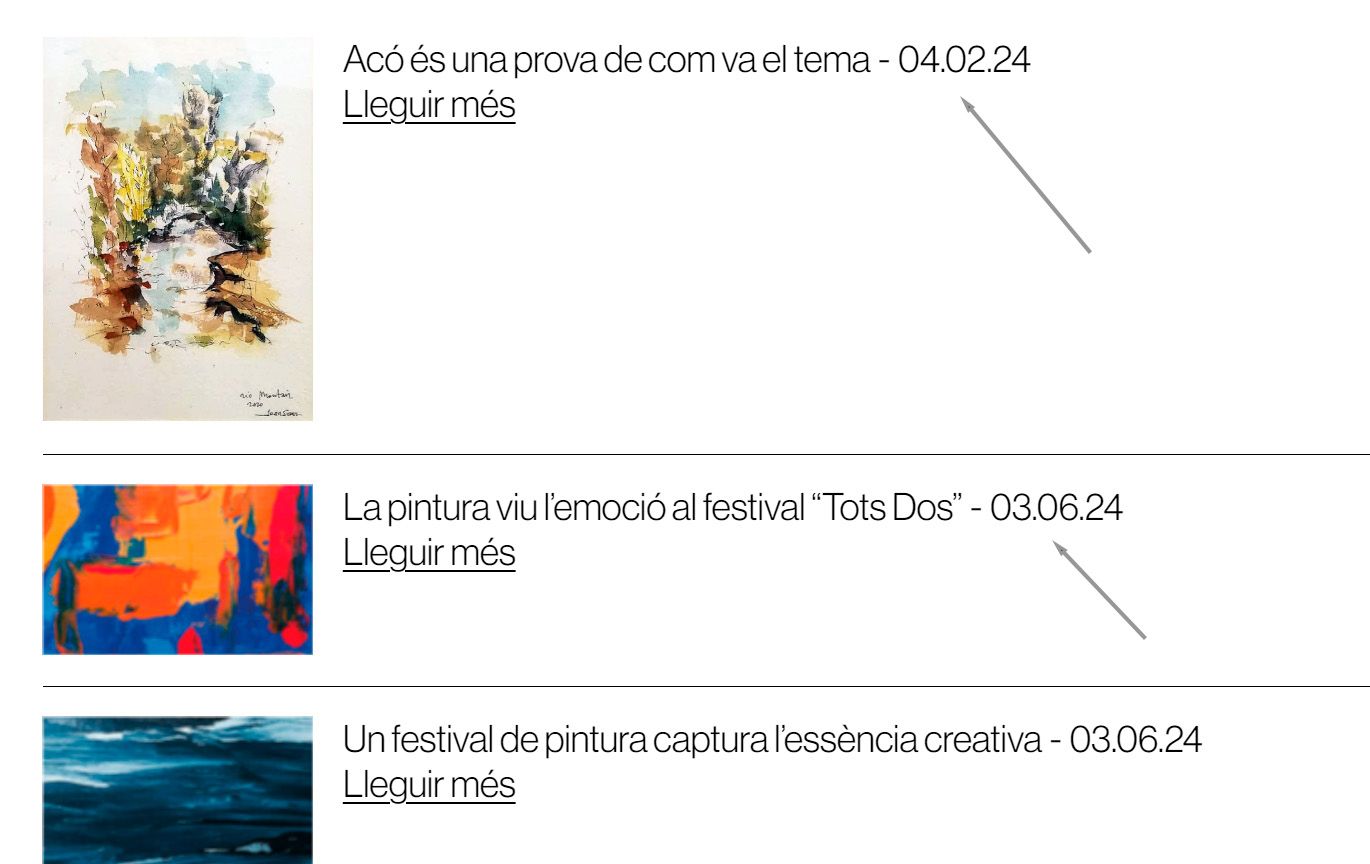
    Acabo de publicar una noticia en mi pàgina web y en el resumen del menú noticias, me aparece el titular y la fecha de publicación como 04/02/2024, cuando debería ser: 02/04/2024.
    He investigado la manera de configurar el formato de la fecha y no encuentro la opción.
    He entrado en Opciones de Wordpress y el formato de la fecha és el correcto. (dia-mes-año), pero sin embargo cuando entro por el menú de mi pagina, el formato de fecha aparece alterado.
    Gracias por vuestro apoyo

    1 Reply Last reply
    0
    • K
      K
      kimetartsgodella
      wrote on last edited by
      #2

      data.jpg

      1 Reply Last reply
      0
      • arminunruhA
        arminunruhA
        arminunruh
        Global Moderator
        wrote on last edited by
        #3

        hey i can only speak english and german

        1 Reply Last reply
        0
        • arminunruhA
          arminunruhA
          arminunruh
          Global Moderator
          wrote on last edited by
          #4

          you want to change the dateformat?
          when u edit the news element here:

          Screenshot 2024-04-02 at 16.58.52.png

          1 Reply Last reply
          0
          • K
            K
            kimetartsgodella
            wrote on last edited by
            #5

            hello again
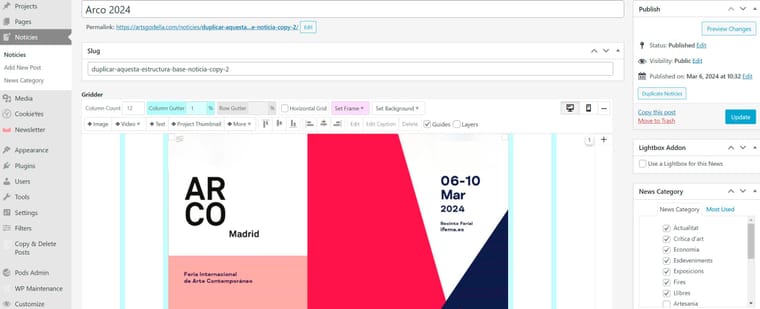
            I don't see the option you indicate in your answer. I have wordpress configured with dd/mm/yy. When I go to edit the news, the image you indicate does not appear. Please, can you help me?
            Thanks again.

            1 Reply Last reply
            0
            • K
              K
              kimetartsgodella
              wrote on last edited by
              #6

              lay1.jpg

              1 Reply Last reply
              0
              • K
                K
                kimetartsgodella
                wrote on last edited by
                #7

                Thanks for your support. I have already solved it with the information you gave me. Closed topic.

                1 Reply Last reply
                1
                • arminunruhA
                  arminunruhA
                  arminunruh
                  Global Moderator
                  wrote on last edited by
                  #8

                  ok very well!
                  the news modal appears when u click "+more" → "+news element"

                  or double click an existing news element to edit it

                  have a great day!

                  1 Reply Last reply
                  0

                  Hello! It looks like you're interested in this conversation, but you don't have an account yet.

                  Getting fed up of having to scroll through the same posts each visit? When you register for an account, you'll always come back to exactly where you were before, and choose to be notified of new replies (either via email, or push notification). You'll also be able to save bookmarks and upvote posts to show your appreciation to other community members.

                  With your input, this post could be even better 💗

                  Register Login
                  Reply
                  • Reply as topic
                  Log in to reply
                  • Oldest to Newest
                  • Newest to Oldest
                  • Most Votes


                  Online Users
                  Forgot your key, lost your files, need a previous Lay Theme or Addon version? Go to www.laykeymanager.com
                  laytheme.com
                  • Login

                  • Don't have an account? Register

                  • Login or register to search.
                  • First post
                    Last post
                  0
                  • Recent
                  • Tags
                  • Popular
                  • Users
                  • Search