Skip to content
  • Recent
  • Tags
  • Popular
  • Users
  • Search
Skins
  • Light
  • Brite
  • Cerulean
  • Cosmo
  • Flatly
  • Journal
  • Litera
  • Lumen
  • Lux
  • Materia
  • Minty
  • Morph
  • Pulse
  • Sandstone
  • Simplex
  • Sketchy
  • Spacelab
  • United
  • Yeti
  • Zephyr
  • Dark
  • Cyborg
  • Darkly
  • Quartz
  • Slate
  • Solar
  • Superhero
  • Vapor

  • Default (No Skin)
  • No Skin
Collapse

Lay Theme Forum

D

danny

@danny
About
Posts
206
Topics
58
Shares
0
Groups
0
Followers
0
Following
0

Posts

Recent Best Controversial

  • mouse cursor does not work
    D danny

    hi @arminunruh

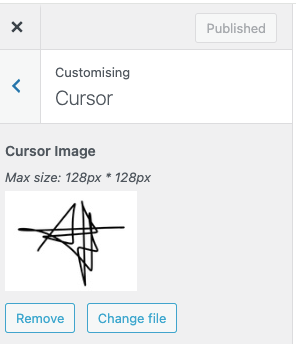
    for https://axellestiefel.com/test6-copy/ I would like to use an image as the mouse cursor. I uploaded the image in the 'cursor' option. I tried as well a custom CSS.

    Both didn't apply. Is it possible to have that image transparent? And how could I regulate the size?

    Thanks again so much.
    xx daniel

    Bildschirmfoto 2026-02-19 um 18.01.26.png

    General Discussion

  • text and image alignment
    D danny

    oh wow! thanks so much @arminunruh !

    General Discussion

  • text and image alignment
    D danny

    @arminunruh thanks a thousand ! Only one thing - not sure if that is possible -

    The last paragraph (on the landing page) should have an indent only in the first line. And that indent should have the same indent as the first paragraph. So to look like this:

    Bildschirmfoto 2026-02-11 um 09.36.44.png

    Thanksxxx

    General Discussion

  • text and image alignment
    D danny

    I just did ! thanks so much

    General Discussion

  • text and image alignment
    D danny

    Dear @arminunruh hattest du evtl. Zeit, einen Blick drauf zu werfen? danke

    General Discussion

  • typeface error in Pdf-upload
    D danny

    Fabian exported the font under a new name - that worked.

    Bug Reports

  • text and image alignment
    D danny

    noch zu Punkt 3) das Herauslösen funktioniert leider nicht, weil ich die vertikalen Linien der Tabelle verwende. Wenn ich die Tabelle teilweise auflöse, fallen diese ja weg.

    General Discussion

  • text and image alignment
    D danny

    Danke @arminunruh

    1. Ich habe den Text-Indent angewandt, er funktioniert auch nach mehren Versuchen nicht. Hast du eine Idee, woran es liegen könnte? Der Text-Indent zieht nur die erste Zeile ein, richtig? Ich suche ja ein Tool, womit nur die erste Zeile einen Einzug bekommt.

    2. Hattest du diese Frage gesehen? Wie kann ich das Bild und den „Contact“ am unteren Rand ausrichten? Damit beide Elemente an der Unterkante auf der selben Höhe sind (über die gestrichelten Linie). Beide haben unten einen Abstand von 20 Pixeln.

    3. Die linke Kolumne ist Teil einer Tabelle (mit den anderen Kolumnen zusammen). Dann müsste ich die erste Kolumne mit dem ▮ wohl herauslösen und separat als einzelnen Text platzieren?

    Vielen Dank!

    General Discussion

  • text and image alignment
    D danny
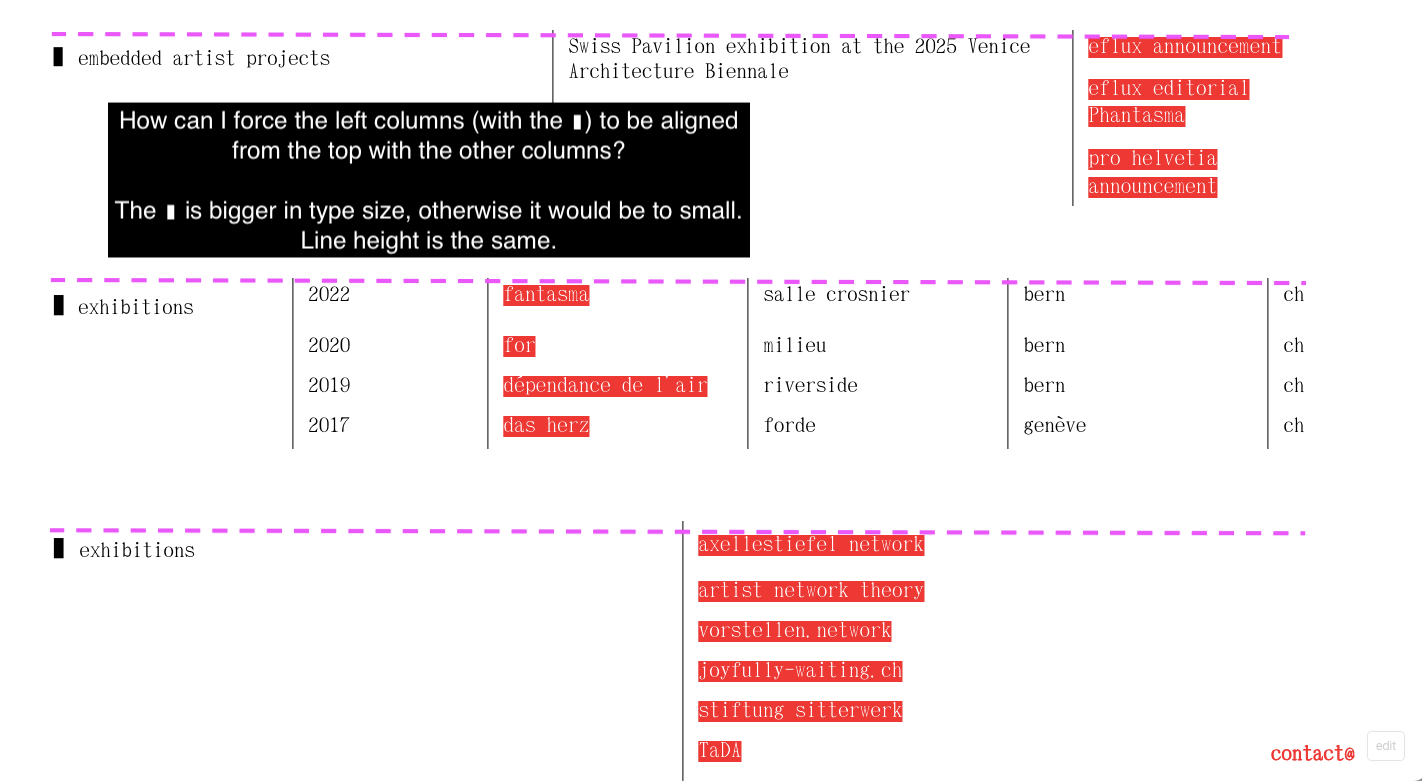
    • this one:

    How can I force the left columns (with the ▮) to be aligned from the top with the other columns?

    The ▮ is bigger in type size, otherwise it would be to small. Line height is the same.

    https://axellestiefel.com/test6/

    Bildschirmfoto 2026-02-04 um 16.12.33.png

    General Discussion

  • text and image alignment
    D danny

    Dear @arminunruh,

    for https://axellestiefel.com/test6/ I have two questions for the landing page.

    1. How can I align only the first line of the third paragraph that starts with „Recently…“ with the alignment of the first paragraph („weaves…“)?

    2. How can I align the image and "contact" from the from the bottom edge? Both have 20px space bottom.

    Thanks a lot !

    XD

    Bildschirmfoto 2026-02-04 um 15.41.01.png

    General Discussion

  • typeface error in Pdf-upload
    D danny

    I solved it :)

    Bug Reports

  • typeface error in Pdf-upload
    D danny

    thanks! I think you right: I just uploaded the same PDF here and it creates the same errors:

    https://excellent-amaranth-jtl2rmhrwn.edgeone.app/20251209_as_text.pdf

    Bug Reports

  • typeface error in Pdf-upload
    D danny

    update: I downloaded the PDF from another IP address and it shows the same messy up then in the PDF. So it is not just the prewiew.

    Many thanks for helping out on this!

    Bug Reports

  • typeface error in Pdf-upload
    D danny

    Actually forcing the PDF to download makes no sense in mobile applications.

    Bug Reports

  • typeface error in Pdf-upload
    D danny

    Yes, that seems to be the case. When I download the file, it's fine. But in the URL it messes up the font (see screenshot attached).

    Is there a way in Laytheme to force the PDF to download immediately instead of an URL-preview?

    Bildschirmfoto 2026-01-22 um 15.59.16.png

    Bug Reports

  • text box wider then column
    D danny

    that works great thanks!

    General Discussion

  • typeface error in Pdf-upload
    D danny

    @arminunruh

    when uploading a PDF in laytheme it messes up the font:
    https://axellestiefel.com/wp-content/uploads/2026/01/20251209_as_text.pdf

    I use the same font (by abc Dinamo) on the website and it works totally fine.

    This is how it looks in the media library in laytheme:
    Bildschirmfoto 2026-01-21 um 18.04.25.png

    Any idea what the issue might be?

    Thanks again !

    Daniel

    Bug Reports

  • text box wider then column
    D danny

    @arminunruh

    Is there a way to make a text box wider than the column?

    On https://axellestiefel.com/test4/ - desktop version - I would like to make the text block on the top right a bit wider (till the doted line, see the screenshot). To use three columns instead of two would be to wide (then the text is over 'Axelle Stiefel'.

    Thanks so much!

    Bildschirmfoto 2026-01-21 um 13.08.50.png

    Bildschirmfoto 2026-01-21 um 13.13.42.png

    General Discussion

  • Highlighting single words in a Text paragraph ?
    D danny

    hei !

    thanks - in the character settings i don't see this option (I think this option is only available in paragraph settings). And when applying the character format "highlighttwo" I don't see any changes to the text.

    Bildschirmfoto 2026-01-17 um 09.05.36.png

    General Discussion

  • Highlighting single words in a Text paragraph ?
    D danny

    Oh sorry! I took the pw away. Thanks so much for the code. I tried it but it does not seem to apply. Maybe you could have a look?

    I called the new character format "highlighttwo" so I can work with the first character format "highlight" in the meantime.

    General Discussion
  • Login

  • Don't have an account? Register

  • Login or register to search.
  • First post
    Last post
0
  • Recent
  • Tags
  • Popular
  • Users
  • Search