Skip to content
  • Recent
  • Tags
  • Popular
  • Users
  • Search
Skins
  • Light
  • Brite
  • Cerulean
  • Cosmo
  • Flatly
  • Journal
  • Litera
  • Lumen
  • Lux
  • Materia
  • Minty
  • Morph
  • Pulse
  • Sandstone
  • Simplex
  • Sketchy
  • Spacelab
  • United
  • Yeti
  • Zephyr
  • Dark
  • Cyborg
  • Darkly
  • Quartz
  • Slate
  • Solar
  • Superhero
  • Vapor

  • Default (No Skin)
  • No Skin
Collapse

Lay Theme Forum

D

dingdong

@dingdong
Unfollow Follow
About
Posts
123
Topics
39
Shares
0
Groups
0
Followers
0
Following
0

Posts

Recent Best Controversial

  • text position wrong after update
    D dingdong
    General Discussion

    hm anything in html-structure changed with the update?
    i asked chatgpt and now it seems to work with this long code?!

    /* Bezugspunkt für die absolute Position herstellen */
    body.home .img-id-13-no-sticky,
    body.home .lay-image,
    body.home .thumb {
    position: relative;
    }

    /* Dein bekanntes Overlay-CSS */
    body.home ._HoverOverview {
    position: absolute;
    top: 50%;
    left: 50%;
    transform: translate(-50%, -50%);
    text-align: center;
    margin: 0;
    z-index: 2;
    pointer-events: none;
    }

    /* --- Nur bei Hover sichtbar (Startseite) --- */
    body.home ._HoverOverview {
    opacity: 0 !important;
    transition: opacity 0.35s ease;
    will-change: opacity;
    }

    /* Variante A: modern & treffsicher mit :has()
    → zeigt NUR die Caption innerhalb genau des Elements, über dem du bist */
    body.home .grid__col:has(._HoverOverview):hover ._HoverOverview,
    body.home .col:has(._HoverOverview):hover ._HoverOverview,
    body.home .thumb:has(._HoverOverview):hover ._HoverOverview,
    body.home .img-id-13-no-sticky:has(._HoverOverview):hover ._HoverOverview,
    body.home .lay-image:has(._HoverOverview):hover ._HoverOverview,
    body.home .lay-gallery-image-wrap:has(._HoverOverview):hover ._HoverOverview,
    body.home .frame:has(._HoverOverview):hover ._HoverOverview {
    opacity: 1 !important;
    }

    /* Variante B: Fallback ohne :has() (für ältere Browser)
    → deckt typische Lay-Container ab, ohne bis zur .row hochzugehen /
    body.home .grid__col:hover ._HoverOverview,
    body.home .col:hover ._HoverOverview,
    body.home .thumb:hover ._HoverOverview,
    body.home .img-id-13-no-sticky:hover ._HoverOverview,
    body.home .lay-image:hover ._HoverOverview,
    body.home .lay-gallery-image-wrap:hover ._HoverOverview,
    body.home .frame:hover ._HoverOverview,
    body.home .thumb a:hover ._HoverOverview, /
    falls das Bild im <a> liegt /
    body.home .grid__col a:hover ._HoverOverview { /
    und die Caption daneben */
    opacity: 1 !important;
    }

    /* Safety: Bleibt sichtbar, wenn du direkt über dem Text bist */
    body.home ._HoverOverview:hover {
    opacity: 1 !important;
    }

  • text position wrong after update
    D dingdong
    General Discussion

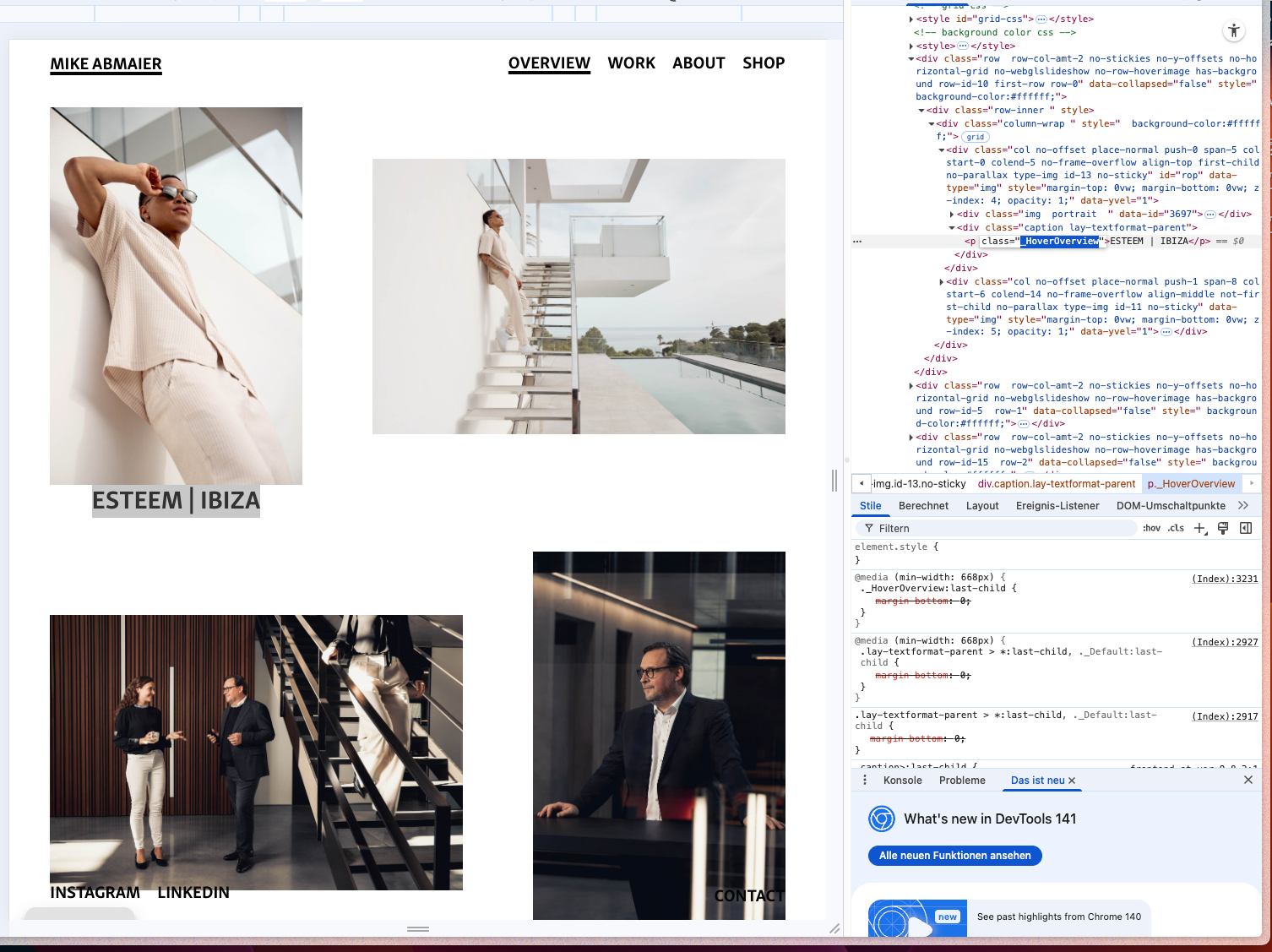
    Hi!
    After i updated laytheme the position of the caption is wrong?!
    before i manged it to appear centered on the image when hovering?!
    any ideas what happened? @arminunruh

    www.mikeabmaier.com

    Bildschirmfoto 2025-10-21 um 10.30.00.png


  • text / link on image hover
    D dingdong
    General Discussion

    @arminunruh works fine, but in mobile version image 4 has different space above and below than other images?!
    is it because of the "long caption text"?
    https://www.mikeabmaier.com


  • text / link on image hover
    D dingdong
    General Discussion

    The text seems to work, THANKS!!! :-*


  • text / link on image hover
    D dingdong
    General Discussion

    @arminunruh said in text / link on image hover:

    am i right, that i have to give all images parallax if i use it?
    i just tried only the second row, but then there is a huge white space... actually the problem is online between first and second row...

    no you dont. just give some of them a small parallax. the ones at the very bottom, dont give them a parallax.

    hm, the images with red background (color just to make it visible) have parallax 1, green has 1,7.
    now the purple actually has to be more than 1,7 - but i just want the "original" distance from green to purple. so actually all below "green" has to have 1,7... no?


  • text / link on image hover
    D dingdong
    General Discussion

    @arminunruh said in text / link on image hover:

    if you want text to follow your mouse when your mouse is over an image:

    http://laythemeforum.com/topic/10519/make-image-caption-follow-mouse

    That works.
    but is it also possible to have the text bottom right / left on the image and no "follow mouse"?


  • text / link on image hover
    D dingdong
    General Discussion

    @arminunruh am i right, that i have to give all images parallax if i use it?
    i just tried only the second row, but then there is a huge white space... actually the problem is online between first and second row...


  • text / link on image hover
    D dingdong
    General Discussion

    hi!
    i just build a new frontpage:
    https://www.mikeabmaier.com/fotos-fotograf-mike-abmaier-copy

    I would like a text (title) to appear on an image when the mouse hovers over it. Ideally, it should also be a link to another page. These are not project thumbnails. Is there an easy way to do this?

    is there also a way to make the scroll at the beginning a little bit more sexy?
    i used browser height for row height so i only see these two images and made them sticky. but it doesnt look / feel that good when scrolling... any ideas for this layout?


  • Cookie-banner after intro video
    D dingdong
    General Discussion

    anybody can help?


  • Cookie-banner after intro video
    D dingdong
    General Discussion

    Hey!
    I just added an intro video to my website.
    now my cookie-banner (made with complianz) is shown during the video (at first visit).
    Is it possible to show the banner after the intro?
    https://www.mikeabmaier.com


  • addon request - add to pdf
    D dingdong
    Addons

    Is there a possibility to create a plugin that allows combining individual images on the website into a PDF? This way, for example, I could have the option to hover over an image and click on "+ PDF." Since LayTheme is often used by photographers, this feature could be very interesting for many users—perhaps as an add-on for around 10 Euros? Additionally, it could be possible to design the PDF, adding a personal touch with a profile picture and contact details. The implementation could involve a small icon like "+" or "add to PDF" during hover, with the option to manage PDFs included in the navigation. What do you think about this idea?


  • imagehover addon
    D dingdong
    Addons

    @arminunruh done. thanks! :)


  • imagehover addon
    D dingdong
    Addons

    @arminunruh i did - no effect?!

    Bildschirmfoto 2024-01-02 um 11.45.59.png Bildschirmfoto 2024-01-02 um 11.46.18.png


  • imagehover addon
    D dingdong
    Addons

    Hi!
    If i hover "studio" on this site: https://www.mikeabmaier.com/about
    i cant change the size of the image, its always fullsize?!
    in layoption i tried with 5px and 20% - always fullsize
    any idea?


  • tables
    D dingdong
    General Discussion

    well, it seems laytheme is not made for this plugin, as i also get this error: https://wordpress.org/support/topic/tablepress-plugin-has-no-response-for-editing-table/


  • tables
    D dingdong
    General Discussion

    @alasdair17 said in tables:

    Hey, I recently had to make a table for a client's website and I found using the plugin, 'Tablepress' to be far easier to use and customise. Give that a try.

    Good idea, thanks.
    But i guess @arminunruh did this on his website without a plugin?


  • tables
    D dingdong
    General Discussion

    Hey,
    i want to create something like this:
    https://laytheme.com/buy-now.html

    but my "insert table" border 1 and color black makes something weird?!
    https://www.mikeabmaier.com/test1

    alt text
    alt text
    alt text


  • project arrows on ipad
    D dingdong
    General Discussion

    hey.
    can you tell me why on ipad the project arrows dont look right? on desktop it works, and on mobile it doesnt show up (like it should). only problems on ipad?!

    website:
    www.mikeabmaier.com
    project example: https://www.mikeabmaier.com/sinusens/
    alt text


  • Show Menu Point only on Shop site
    D dingdong
    General Discussion

    Hi!
    Currently im hiding the menu point "CART (0)" in my third menu (bottom left) for my shop with:

        #menu-item-2149 {
        display: none;}
    

    But on my shop-site i would like to show it.
    Can you tell me, how to do it?

    www.mikeabmaier.com

    THX!

    /edit
    now i tried:

    body.id-2093 nav.third_menu #menu-item-2149{
        display: inline;}
    

    and it seems to work.
    can you please tell me if this is the way how to do it?
    i "solved" it by trial and error...

    to hide the 3rd menu from shop page i did this i custom css for mobile:

    .third_menu{
      display: none !important;  
    }
    

    do you see any problems in my "solution"?


  • overlay vertical position & mobile view
    D dingdong
    General Discussion

    @arminunruh
    works!
    thanks (again) @arminunruh :*

  • Login

  • Don't have an account? Register

  • Login or register to search.
  • First post
    Last post
0
  • Recent
  • Tags
  • Popular
  • Users
  • Search