Skip to content
  • Recent
  • Tags
  • Popular
  • Users
  • Search
Skins
  • Light
  • Brite
  • Cerulean
  • Cosmo
  • Flatly
  • Journal
  • Litera
  • Lumen
  • Lux
  • Materia
  • Minty
  • Morph
  • Pulse
  • Sandstone
  • Simplex
  • Sketchy
  • Spacelab
  • United
  • Yeti
  • Zephyr
  • Dark
  • Cyborg
  • Darkly
  • Quartz
  • Slate
  • Solar
  • Superhero
  • Vapor

  • Default (No Skin)
  • No Skin
Collapse

Lay Theme Forum

DMBD

DMB

@DMB
Unfollow Follow
About
Posts
111
Topics
39
Shares
0
Groups
0
Followers
0
Following
0

Posts

Recent Best Controversial

  • Pages won't load unless I refresh
    DMBD DMB
    Bug Reports

    Hello! For some reason this site I made several years ago (that has been working fine) will not load pages now unless I refresh the page.

    hannahcollins.net

    Can you help me out with this as my client is getting frustrated the site isn't working and I'm not sure how to fix it. Strangely the 'news' oage seems to be fine but none of the other pages will load properly.

    Thanks in advance


  • lay theme update issues
    DMBD DMB
    General Discussion

    Yeah same issue here on multiple lay sites. good to know old theme fixes it


  • Vimeo in Carousel not working
    DMBD DMB
    Bug Reports

    PPS it's on the row with the light grey background!


  • Vimeo in Carousel not working
    DMBD DMB
    Bug Reports

    @DMB PS any idea how to fix it?


  • Vimeo in Carousel not working
    DMBD DMB
    Bug Reports

    Hi there,

    I've added a couple of vimeo videos to a carousel but they just will not show up.

    https://a0k.ee7.myftpupload.com/main/

    Seems like a bug.

    Thanks in advance,
    Duncan


  • Update has caused Sub Menu problems
    DMBD DMB
    Bug Reports

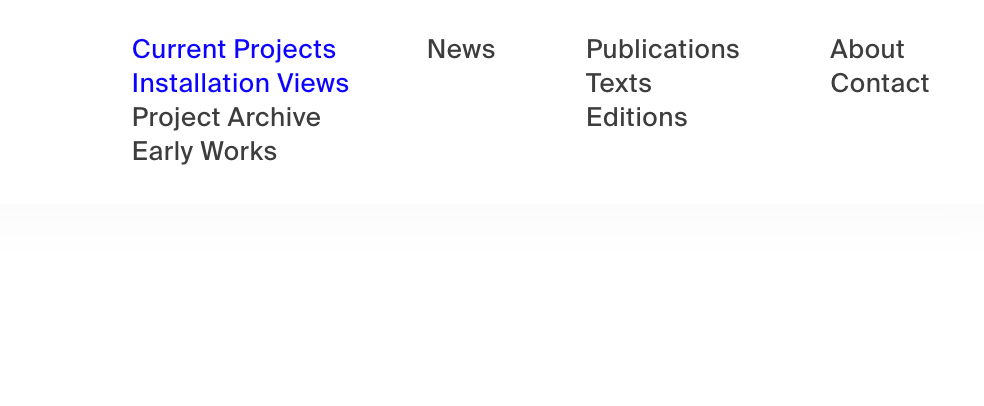
    In addition to this, it is also causing the active link in the sub-menu to be shown on two headings which is very confusing as well.

    For example, here I am on the page 'Installation Views' but it is also highlighting 'Current Projects' – this never used to happen before

    Screen Shot 2021-10-31 at 21.42.53.png


  • Update has caused Sub Menu problems
    DMBD DMB
    Bug Reports

    Hi there!

    I have had sub-menus working on a site I built for an artist for years now, but since the update they are broken. I see there are now options in the 'Customiser' for sub menus but the only options are to show the sub menu items on either hover or click – what about people (such as myself) who want them visible at all times? Would be quite simple to add that option in on the next update no?

    I added a simple line of CSS to force the sub menu to show, but now it doesnt properly hide my menu when I scroll down, as I use the 'hide menu on scroll' function... Argh.

    Could you help me fix this please? It's probably just a simple line of code to force the menu to be hidden further up when in its 'hidden' state but I cant figure out how to target it.

    The site is:
    https://www.hannahcollins.net/current-projects

    You will see the problem if you scroll down – the menu is now not fully hidden.

    Thank you in advance.

    Best Wishes,
    Duncan


  • 'display: none' not working on mobile
    DMBD DMB
    Bug Reports

    Hi Richard,

    This is true, this does work if I uncheck 'display:block' on the parent rows like you suggested in firefox dev tools. However, what code would i use? If I use display: none on the parent in my css then nothing shows up at all.

    Block, inline, flex etc none of those will work. Is there no way I can get my class to override the parent rows at all?

    Best,
    Duncan


  • 'display: none' not working on mobile
    DMBD DMB
    Bug Reports

    Sorry i forgot to say this is happening in chrome, firefox and safari.


  • 'display: none' not working on mobile
    DMBD DMB
    Bug Reports

    Hi there. I have an jQuery accordion where I am hiding the content at first with 'display: none;' on the class in my css.. It works fine in the desktop layout but does not work in mobile. In fact, even if i just make a simple text block, give the row a class, and then set that class to 'display: none;' it does not hide it in mobile.

    So simply put - display: none; does not work at all on mobile. I just checked and it is not working either on another site I built on mobile either. Perhaps something has gone wrong in a new iteration of lay theme? From the inspector it seems my css that sets a class to display: none is being overruled by a lay theme style sheet.

    Could you have a look please as this is a bit of a problem.

    anniebellamy.com/scholarship
    hannahcollins.net/texts

    Thankyou!
    Duncan


  • Span class glyphicons not inserting properly in text editor
    DMBD DMB
    General Discussion

    Put your code in the HTML editor using the 'HTML' button in 'More'.

    That will work, and is a better place to put it rather than in the text editor.

    D


  • problems with the stack-element and also with image linking.
    DMBD DMB
    Bug Reports

    @mariusjopen @arminunruh Hi! Any update on stacks working in custom phone layouts? Best, D


  • mute and unmute row video background
    DMBD DMB
    Bug Reports

    @arminunruh @mariusjopen — Ah thanks for clarifying Armin. Is there any way to have a fullscreen video in the background row but with controls? So the user has to hit play and then there could be sound?


  • Fullscreen Slider MoveTo function no longer works?
    DMBD DMB
    Addons

    @mariusjopen Hi, actually it works, but not horizontally strangely, only vertically. Strange


  • Fullscreen Slider MoveTo function no longer works?
    DMBD DMB
    Addons

    Re: magnetic slide - moveTo certain ID

    Hi @arminunruh @mariusjopen

    Ive been using the method above to move to certain slides for a while now. Assign some text the class "godown" for example, and then when you click it it moves to a certain slide.. Since the last update, this code no longer works?

    <script>
    jQuery(document).ready(function(){
    jQuery("body").on("click", ".godown", function(){
    jQuery.fn.fullpage.moveTo(1)
    });
    });
    </script>

    Any idea how to fix it?

    Best,

    D


  • mute and unmute row video background
    DMBD DMB
    Bug Reports

    Hi @Armin-Unruh @mariusjopen !

    I'm trying to play the sound from row background videos but the little option to Mute/Unmute seems to have disappeared?

    How can I play the sound of row background videos again?

    Best,

    D


  • Custom Lines/page dividers
    DMBD DMB
    General Discussion

    If you set the left-right frame to 0% you could then just use normal rows with background colours as a divider. Then you could just use the x/y offsets to create a margin for your content. Bit of a hack but it'll work.

    D


  • How to place captions for slideshow carousel on the actual slides???
    DMBD DMB
    General Discussion

    @brief Add this to custom css &html for no transition between your slides:

    .fp-slide {
    -webkit-transition: all 50ms ease!important;
    transition: all 50ms ease!important;
    }


  • How to place captions for slideshow carousel on the actual slides???
    DMBD DMB
    General Discussion

    @brief Hi Thomas,

    So... Here's how you can do this.

    You need a fullscreen slider. In 'Lay Options - fullscreen slider' you need to change the 'Direction' to 'Horizontal' and enable 'Slide on page click' and also enable 'fading effect'. You need to disable 'show navigation'.

    Then on the page you have the slider you need to put your images into rows and right-click to enable 'user browser height for row height' on each row.

    You're going to need to cheat a little to do the captions and numbers here. For each slide you'll need to manually add the caption and place in the gridder and the same with the slide number. If you have a 5% left/right frame then you'll need to right click on your caption and slide number and add '5' to 'space below'. Make sure the text frames are set to bottom alignment.

    This will then make your captions and numbers nice and neat and equal. You can of course set these to whatever you like. And don't forget to clone these to save yourself time and keep your formatting nice and neat!

    It's a little effort but this is the way to do it. Im sure there is a way to then change the duration of the 'fade effect' but I havn't looked into that - it's definately possible though.

    I hope this helps!

    D

  • How to get javascript to show in a location with a class?
    DMBD DMB
    General Discussion

    @mariusjopen Yeah I've had a look and tried to adapt it but im not a javascript pro..

    The thing is, I can get it to appear if I put the code into 'custom head and html' but only at the top of the page.

    I guess what im asking is - is there a way to tell the code to locate itself in a certain row with a class?

  • Login

  • Don't have an account? Register

  • Login or register to search.
  • First post
    Last post
0
  • Recent
  • Tags
  • Popular
  • Users
  • Search