Ah! Okey! thanxssss!
D
dnlbrv
@dnlbrv
Posts
-
In Edit Project Thumbnail Grid the Order section the functionality does not work -
In Edit Project Thumbnail Grid the Order section the functionality does not workAfter update to 11.3.1 all is okey.
Thanxs a lot! -
In Edit Project Thumbnail Grid the Order section the functionality does not work@arminunruh if you see the capture I have select All projects, but the dropdown is empty. I'm under wordpress 7.0 and Lay Theme Version: 11.2.8. I still for the next update.
Thanxs a lot. -
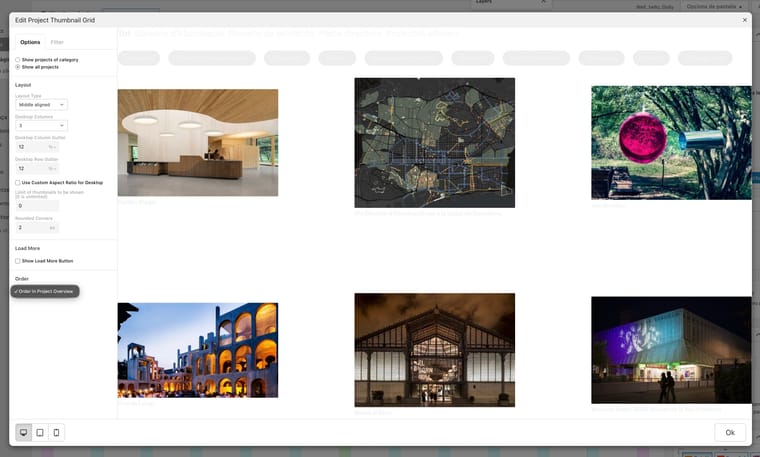
In Edit Project Thumbnail Grid the Order section the functionality does not work@arminunruh, I update to Version: 11.2.8 and the dropdown and project order dont work. The dropdown is empty and the order projects dont show.
-
In Edit Project Thumbnail Grid the Order section the functionality does not workA little problem here: in Edit Project Thumbnail Grid, in the Order section the functionality does not work.
Any idea?
Thanxs in advance -
Problem after update 11.1.8Hey, after las update all is okey.
-
Problem after update 11.1.8I downgraded to keep working. They'll fix it eventually.
-
Problem after update 11.1.8After version 11.1.8, when editing a page, the page overlay settings are placed over the entire WordPress UI and the Cancel or OK buttons do not work.
Any idea? I cant work!
screenshot link:
https://www.dropbox.com/t/9gdoYBPJqq52GTxe -
When opening a project page, it does not respect the previously selected language.Hey I send a email with the data
-
When opening a project page, it does not respect the previously selected language.sorry, where is this option?
-
When opening a project page, it does not respect the previously selected language.And qTranslate-XT Version 3.15.5
-
When opening a project page, it does not respect the previously selected language.Hey, Im under 10.9.7 version but the problem persist. In the projects doesn't respect the language selected.
-
When opening a project page, it does not respect the previously selected language.Hey sorry, the path disappear because is configurated in the language preferences. But the traductions in project pages doesn't work, always show the deafault languaje selected in preferences no the languaje selectd in the website.
-
When opening a project page, it does not respect the previously selected language.A big problem here: I make a 3 languages site but the project pages doesn't respect the language selected, always show english.
The problem is:
For exemple, when open a project from:
https://lainvisible.pro/site/ca/services/The adress from the open project is;
https://lainvisible.pro/site/test-project/The path of the languaje is disapear and show default.
Any idea??
Thanks in advance
-
Language switcher in the footer with shortcodeIs posible change the properties and functionality of the language switcher added with shortcode? for example add a dropdown functionality.
Thanxs in advance
-
Big problem here with licensesHello,
I have several Laytheme licenses and they've stopped working. I can't log in to laykeymanager.com with my username. What's going on? I need to be able to activate my licenses.Thanks
-
qtranslate-xt language switcher in the footer?Hello all,
is posible put the qtranslate-xt position of the language switcher in the footer?
Thanxs in advance.
-
Help! Sticky element doesen't work for me...Yeah, now works perfect.
thanxs again! Lay theme are the f****g best!
-
Help! Sticky element doesen't work for me...I send the email
Thanxs a lot