@arminunruh One more request - would it be possible to allow "Current category" to be selected in Page templates? I know there is no "Current category" per se when it's a template, but that was the use case I had in mind – clients being able to create a new category page using a template and the filtering applying automatically.
I
itsbadjujuju
@itsbadjujuju
Posts
-
thumbnail grid: automatic category based on page -
thumbnail grid: automatic category based on page@arminunruh that's fantastic, you're the best :)
-
thumbnail grid: automatic category based on pageHi Armin,
Thanks for the suggestion, but I already did that at handover. It seems to not be enough for them. The person in charge of the changes is not very tech savvy apparently.
It honestly just sounds like a useful feature that would make laytheme a bit more client-friendly, so I thought I would suggest it. I love working with laytheme, but it get tricky sometimes after handover.
-
thumbnail grid: automatic category based on pageHi Armin,
I have a question about a workaround or a possible new feature.
Context: In a client's page, I'm using the category pages a lot to showcase talents they have on their agency roster. They keep adding the new pages themselves and it works well (even smoother with the new template feature, thanks), but one hiccup we have is the thumbnail grid we use at the end. We use it to show projects that the talent has done, so projects assigned to that category. However, they have to edit the category it shows anytime they create a new page. They have made the mistake several times before, where they create a new category and then panic why the category is showing projects of the wrong talent (they forgot to change it) as they expect it to work automatically.
Question: When thumbnail grid is shown on a category page, would it be possible to have an automatic category selection option in the dropdown based on the page it's on? Something like, Category: Current category page. If not, could a custom code workaround exist?
Thanks a lot,
Juju -
QTRANSLATE-XT shows both languages at the same time@arminunruh you're a legend, thank you so much for the fix 🙏
-
QTRANSLATE-XT shows both languages at the same time@arminunruh Did some testing and looks like the issue only affects categories. Really scratching my head here.
-
QTRANSLATE-XT shows both languages at the same time@arminunruh sent, thank you! 🙏
-
QTRANSLATE-XT shows both languages at the same timeHi @arminunruh !
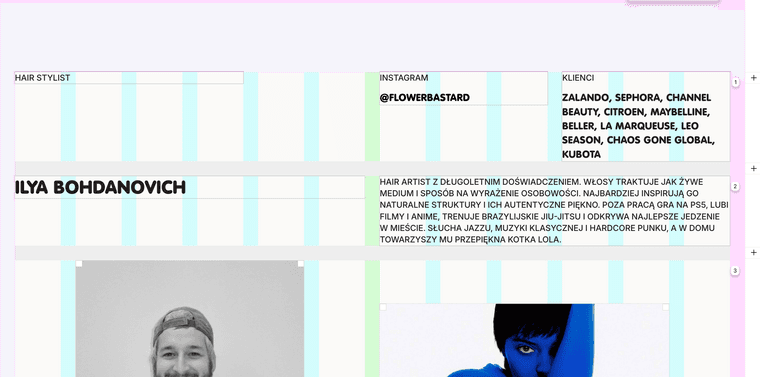
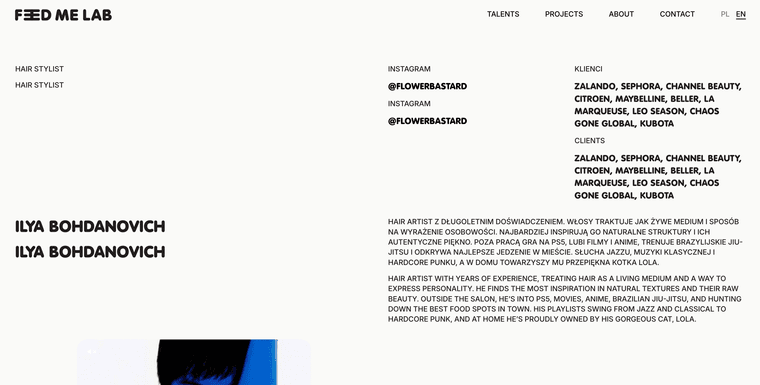
I'm having an issue on a client site, where suddenly on edited or newly created pages qtranslate text content gets shown duplicated (both languages at the same time) in the preview/live version. It looks fine in the gridder.
See an example here: https://feedmelab.pl/en/category/ilya-bohdanovich/
I already updated qtranslate to the latest version from their github (3.15.5), but the issue is still there.
All previously created posts look fine, the issue appeared recently and affects only new and edited pages (categories in this case).
Could you please help? Thank you!
-
page content not showingI managed to fix it in the meantime: tldr, I think the update fixed the issue, but caused some new issues with the custom code that made it look like it didn't fix it. Topic can be closed :)
-
page content not showingHi laytheme team,
The content of the pages suddenly stopped showing up (no update to laytheme or wordpress), just the menu is showing. I already updated wordpress and laytheme since then, as I saw other people had similiar issues..
The fix mentioned here (disabling transitions) only helped to fix some parts of the page, images and thumbnails are still not showing. Running out of ideas what to do and getting some pressure from the client side. Could you please help or advise? 🙏
Website: www.feedmelab.pl
-
project thumbnail grid: custom order overwritten when updating project@arminunruh it's my customer's live site, so I don't feel super comfortable sharing it, but I'll message you maybe we can figure out how to do it securely.
-
project thumbnail grid: custom order overwritten when updating project@arminunruh I'm having the same issue. The custom project order is overridden anytime a project is updated. Then the project jumps to the beginning of the list.
-
mute and unmute row video background@arminunruh @mariusjopen It's been a while since this question has been asked, I wanted to follow up if it's possible now to add mute/unmute controls to a background video?
-
Migrate/Copy Page Content to Project@arminunruh Worked like a charm, thank you!
-
Migrate/Copy Page Content to ProjectHi folks!
I wanted to ask if there is a reason why "Screen options", specifically Gridder JSON, is not available for Categories? I made a layout I would like all categories to follow, is there no way to copy it to the other categories?