EDIT: I just found out that this problem only appears on a screen with high resolution (e.g. 5k iMac). On my 2560px screen it looks totally fine. So it's even stranger. Anything I could do?
L
liquish
@liquish
Posts
-
Strange Outline Custom Arrows Carrousel -
Strange Outline Custom Arrows CarrouselHi!
I didn't find any informations on existing postings so I hope I won't annoy you with this topic.
I have a question regarding custom arrows for carrousels:
When uploading a SVG as custom arrow I always have a strange, black outline. I have no idea how to get rid of it.Please check on my about section on my website: http://fredericschlosser.de/about/
You have to hover the making of pictures on the bottom.
Do have any idea what I could do?
Thanks a lot, appreciate it!
Frederic
-
Maximum image size when uploadingDear Armin and Marius,
thank you so much! Now it's working perfectly :)Cheers,
Jo -
Maximum image size when uploadingDear @mariusjopen
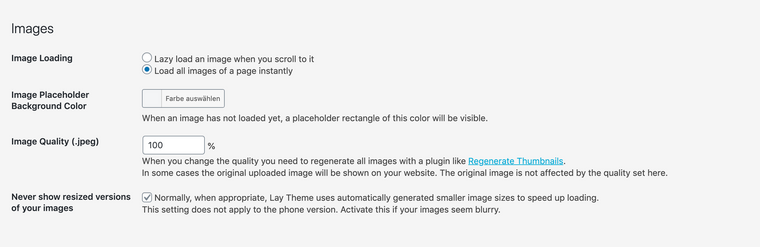
Thanks a lot for your answer. Sadly this doesn't help me. I know what this button does. I had a look at all options and can't find the right one to pretend that your theme is scaling my images to 2560px after uploading. I want to use 4000px images on my website.
I would really appreciate if you could help me with this since I can't use your template because of this problem.
Thanks a lot,
Jo -
Maximum image size when uploadingAny idea what could help? Still struggling with this problem and can't go on with my website since I want to work with full screen images and they are for sure unsharp on a 5k iMac... any help would be appreciated.
Thanks,
Jo -
Maximum image size when uploadingDear @mariusjopen ,
thanks a lot for your quick answer, really appreciate it. Although I can't really follow since I already had a look at all options and can't find the correct one.Please see attached that I already clicked on the option, that I don't want to have resized photos. Nevertheless when uploading images it still happens (see second screenshot). I tested different browsers...
Are the any other options I'm missing?
Thanks a lot,
Johannes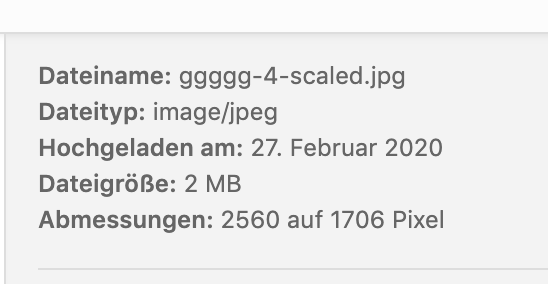
-
Maximum image size when uploadingHi all,
I have problems when uploading images to lay theme. I would like to upload 4000px wide images for perfect presentation on a 5k imac. I always have the problem that after uploading the image is only 2560px wide (The system tells me the new size in the upload area, there is no button to just upload the original size). Seems like lay theme always resizes it.
I was not able to find this question in the forum. Sorry if this was already asked.
Hope you can help me.
Thanks a lot,
Johannes