hello!
using polylang pro + polylang for woocommerce and laytheme and everything works just fine but there are no subpages on the account page – even after the url slugs were translated.
please advice!
 M
M
hello!
using polylang pro + polylang for woocommerce and laytheme and everything works just fine but there are no subpages on the account page – even after the url slugs were translated.
please advice!
@arminunruh
Incredible, thank you!
@arminunruh said in Thumbnail grid + tags:
then you want the projects of this tag to also not show. is that right?
yes, that is what I expected it will case – so that it is not only show or hide bubble tags, but also projects that are assigned to it – e-mailed you back!
Like – hiding a filter (clicking on the eye icon) only hides a bubble tag, not the project of a category with that tag, but maybe that is the idea.
Selecting category + filter tags still shows all projects of category but just less tags unless user select a tag, but maybe it should show all projects of category within selected tags and the tags to filer out
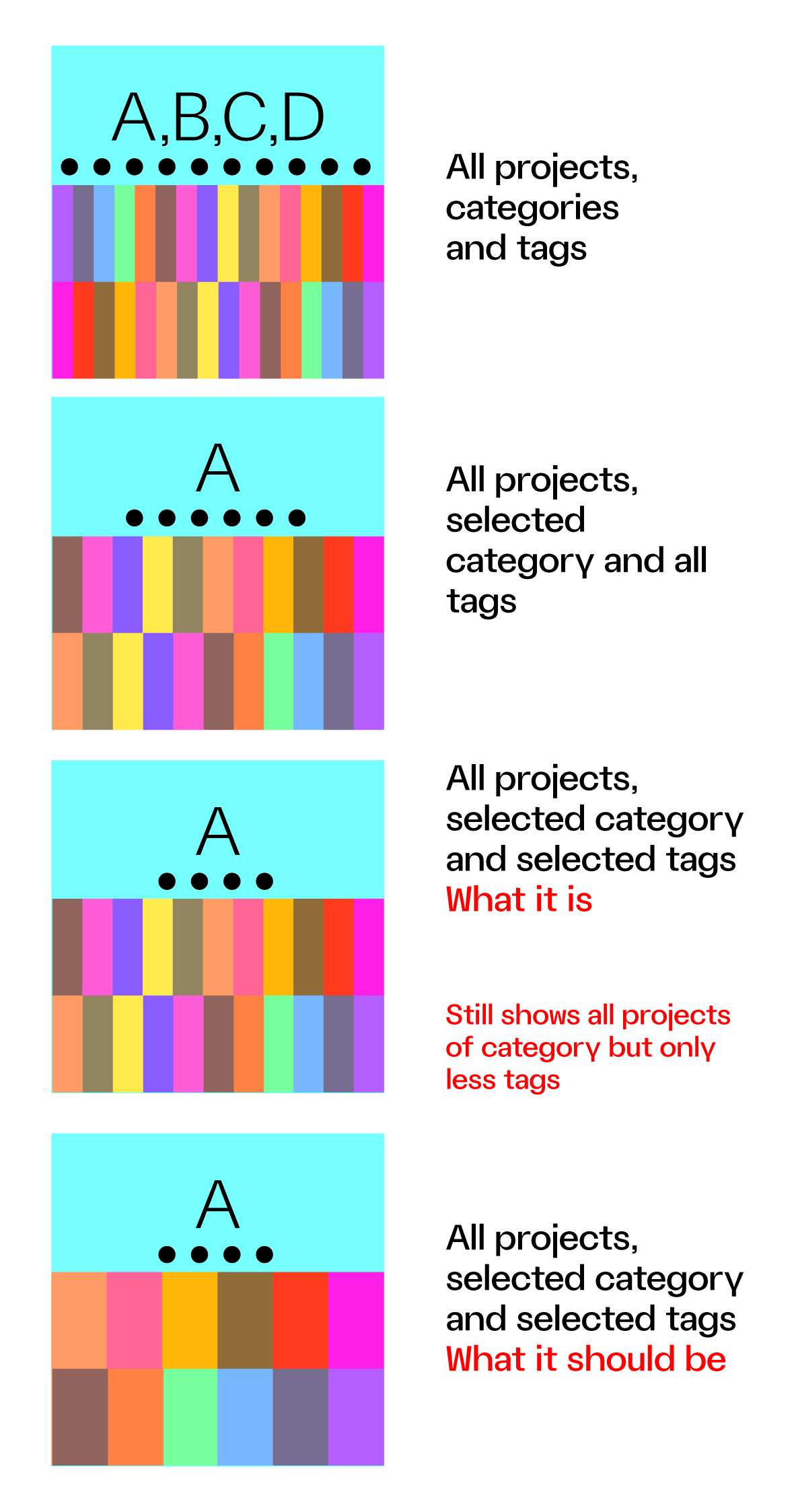
What I would expect from a select category + select tags (as admin) is to see all projects of selected category but only within the selected tags and not all projects of category + selected TAG BUBBLES.
Maybe this can show what I mean
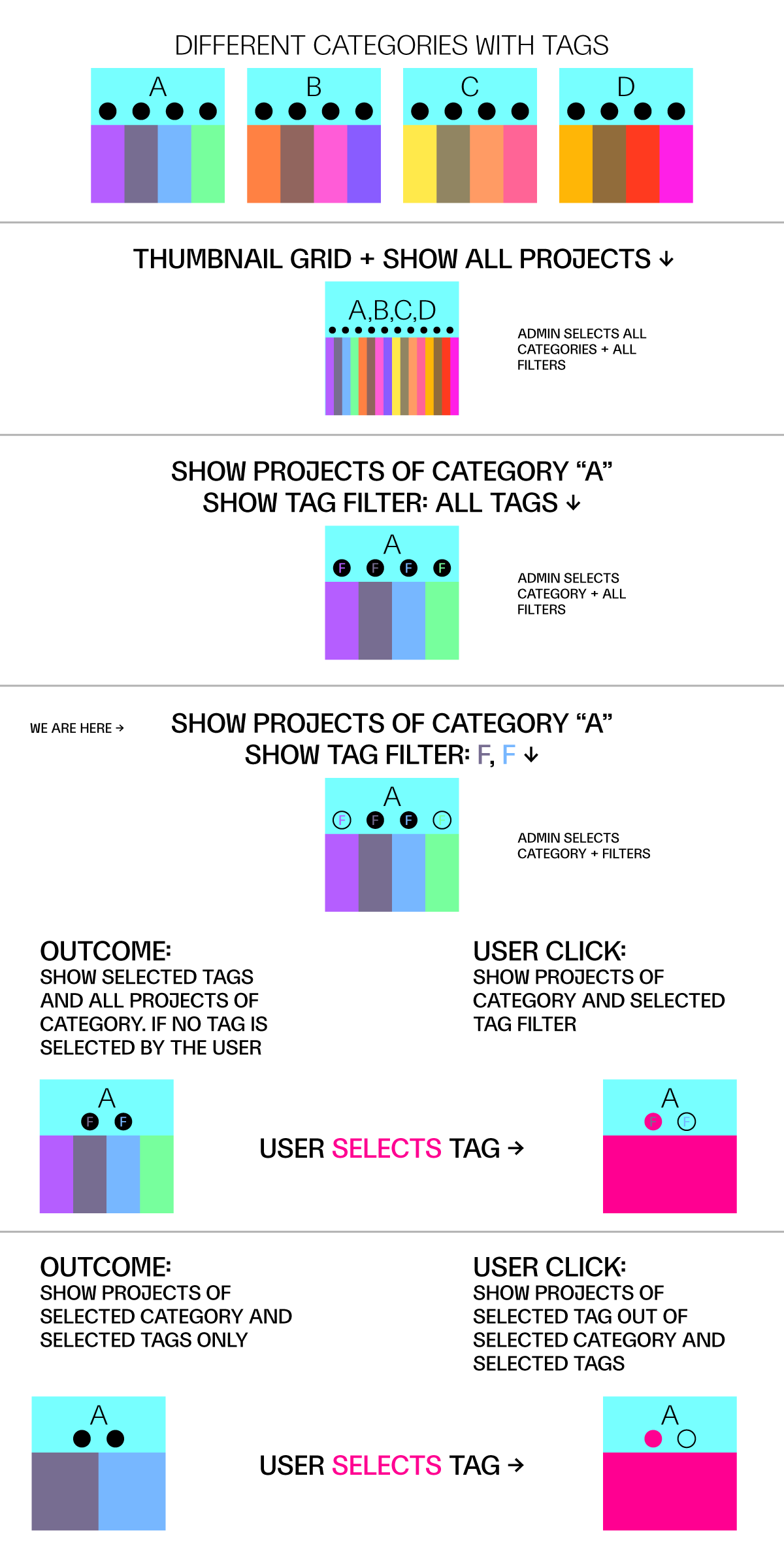
Hello, I have a question regarding the Thumbnail Grid logic.
I select a Thumbnail Grid and "Show Projects of Category"
for example Paintings (among other projects categories like printmaking, posters). Then I add Filter, Show Tag Filter and pick just two – portraits and self-portraits.
What it does is present all paintings (a selected category) and display tag filters above, but the initially it is showing the full category and not projects of selected category and filter.
Should this be solved with using a different category, not filters?
Displaying a category like Paintings > People with Tags Self-portraits, People portraits instead?
Best regards!
@arminunruh
Please, have a look. It is not browser specific (tried chrome and safari)
https://polczynski.info/pl/sklep/?woo-share=gMFbk04jOowoNsZMPo0VwJt7XFOEnRuB
Correct, no extra code in that!
@arminunruh sorry, nevermind – had some laggy css or something.
do you have any idea why check out page input fields doubles?

hello! i thought you might consider this a built-in lay-theme interface feature whenever you have some free time
Hello,
the description on the product page is on sticky ( body.single-product .lay-woocommerce-sticky .summary )
.cart-collaterals on the cart page works great with that too! Probably depends on the design but the instance layout seems to be the same.
.lay-woocommerce-cart-product-item-last-line is super on point.
Best,
Maciej
@arminunruh
Perfect! Thanks!
Hello!
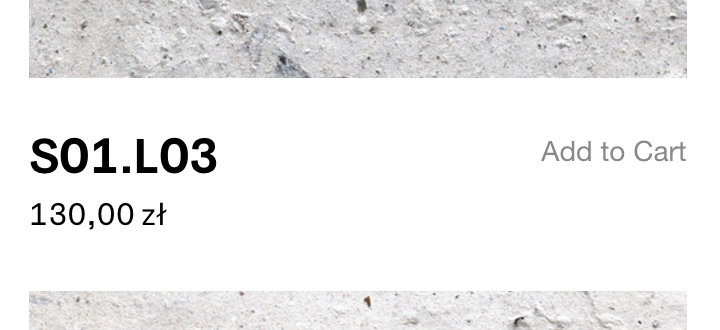
Working on a store page – the below image description for the products thumbnail grid –
takes a lot to put the "add to cart" button on the right side of the below-image. Please advice if there is a better way to get that done.
Best!
/* store page title + button*/

/*description not 100%*/
.lay-products-thumbnails-grid .below-image .woocommerce-loop-product__title ,.lay-woocommerce-product-thumbnail-price{
	width: 64%; float:left; }

.lay-products-thumbnails-grid .product .woocommerce .add_to_cart_inline
{
float: right; color: #888;
}

.lay-products-thumbnails-grid .below-image .add_to_cart_inline {
	margin: 0px !important;
	float:right !important;
	text-align: right;
	color: #888;
}

.lay-products-thumbnails-grid .below-image #lay-woocommerce .button, .lay-content a.button.add_to_cart_button {
	padding: 0px !important;
	color: #888;
}

.lay-products-thumbnails-grid .below-image .ajax_add_to_cart{
	margin: 0px !important;
}

#lay-woocommerce .button, #lay-woocommerce a.button, .lay-content a.button.add_to_cart_button {
  color: #888;
	opacity: 1;
	line-height: 0px !important;
	top:-20px
}

.lay-products-thumbnails-grid #lay-woocommerce .button, #lay-woocommerce a.button, .lay-content a.button.add_to_cart_button:hover {
    border-color: #000;
    border-bottom: 0px solid #000 !important;
    border-width: 0px;
    border-style: solid;
    background-color: transparent;
}
Thank you!!!
Hello!
Is it just here, or the "Set width in Pixels" not working?
10.1.0 fixed this, thank you!
@arminunruh no – still not solved. "Show Tag Filter" ticked makes the "Show projects of category" off.